What to check before buying
Start with the device and game you actually use. Once those match, compare the space the controller and its connection arrangement will occupy, then consider grip and optional features.
| Concern |
What to check |
Who this matters to |
| Platform and game compatibility |
Check the exact model, its connection mode and controller support in your mystery game. Bluetooth alone does not establish compatibility. |
I do not want a small controller that cannot run my game on my main device. Around 36% of consumers put compatibility first. |
| Desk space and cables |
Compare stated dimensions where available, and account for a cable or wireless receiver if the chosen mode needs one. |
With a keyboard or other items already on the desk, I need somewhere to use and store the pad without a permanent cable in the way. For around 29% of consumers, space and cable management are the primary concern. |
| Grip and navigation |
Consider the controller’s shape and button layout for movement, dialogue and menus; try a similar shape if possible. |
Long stretches of exploration and menu use make a familiar grip more important to me than minimum size. Around 21% of consumers prioritise that control feel. |
| Features and upkeep |
Confirm which features work in your game and connection mode, and check the charging arrangement and included accessories. |
If I am choosing a controller for particular feedback features, I want to know when they will actually work and how I will keep the pad ready to use. That is the leading concern for around 14% of consumers. |
Joybuy product choices
These controllers cover different small-desk setups: Switch-focused pads, an Xbox and PC model, a PS5 controller and a tri-mode option. Choose by your main device and game first; the product title alone cannot confirm every connection mode or how a controller will fit your desk.
 No image available
Lexip SteelPlay Twin Pads Controllers
Consider these twin pads for a Switch-based desk setup if separate controls appeal to you. Confirm your game’s controller support and check the pads’ dimensions if storage space is tight.
View on Joybuy
 No image available
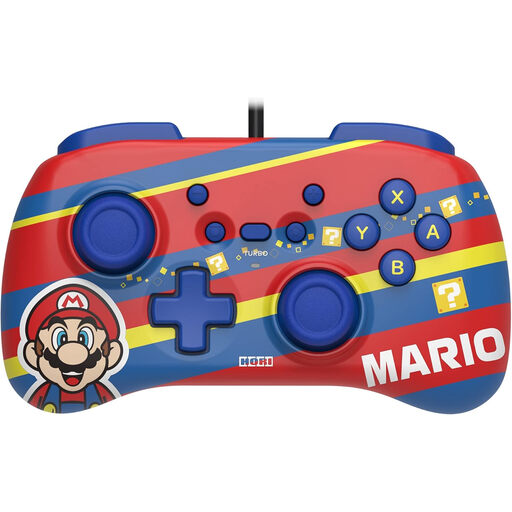
HORI HORIPAD Mini Wired Controller – Mario (Switch)
This mini wired pad is a choice to examine for a docked Switch setup. Plan where its cable will run, and check the game’s controller support and any features it requires.
View on Joybuy
 No image available
Microsoft Xbox One S Elite Wireless Controller Series 2 (Xbox One/Xbox Series X/S/PC)
This is an Xbox and PC-oriented choice when a full-size controller suits your setup. Check your exact game and intended connection method, and allow room to store the controller.
View on Joybuy
 No image available
Sony PlayStation 5 DualSense Wireless Controller – Starlight Blue V3
Consider this PS5 controller for a PS5-first setup or a supported PC game. PlayStation says PC haptic feedback requires USB and adaptive triggers require game support, so check those conditions before choosing wireless play for particular features.
View on Joybuy
 No image available
Machenike G3 V2 Tri-mode Controller – White
This tri-mode controller is worth checking if you use a PC or Switch at your desk. Confirm which mode works with your device and game before buying, particularly if you intend to play wirelessly.
View on Joybuy
Common questions
Should I choose a compact controller just because my desk is small?
Choose a compact controller only if it also supports your main device and game. For example, 8BitDo lists Lite 2 for Switch, Android, Apple platforms and Raspberry Pi, rather than Windows; its small size does not resolve a platform mismatch.
Will DualSense haptics and adaptive triggers work in every PC mystery game?
No: their availability depends on the feature, connection and game. PlayStation states that PC haptic feedback requires USB and adaptive triggers require game support, so check the particular game before choosing DualSense for either effect.
Which connection keeps a small desk clear?
A compatible wireless mode can remove a controller cable during play, but the right mode depends on your device and model. For example, 8BitDo specifies 2.4 GHz or wired Windows use for Ultimate 2C Wireless and Bluetooth use for Android; check whether your chosen setup also needs a receiver or charging cable.
What should I do with an old controller in the UK?
Keep the controller and its batteries out of household rubbish. GOV.UK advises recycling electrical products and batteries separately; use an appropriate collection or household recycling facility.


