What matters when choosing?
Check your main device and game first. Then decide how the controller will draw power or recharge without disrupting your limited-socket setup.
| Concern |
What to check |
Who this matters to |
| Device compatibility |
Confirm your exact console or operating system, connection method and game support. |
If my narrative game is on one main device, I need to know the controller will work there before its battery arrangement matters. Around 36% of consumers put confirmed compatibility first. |
| Charging with few sockets |
Identify an available USB charging source, or plan how you will replace or recharge removable cells. |
With wall sockets already occupied, I want a power routine that will not interrupt play or require an unplanned charger. For around 46% of consumers, managing power is the primary concern. |
| Puzzle-game controls |
Consider D-pad layout and button placement; check game and device support for any desired feedback features. |
When I spend time navigating dialogue and menus, I care more about comfortable, straightforward inputs than extra controls I may not use. Around 18% of consumers place that need first. |
Joybuy product choices
These controllers cover different device setups, from PS5 and Xbox to Switch 2, PC and Type-C phones. Choose your device and intended connection before comparing their charging arrangements; the wired phone controller serves a different use case from a wireless console controller.
 No image available
Sony DualSense HYPERPOP Techno Red Wireless Controller
For PS5 narrative games, this DualSense variant is worth considering if you can use an existing USB charging source.
Its title also names PC, Mac and mobile use; confirm your device and game before relying on particular features. PlayStation Support says feature availability outside PS5 varies, and PC haptic feedback may require USB.
If charging intervals matter, check the runtime and charging time for this variant before buying.
View on Joybuy
 No image available
Microsoft Xbox One S Elite Wireless Controller Series 2
Consider this Elite Series 2 listing for an Xbox or PC setup only after confirming support for your exact device.
The title names Xbox One, Xbox Series X/S and PC, but the listing's compatibility statements conflict. If you intend to use its charging dock, check whether a mains-powered dock fits your limited-socket setup.
Check the charging arrangement and expected runtime for this listing rather than applying battery guidance for the standard Xbox Wireless Controller to the Elite Series 2.
View on Joybuy
 No image available
Machenike G3 V2 Tri-mode Controller, White
If you play puzzles on PC, Switch or Android, consider this tri-mode controller only after checking the pairing method for your exact device and game.
For a limited-socket setup, also check how this model charges and how long a charge is stated to last under the connection mode you intend to use.
View on Joybuy
 No image available
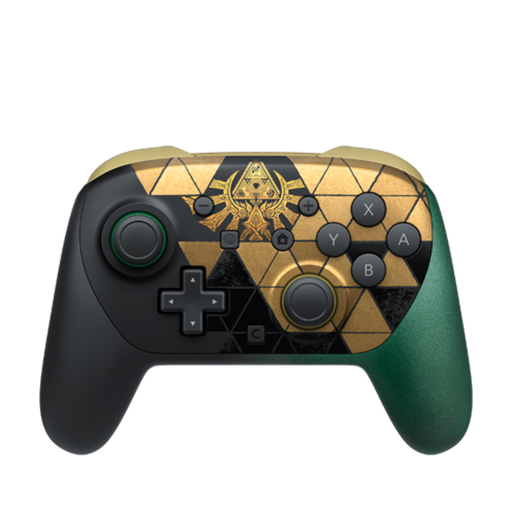
Nintendo Switch 2 Pro Controller – The Legend of Zelda 40th Anniversary Edition
For a Switch 2 setup, this edition is a controller choice to check if USB charging fits your available ports.
Confirm support for your intended games and check this Switch 2 model's charging time and runtime separately; Nintendo's published figures for the earlier Switch Pro Controller do not describe this variant.
View on Joybuy
 No image available
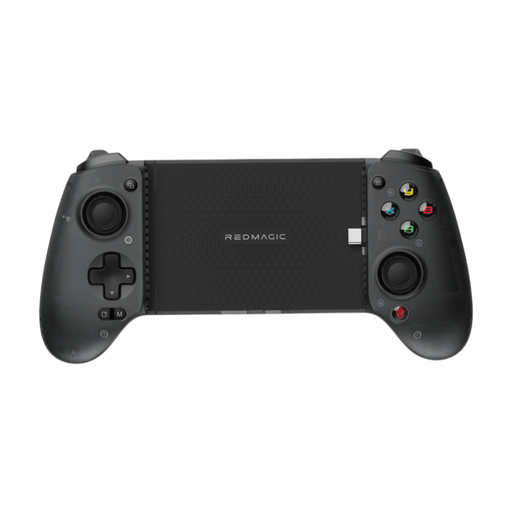
REDMAGIC Shadow Blade Gamepad 2.0, Type-C
For narrative games on a Type-C phone, this wired gamepad is relevant if the phone and game support controller input.
Check how it draws power and whether you can charge the phone while playing before treating a wired connection as a solution to limited sockets.
View on Joybuy
Frequently asked questions
Can a wireless controller avoid using another wall socket?
Yes, if you have a suitable USB charging source or choose a controller that takes replaceable cells. Check that the console, dock or computer port you plan to use is available when charging is needed; the standard Xbox Wireless Controller can instead use AA cells or a compatible rechargeable pack.
Do rechargeable AAs charge inside an Xbox Wireless Controller?
No. Xbox Support says rechargeable AA batteries must be charged by the method recommended by their manufacturer, outside the standard Xbox Wireless Controller. If you want in-controller charging, check which rechargeable pack fits your controller variant.
Will every DualSense feature work wirelessly on a PC, Mac or phone?
No. PlayStation Support says DualSense features depend on the device, connection and game: adaptive triggers need game support, PC haptic feedback may require USB, and haptics are unavailable on Mac and mobile devices. Check the features you want for your particular setup rather than assuming PS5 behaviour carries across.
How should I dispose of an old controller or battery in the UK?
Use an appropriate collection or recycling route rather than household rubbish for batteries and electrical products marked with the crossed-out wheelie-bin symbol. GOV.UK identifies battery collection points and household waste recycling centres as options; check which items your chosen location accepts.


