Choose a controller confirmed to work with your gaming platform before deciding how to power it without another wall socket. A PS5 or Switch controller may charge from the console or dock USB port, while a wired Switch pad needs no controller charging; Xbox battery options and PC or mobile compatibility require model-specific checks. For platform games, assess the directional controls alongside the power arrangement.
Who these choices suit
Console players short of plug sockets
If you mainly play on one console, charging a compatible wireless controller from the console or its dock could avoid occupying another wall socket. Check that a powered USB port is available when you normally charge.
Players focused on directional controls
For platform games with frequent directional inputs, compare the D-pad or + Control Pad layout before letting wireless features decide. Nintendo, Xbox and 8BitDo identify different pad designs, but a specification cannot tell you which will feel right in your hands.
PC or mobile players with a USB charging setup
If you can keep a USB lead or charging dock connected to your computer, check whether the exact controller supports your device. 8BitDo lists different compatibility for its Ultimate 2C Wireless and Ultimate 2 Wireless models.
What matters when choosing
Start with the device and any game-specific functions you need. Then check where the controller gets power and whether its directional layout suits the platform games you play.
| Concern |
What to check |
Who this matters to |
| Platform compatibility |
Confirm the exact console or device and connection mode. Check any console-specific functions your games use. |
If I play on a particular console, I need the controller to connect and support the functions I use; around 33% of consumers put compatibility first. |
| Power without another socket |
Check for an available powered USB port and the controller’s battery arrangement. PS5 rest-mode USB power depends on its setting. |
When the wall sockets are occupied, I want a charging or battery routine that fits the equipment I already use. Around 27% of consumers make avoiding another socket their primary concern. |
| Directional control |
Inspect the D-pad or + Control Pad layout; where possible, assess its feel before choosing. |
I make frequent directional changes in platform games, so the pad layout matters more to me than extra wireless features; roughly 27% of consumers prioritise directional control. |
| Use across devices |
Compare the exact model’s supported devices and any connection modes or accessories required. |
If I alternate between compatible devices, I want one controller that works with each of them. Multi-device use comes first for around 13% of consumers. |
Buying pitfalls
-
Assuming a wireless controller works with every platform
Support depends on the model. For instance, 8BitDo lists Windows and Android for the Ultimate 2C Wireless, while Microsoft lists Xbox consoles, Windows PC, Android and iOS for the Xbox Wireless Controller.
Match the exact controller and its connection mode to the device you will use before comparing other features.
-
Assuming wireless means a built-in rechargeable battery
Microsoft says the standard Xbox Wireless Controller can use AA batteries or a rechargeable Play & Charge battery pack. Rechargeable AA cells do not charge inside the controller.
Decide whether you want to replace batteries, charge AA cells separately or use a compatible in-controller battery pack.
-
Assuming a USB cable always solves the socket problem
A cable still needs a suitable powered USB port. A Switch Pro Controller can charge through an available dock port, while charging a compatible PS5 controller in rest mode depends on the console’s USB-power setting.
Count available USB ports and check when your console or dock supplies power.
-
Assuming licensing includes every console feature
PowerA says its cited Enhanced Wireless Controller is licensed for Switch, Switch OLED and Switch Lite, but does not support HD rumble, IR or amiibo NFC.
Check the functions your games use against the exact controller model rather than relying on licensing alone.
Brands to consider
Nintendo
Nintendo’s Switch Pro Controller is an official full-size option for Switch-family play with a single + Control Pad.
- Nintendo says it can charge from an available USB port on the Switch dock.
- Nintendo states approximately six hours for a full charge; its approximately 40-hour battery-life estimate varies with usage.
PlayStation
DualSense is a PS5 controller route for players who can charge from the console rather than use another wall socket.
- PlayStation says a compatible controller can charge from the PS5 using its included USB cable.
- USB charging in rest mode requires the relevant PS5 setting; PS5 support does not establish that every feature works on other devices.
Xbox
Microsoft lists the Xbox Wireless Controller for Xbox consoles, Windows PC, Android and iOS, and identifies its hybrid D-pad.
- Its listed device range may suit consumers who play across those platforms.
- Power depends on the batteries or pack chosen. Rechargeable AA cells must be charged outside the controller.
8BitDo
The Ultimate 2C Wireless and Ultimate 2 Wireless offer distinct PC and mobile routes; their supported devices differ by model.
- 8BitDo identifies a refined D-pad on the Ultimate 2C Wireless and a USB-connected charging dock for the Ultimate 2 Wireless.
- Check the exact model before buying for a console. Battery figures stated for ideal conditions should not be treated as guaranteed runtime.
PowerA
PowerA’s cited Enhanced Wireless Controller is a rechargeable, officially licensed alternative for Switch-family players.
- PowerA lists a USB-C cable and up to 30 hours per charge for this model.
- PowerA states that this model does not support HD rumble, IR or amiibo NFC.
Joybuy product choices
These choices cover PS5 controllers that can fit a console-USB charging routine and Switch controllers for either wired play or wireless play. For the wireless Switch set, confirm its charging power source before relying on it to save a wall socket.
 No image available
Sony DualSense PS5 Wireless Controller – Midnight Black V3
For PS5 play when you can use the console as the charging source rather than another wall socket.
Check that a PS5 USB port is available; charging in rest mode depends on the console’s USB-power setting. Assess whether the directional pad feels right for your platform games.
View on Joybuy
 No image available
Sony DualSense Edge PS5 Wireless Controller – White
For PS5 players considering a DualSense Edge while planning to charge a compatible controller from the console.
Confirm that you have a usable PS5 USB port and enable USB power in rest mode if that is when you intend to charge. Check the directional controls against your own preference.
View on Joybuy
 No image available
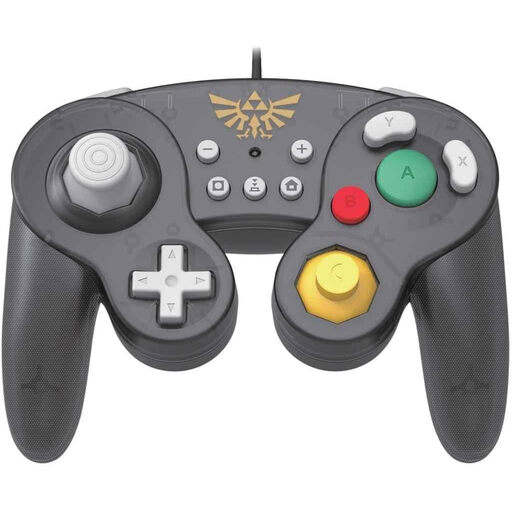
HORI Battle Pad GameCube Style Controller – Zelda (Switch)
For Switch play if you would rather use a wired controller than manage controller battery charging.
This option requires a suitable USB connection and keeps a cable between you and the device. Check that the cable arrangement and directional controls suit where you play.
View on Joybuy
 No image available
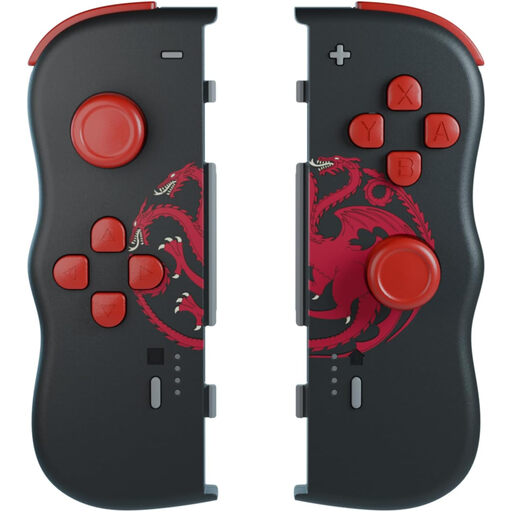
HBO Game of Thrones Targaryen Wireless Twin Pads for Nintendo Switch
For Switch play when you want wireless Twin Pads, provided their controls and charging routine meet your needs.
Before depending on dock USB power, confirm the supported charging source. Check the applicable battery runtime and directional-pad layout for this set.
View on Joybuy
Common questions
Can I charge a PS5 controller without another wall socket?
Yes, a compatible controller such as DualSense can charge from the PS5 using the included USB cable, according to PlayStation. If you plan to charge while the console is in rest mode, enable the relevant USB-power setting.
Can the Nintendo Switch Pro Controller charge from the dock?
Yes. Nintendo says to connect its USB charging cable to an available dock USB port, and states that a full charge takes approximately six hours.
Does the Xbox Wireless Controller have a built-in rechargeable battery?
The standard Xbox Wireless Controller does not have one fixed rechargeable-battery arrangement. Microsoft says it can use AA batteries or a rechargeable Play & Charge battery pack; rechargeable AA cells must be charged separately.
Can I compare controller battery-life figures directly?
Only when the stated conditions are comparable. Nintendo describes the Switch Pro Controller’s approximately 40-hour figure as an estimate that varies with use, while 8BitDo identifies ideal-environment conditions for certain controller figures. Check how each figure is qualified before using it to plan your charging routine.


