What should you check before buying?
Start with your main device and the game’s controller support. Then weigh the controls you need during play against connection options and any features that depend on a particular platform or game.
| Concern |
What to check |
Who this matters to |
| Device and game compatibility |
Check the exact console or device and the game’s controller-support information. |
If I mainly play on one console, I need a controller that works with it before considering extra features. Around 29% of consumers put device and game compatibility first. |
| Comfort and control layout |
Consider a familiar grip and whether button mapping or extra controls meet your needs. |
During longer adventure sessions, I want movement and action controls that feel manageable to me. Comfort and layout are the primary concern for around 29% of consumers. |
| Connections across devices |
Match Bluetooth, a supported wireless adapter or USB to each device; check whether the required accessory is included. |
If I switch between PC and mobile play, I need a connection method that works on both. Around 21% of consumers chiefly need that flexibility. |
| Game-dependent feedback |
Check the game’s support for haptics, adaptive triggers or motion controls, including any wired-connection condition. |
I care about tactile effects, but only if my game and device can use them. For around 14% of consumers, supported feedback features come first. |
| Adaptable inputs |
Check the required button positions, mounting and compatibility with any external switches. |
If a standard pad is difficult for me to operate, I need controls I can arrange around my mobility. Around 7% of consumers prioritise that adaptability. |
Joybuy controllers for different setups
These controllers cover Xbox or Windows play, PS5-oriented play and different control layouts. Choose by your actual device and game support; a wired setup, configurable controls and a standard wireless pad answer different needs.
 No image available
Xbox Wireless Controller – Robot White
Consider this for Xbox play or for a supported Windows or mobile device. Microsoft lists Xbox Wireless, Bluetooth and button mapping for this controller; confirm the connection method your device and game use.
Joybuy
 No image available
Microsoft Xbox One S Elite Wireless Controller Series 2 (Xbox One/Xbox Series X/S/PC)
Consider this Xbox or PC-labelled variant if you want to assess a more configurable control layout. Check the game and device you intend to use, and allow time to set the controls to your preference.
Joybuy
 No image available
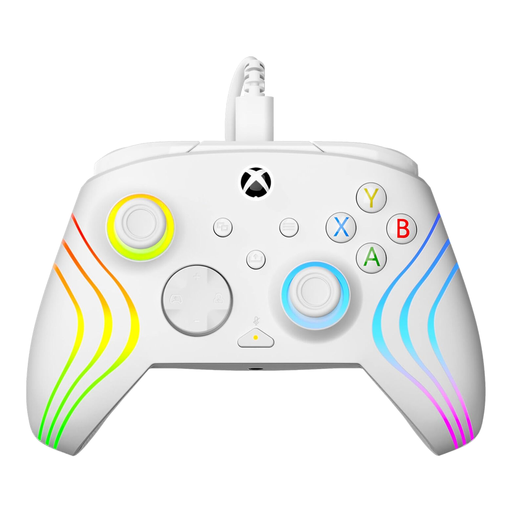
Turtle Beach PDP Afterglow Wave Wired Controller for Xbox/Xbox Series – White
Consider this Xbox-labelled controller if a wired play area suits you. It is a wired variant, so check the connection, available port and reach from your seat before choosing it over a wireless pad.
Joybuy
 No image available
Sony DualSense HYPERPOP Remix Green Wireless Controller (PS5, PC, Mac & Mobile)
Consider this DualSense variant for PS5-first play. PlayStation says it can also connect to PC, Mac and mobile devices, but haptic feedback and adaptive triggers work in selected PC games and may require USB.
Joybuy
 No image available
Turtle Beach Victrix Pro BFG Reloaded Wireless Modular PlayStation Controller – White
Consider this PlayStation-labelled modular controller if changing the control layout matters to you. Confirm compatibility with your device and game, and check the connection mode for this exact variant before relying on wireless play.
Joybuy
Frequently asked questions
Can I use DualSense for a superhero game on PC?
Yes, PlayStation says DualSense connects to Windows PC by USB Type-C or Bluetooth. Check the particular game before buying for haptic feedback or adaptive triggers: PlayStation says those features work in selected PC games and may require USB.
Can an Xbox Wireless Controller work with my PC and phone?
Microsoft lists the Xbox Wireless Controller for Windows PC, iOS and Android as well as Xbox consoles. Confirm that your particular device and game support the connection method you intend to use.
Should I buy a Switch 2 Pro Controller for PC or mobile play?
Treat Nintendo’s Switch 2 Pro Controller as a Switch 2-first purchase. If PC or mobile play is your main reason for buying, confirm support for the exact controller, device and game before ordering rather than assuming its Switch 2 features will transfer.
When is the PlayStation Access controller worth considering?
Consider the PS5 Access controller when a conventional pad’s button positions or stick controls are difficult to use. PlayStation lists configurable inputs, alternative caps, adjustable stick settings and compatible external controls; check which arrangement and accessories meet your own needs.
Should a controller sold in Great Britain carry CE or UKCA marking?
For products placed on the market in England, Scotland and Wales, Department for Business and Trade guidance dated 31 March 2026 says CE marking continues to be recognised alongside or instead of UKCA where the relevant product-regulation requirements are met. A marking alone does not establish that a particular controller complies; Northern Ireland has different processes, so check the applicable product information for your purchase.


