Choose a keyboard around the work you repeat most: extended typing, configurable shortcuts or commands you want on dedicated controls. Check the exact key layout and device compatibility before buying, and adjust the standing desk so the keyboard sits just below elbow height and central to the screen rather than expecting a new keyboard to fix the workstation on its own.
Who this choice matters to
Standing-desk UI creators
If you spend long sessions writing menu labels and adjusting interaction states, keyboard height and alignment deserve attention alongside the keyboard itself. The Health and Safety Executive advises keeping the keyboard just below elbow height and the screen and keyboard central.
Shortcut-heavy game-tool users
If you move repeatedly between an editor, design tools and test builds, identify the commands you want close to hand. Logitech, Keychron and Razer describe different approaches, from programmable keys and remapping to dedicated macro controls.
UK-layout mechanical-keyboard buyers
If UK key legends and ISO geometry matter to your typing, check the selected variant rather than relying on where it is sold. Keychron explicitly identifies a UK-ISO version of the Q5 Max with wireless connection options.
What to prioritise
Low-profile productivity keyboard
Consider it: when menu text, notes and switching between compatible devices take up much of the session; Logitech describes these features on the MX Keys S.
Trade-off: check whether its programmable keys give you the direct command access you need in place of dedicated macro controls.
Customisable UK-ISO mechanical keyboard
Consider it: when confirmed UK-ISO geometry and configurable key behaviour are priorities; Keychron specifies both for the Q5 Max UK-ISO.
Trade-off: its stated polling rate depends on connection mode, so choose that mode as carefully as the layout.
Gaming keyboard with dedicated controls
Consider it: when your menu-testing routine has repeatable commands you would use on macro buttons or a dial; Razer identifies such controls on its BlackWidow V4 models.
Trade-off: check the exact model’s dimensions, layout and switch feel before giving desk space to controls you may rarely use.
| Concern |
What to check |
Who this matters to |
| Standing-desk fit |
With the keyboard in place, can you set it just below elbow height and keep it central to the screen, as the Health and Safety Executive advises? |
If adjusting the desk still leaves my shoulders raised or makes me twist towards the keys, placement comes before switch choice; around 42% of consumers put standing-desk fit first. |
| Shortcut access |
Check how you would assign recurring commands in your tools, and whether the selected keyboard offers the keys or controls you intend to use. |
When I keep repeating the same editing and test commands, I want a way to reach them consistently; for around 33% of consumers, customising that workflow is the primary concern. |
| Layout and devices |
Confirm the selected physical layout, required device compatibility and available connection modes. |
If unfamiliar key positions interrupt menu-text entry or I move between devices, those details shape my choice; roughly 25% of consumers prioritise layout and device flexibility. |
Mistakes to avoid
-
Assuming a standing desk fixes keyboard posture
A keyboard set too high can encourage raised shoulders, while one placed off-centre can make you twist. The Health and Safety Executive treats keyboard position as part of the whole workstation.
Adjust the desk with the keyboard in place: put the keys just below elbow height and keep the keyboard and screen central.
-
Assuming a UK-sold keyboard has a UK layout
Key legends and physical geometry affect punctuation entry and familiar shortcuts. A product-family name does not identify every selectable variant.
Check the exact configuration for UK-ISO or English UK layout wording if that is what you need. Keychron explicitly labels its Q5 Max UK-ISO configuration.
-
Choosing macro controls without a use for them
Extra buttons and dials offer little practical value if the commands you repeat cannot be assigned to them or are easier to use through your existing shortcuts.
Write down the actions you repeat in your editor, design tool and test build, then check how the selected keyboard would handle them.
-
Expecting identical behaviour from every connection mode
Keychron states different polling rates for the Q5 Max: 1000 Hz when wired or using 2.4 GHz, and 90 Hz over Bluetooth. One wireless specification does not describe every mode.
Compare the selected keyboard’s specifications by connection mode before deciding how you will connect it.
Relevant brands to consider
Logitech
The MX Keys S is a low-profile productivity option for typing, programmable actions and switching between compatible devices.
- Logitech specifies programmable keys, Smart Actions, illumination and switching across up to three compatible devices for the MX Keys S.
- Check the selected key layout and whether Logi Options+ works with your operating system and intended actions.
Keychron
The Q5 Max UK-ISO is an option for buyers who want a stated UK layout and configurable mechanical-keyboard functions.
- Keychron specifies QMK/VIA, 2.4 GHz wireless, Bluetooth connection to three devices and Mac/Windows keycaps for this configuration.
- Keychron’s stated polling rates differ between Bluetooth and its wired and 2.4 GHz modes; check which connection you intend to use.
Razer
The BlackWidow V4 models considered here offer dedicated controls for workflows that make regular use of them.
- Razer identifies macro keys and a dial on the BlackWidow V4 Pro, and four macro buttons plus a roller on the BlackWidow V4 Low-Profile HyperSpeed.
- Confirm the selected model’s physical layout, switch feel and dimensions rather than assuming those controls suit a text-led workflow.
Joybuy keyboard choices
These keyboards offer different layouts and controls to consider for menu editing and testing. Match the selected variant to your preferred key geometry, recurring commands and desk arrangement.
 No image available
HyperX Alloy Rise 75 Wireless Keyboard UK
Consider this 75% wireless keyboard if you want to plan key assignments for repeated commands. Check the selected physical layout if UK legends or ISO geometry are essential; the title’s UK wording alone does not establish the key geometry.
View on Joybuy
 No image available
Ticktype EVO75 Custom Tri-Mode Wireless Mechanical Keyboard, US Layout, Creamy Rye Switches, Spray-coated Nebula
Consider this 75% keyboard if configurable commands are part of your workflow and a US layout suits your typing. Its product name also specifies a full-aluminium body, hot-swappable switches, VIA compatibility and an 8000mAh battery; the stated US layout is an important check if you expect UK key legends or ISO geometry.
View on Joybuy
 No image available
Razer Huntsman V3 Pro Mini 60% Analog Optical Esports Keyboard
Consider this 60% keyboard if a small footprint matters and secondary-function navigation fits the way you edit menus. It uses a wired connection; confirm its physical key layout before buying if UK legends or ISO geometry matter.
View on Joybuy
 No image available
ASUS ROG Falchion Ace HFX 65 Analog Gaming Keyboard, UK Layout
Consider this 65% wired keyboard if a stated UK layout is more important to you than wireless device switching. Check its Windows 10/11 compatibility against your setup, and confirm how you would assign shortcuts if that is central to your work.
View on Joybuy
 No image available
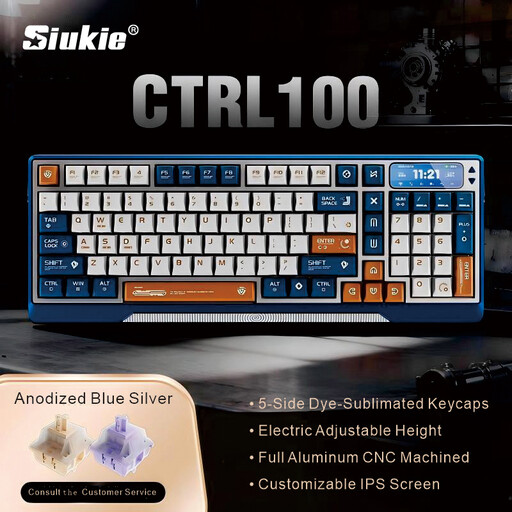
Siukie CTRL100 CNC Aluminium Mechanical Keyboard, 96% US QWERTY, HMX Cream Taro Switches, Klein Blue
Consider this 96% keyboard if an adjustable typing angle and a US QWERTY layout suit your desk setup. The product name specifies a motorised lift, tri-mode wireless connectivity and HMX Cream Taro switches; angle adjustment alone does not establish a suitable posture. Check operating-system compatibility and shortcut configuration if you rely on either.
View on Joybuy
Common questions
Where should my keyboard sit when I work at a standing desk?
Place it just below elbow height and keep it central to the screen. The Health and Safety Executive also advises avoiding raised shoulders and twisting, so adjust the desk and screen together rather than relying on keyboard shape alone.
Do I need a UK-ISO keyboard for menu creation?
Choose a confirmed UK-ISO variant if UK key legends and ISO geometry are important to your typing or shortcuts. Check the selected configuration rather than the seller’s location; Keychron explicitly labels its Q5 Max UK-ISO version.
Does Bluetooth work the same as other connection modes?
Not necessarily: check the specifications for each mode on the keyboard you choose. Keychron states 90 Hz polling over Bluetooth for the Q5 Max, compared with 1000 Hz in its wired and 2.4 GHz modes.
When does a UK employer need to assess a display-screen workstation?
The Health and Safety Executive says an employer must carry out a workstation assessment when a worker uses display screen equipment daily as part of normal work for continuous periods of an hour or more. The assessment covers the whole workstation, the work and individual requirements, not just the keyboard.


