Choose a controller that works with your gaming device before deciding how to power it. A controller made for your console is a sensible starting point for PS5, Xbox or Switch play; for PC or mobile games, check the exact device and connection requirements. When plug sockets are limited, an available console, dock or computer USB port may provide a charging route, while an AA-powered controller calls for a plan to replace or charge its batteries.
Who this is for
Console-first fantasy players with no spare socket
You mainly play on one console and would rather use an available console or dock USB port than add a wall adapter. Confirm controller compatibility with your console before choosing a charging arrangement.
PC or Android players seeking wireless flexibility
You want wireless play on a Windows PC or Android device. Check the controller’s supported operating system and whether your intended device uses Bluetooth, a USB receiver or a cable.
Long-session players planning around interruptions
You want to keep playing without an unexpected power break. Compare the controller’s charging or battery arrangement with the USB ports and other power options you already have.
What to check before buying
Start with your console, computer or mobile device; then work out where the controller will get power. Treat battery-life figures and special game features as further checks, not substitutes for compatibility.
| Concern |
What to check |
Who this matters to |
| Device compatibility |
Confirm the exact console or operating system and the required connection mode. |
If I play mainly on one console or computer, I need the controller to work there before its charging features matter. Around 42% of consumers put device compatibility first. |
| Power without another socket |
Check for an available powered USB port, the cable needed and whether the controller uses a built-in battery, a battery pack or AA cells. |
With every wall socket occupied, I need a workable way to charge or replace batteries between sessions. Avoiding another socket is the primary concern for around 33% of consumers. |
| Long-session fit |
Check battery-life conditions and whether the features you value work with your game, device and connection. |
For a long adventure, I want to plan power breaks and know which controller features the game will actually use. Around 25% of consumers prioritise that session fit. |
Buying pitfalls
-
Choosing wireless before checking the platform
Wireless play does not establish console compatibility. For example, 8BitDo lists the Ultimate 2C Wireless for Windows and Android, not as a native PS5, Xbox-console or Switch controller.
Note your exact console or operating system, then check that the controller and your intended connection mode are supported.
-
Assuming everything needed for charging is in the box
A standalone DualSense controller does not necessarily come with a USB cable. An Xbox Wireless Controller using rechargeable AA cells needs those cells charged outside the controller.
Check the package contents and power system against the USB ports and charging equipment you can already use.
Your chosen setup may call for a suitable USB cable, rechargeable battery pack or separate AA charger.
-
Treating stated battery life as a guaranteed session length
Nintendo says Switch Pro Controller battery life varies with software and functions. 8BitDo’s stated Ultimate 2C Wireless runtimes come from ideal laboratory conditions.
Allow time to charge before a long session, and check whether your controller offers a wired or replaceable-battery alternative if interruptions matter.
-
Assuming DualSense feedback works in every fantasy game
Adaptive triggers and haptic feedback depend on game and device support. PlayStation says PC haptic feedback may require USB, and some features are unavailable on Mac or mobile devices.
Check the game’s controller-feature support on the device where you will play before making those features a deciding factor.
Relevant controller brands
Sony PlayStation
DualSense is the PS5 controller route and is also listed for PC, Mac and mobile devices.
- PlayStation lists a built-in battery and USB-C charging for DualSense.
- Haptic feedback and adaptive triggers depend on the game; availability and connection requirements differ away from PS5.
Xbox
The Xbox Wireless Controller is listed for Xbox Series X|S, Xbox One, Windows PC, Android and iOS.
- Microsoft lists Xbox Wireless, Bluetooth and USB-C connection options.
- Its AA and compatible rechargeable-pack power options need different planning. Rechargeable AA cells do not charge inside the controller.
Nintendo
The Nintendo Switch Pro Controller is a wireless route for Nintendo Switch play; check the exact console when considering a different Switch model.
- Nintendo says the Switch Pro Controller can charge through an available USB port on a powered Switch dock.
- Nintendo states approximately 40 hours of use when fully charged, varying by software and functions, and approximately six hours to charge. These figures concern the Switch Pro Controller, not the Switch 2 Pro Controller.
8BitDo
8BitDo lists the Ultimate 2C Wireless for Windows and Android.
- Its listed connection routes are 2.4G wireless or wired play on Windows and Bluetooth on Android.
- 8BitDo’s stated runtimes of 19 hours over 2.4G and 32 hours over Bluetooth reflect ideal laboratory conditions; do not assume console compatibility.
Joybuy product choices
These controllers cover different console and mobile setups, not interchangeable choices for every fantasy game. Match the model to your device first, then check how its power arrangement fits your available USB ports or battery plan.
 No image available
Microsoft Elite Wireless Controller Series 2
Consider this Xbox controller if you want to check a rechargeable power arrangement for play on Xbox Series X. Confirm compatibility with your exact device, along with what the charging setup needs from an available powered USB port.
View on Joybuy
 No image available
Nintendo Switch 2 Pro Controller — Black
Choose this model only for a suitable Nintendo Switch 2 setup. Check the supplied charging items and where you can connect them; do not apply battery-life figures for the original Switch Pro Controller to this model.
View on Joybuy
 No image available
Xbox Wireless Controller — Robot White
This is an Xbox controller to consider if replaceable AA power suits your setup. Microsoft says rechargeable AA cells must be charged outside the controller; check your exact device and preferred connection before buying.
View on Joybuy
 No image available
Sony DualSense Wireless Controller — Starlight Blue, V3
For PS5 play, DualSense offers a built-in battery and USB-C charging. Check whether this package includes the cable you need. If you plan to use it with a PC or mobile game, confirm that game’s support for haptic feedback and adaptive triggers.
View on Joybuy
 No image available
Razer Kishi V3 Pro Full-Size Mobile Controller (8″)
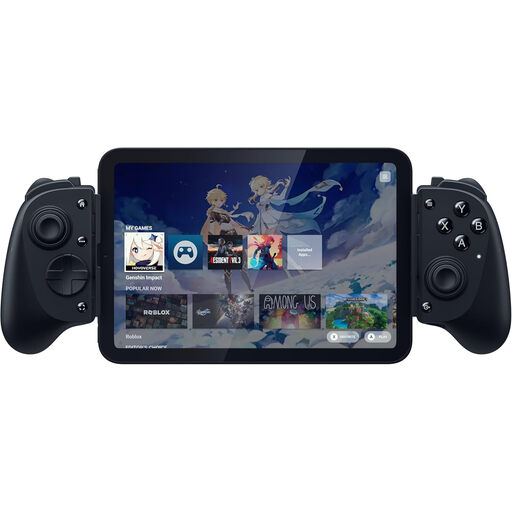
For mobile fantasy games, check that your device fits this controller and that the game accepts controller input. This is a wired mobile option rather than a standalone wireless controller; confirm the connection and powered USB source needed if you intend to use passthrough charging.
View on Joybuy
Common questions
Does a wireless controller eliminate the need for a cable or wall socket?
No. Wireless describes how the controller connects during play, not how it gets power. A rechargeable controller may use an available console, dock or computer USB port instead of a separate wall adapter; an AA-powered controller still needs replacement cells or a way to charge them.
Can I charge a Nintendo Switch Pro Controller without using another wall socket?
Yes, if your Switch dock is already powered and has an available USB port. Nintendo says the original Switch Pro Controller can charge through that port and takes approximately six hours for a full charge. Check the charging details separately for a Switch 2 Pro Controller.
Can I charge rechargeable AA batteries inside an Xbox Wireless Controller?
No. Microsoft says rechargeable AA batteries do not charge inside the Xbox Wireless Controller. Plan to charge those cells separately, or check the requirements for a compatible rechargeable battery pack if that is your preferred power arrangement.
What if a controller bought in the UK is faulty?
Qualifying faulty goods may be eligible for repair or replacement under the Consumer Rights Act 2015. Where that remedy applies, the Act requires the trader to provide it within a reasonable time and without significant inconvenience. Keep your order details and contact the seller; a manufacturer warranty does not replace statutory rights.


