What matters in a shared room?
Decide which games and shared-room need come first, then check the accounts, controllers and audio needed to make that arrangement work.
Dock-capable Nintendo Switch setup
Consider it when: Play away from the television matters; Nintendo describes TV, tabletop and handheld modes for the original Switch.
Allow for: Local-player support depends on the game, and original Switch parental controls apply to everyone using that console.
PlayStation 5 shared-console setup
Consider it when: The household wants PS5 games alongside PlayStation’s account-level family controls.
Allow for: PlayStation permits Console Sharing and Offline Play on only one PS5 at a time, and not every PlayStation Plus benefit is shareable.
Xbox Series X|S shared-console setup
Consider it when: Xbox games, family settings or a particular supported accessible-control arrangement meet the household’s needs.
Allow for: Xbox permits only one designated Home Xbox at a time; check the intended game and accessories separately.
| Concern |
What to check |
Who this matters to |
| Local play and controllers |
Check each game’s same-console player limit and accepted controller types. For an original Switch using Bluetooth audio, Nintendo limits wireless-controller connections to two. |
If I want several people playing together, the game must support our group and we need enough compatible controllers. Around 33% of consumers put local play first. |
| Access to the main TV |
Check the available display inputs and whether the particular console and game support a way to play away from the TV. |
When the television is needed for something else, I want gaming to move without taking over that screen. Roughly 27% of consumers make TV access their main concern. |
| Accounts and online access |
Compare family settings and the rules for sharing purchases or memberships on the designated console; check the chosen game’s online requirement. |
I need different people to use the console with settings suited to their accounts, without assuming one purchase covers everyone’s online play. About 20% of consumers prioritise managed access. |
| Audio and accessible control |
Confirm the headset’s connection method or the exact accessible-control feature needed for the console, controller and game. |
If room sound or a player’s control needs determine whether we can play together, I need an arrangement that fits our equipment. Around 20% of consumers put quieter or accessible play first. |
Joybuy product choices
These consoles and supporting accessories address different parts of a shared living-room setup. Choose a console for the games and account arrangement you need, then check game-specific controllers and audio before adding accessories.
 No image available
Nintendo Switch 2 Console (UK Version)
Consider this console if a Switch 2 setup fits the household’s intended games and shared-TV plans. Check each game’s local-player count and controller requirements, as well as the current Switch 2 account and play-mode rules, before settling on the arrangement.
Joybuy
 No image available
Sony PlayStation 5 Disc Edition Slim
Consider the Disc Edition if the household wants a PS5 setup that uses compatible game discs as well as PlayStation family accounts. Check local-player and controller requirements for each game; PlayStation limits Console Sharing and Offline Play to one PS5 at a time.
Joybuy
 No image available
Xbox Series S 1TB
Consider this 1TB Xbox Series S if Xbox games and family settings fit the household’s plans. Xbox allows one designated Home Xbox at a time; check each intended game’s local-player and controller requirements.
Joybuy
 No image available
LOGITECH ASTRO A10 Gen 2 Wired Headset, White
Consider a wired headset when private listening or voice chat matters in the shared room. Confirm how this model connects to the exact console and controller before choosing it.
Joybuy
 No image available
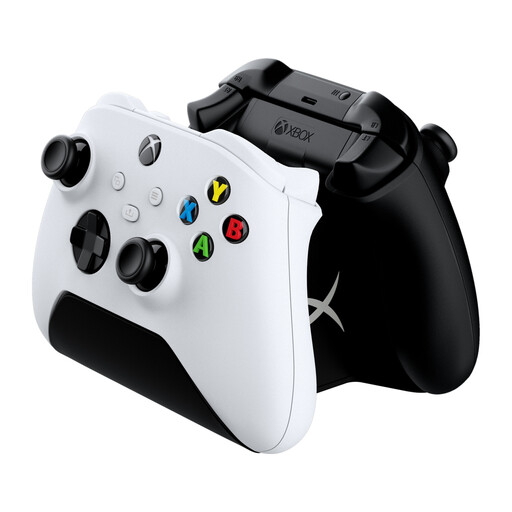
HyperX ChargePlay Dual for Xbox
Consider a charging accessory if more than one Xbox controller needs to be ready for shared use. Check compatibility with the household’s exact controller models and confirm which charging components are included.
Joybuy
Common questions
Does everyone need a separate online membership on a shared console?
Not necessarily, but coverage depends on the platform, game and account setup. Nintendo says many Switch games require Nintendo Switch Online for online features; users must be added to the Nintendo Account family group to use a family membership. PlayStation says some PlayStation Plus benefits can be shared on one PS5 with Console Sharing and Offline Play enabled, while Xbox ties Home Xbox sharing to the designated console. Check the intended game and current membership terms for each account.
Can everyone use one adult account?
Use individual accounts when household members need different access settings. PlayStation and Xbox provide family-management controls for child members. Nintendo says parental controls on the original Switch apply to the console, so those restrictions are not individually tailored to each person using it.
Can we use Bluetooth audio with three local players on Nintendo Switch?
On the original Nintendo Switch, Nintendo says connecting a Bluetooth audio device limits the console to two wireless controllers. Disconnect Bluetooth audio before connecting a third wireless controller, and check the rule for the exact Switch model and controller arrangement you plan to use.
How can we keep game audio private in the living room?
Choose an audio arrangement supported by the exact console and controller. PlayStation documents PS5 output settings for a TV, headset or AV system; Xbox documents controller connections for compatible headsets. Check the headset connection and microphone needs before buying.
Which console should we consider for accessible controls?
Start with the player’s required input method rather than choosing by console name alone. Xbox documents Controller Assist, which combines two controllers as one input, while PlayStation describes configurable inputs for its PS5 Access controller. Check the exact accessory, console and game features against the player’s needs.


