Parents setting up a child’s first online console account
You want a separate child account and practical ways to manage content, communication, playtime and purchases before online play begins.


Start with the games the child wants to play and where their friends play, then compare child-account controls and online-service requirements across the relevant consoles. Parental controls can help manage access and communication, but you still need to check each game’s PEGI rating, online features and settings for the child.
You want a separate child account and practical ways to manage content, communication, playtime and purchases before online play begins.
Your starting point is the games the child wants to play and the platforms their friends use. Check the intended multiplayer mode, any cross-platform support and the account or membership conditions before choosing hardware.
Think about who else will use the device and where it will be played. Nintendo says parental controls on a Switch console apply to everyone using it, which matters when children of different ages share one system.
If the intended games and friends point to more than one platform, compare how each ecosystem handles the child’s account and online play before deciding which hardware format fits your home.
Consider it when: The child’s games and friends are on PlayStation and you want a separate child account managed by a family manager.
Allow for: Sony Interactive Entertainment says most PS4 and PS5 games require PlayStation Plus for online multiplayer; check the game and any household-sharing conditions.
Consider it when: The child’s games and friends use Xbox and an adult will manage their settings through a Microsoft family group.
Allow for: Microsoft Xbox Support says the child must be linked to an adult Microsoft account to use Xbox services; check each game’s multiplayer-service requirements separately.
Consider it when: The intended games and friends are on Nintendo platforms and play away from the TV matters to your household.
Allow for: Nintendo says Switch console parental controls apply to every user, while many compatible online games require Nintendo Switch Online.
| Concern | What to check | Who this matters to |
|---|---|---|
| Child-account controls and communication | Check whether the child has a separate account and how you set communication and multiplayer permissions. | If I want to manage who can contact my child, I need controls that apply to their own account rather than a shared adult login. Around 33% of consumers would put supervision and interaction controls first. |
| Game suitability and online features | Check each game’s PEGI rating and descriptors, then review its chat and other online features. | A game that looks suitable from its cover may still have online interactions I need to assess for my child. Game suitability would be the primary concern for around 27% of consumers. |
| Friends, multiplayer and memberships | Confirm friends’ platforms, the intended game mode and whether it requires a recurring online membership. | I do not want to choose a console only to find that the planned games or multiplayer arrangements do not fit. Around 27% of consumers would prioritise this ecosystem and service fit. |
| Shared and portable use | Decide where play will happen and who will share the device; check whether restrictions apply per account or to the console. | When siblings or adults share a system, I need its restrictions and playing location to work for everyone using it. This would come first for around 13% of consumers. |
Online multiplayer depends on the game and platform. Sony Interactive Entertainment says most PS4 and PS5 games require PlayStation Plus, while Nintendo says many compatible Switch and Switch 2 games require Nintendo Switch Online.
List the games and friends the child wants to play with, then check each game’s supported platforms, online mode and membership conditions.
An age rating helps with content decisions, but it does not describe every interaction a child may encounter in online play.
Read the rating and content descriptors, then review the game’s chat, community and reporting features separately.
Account-specific restrictions cannot serve their intended purpose if the child plays through an unrestricted adult login. PlayStation and Xbox both provide child-account arrangements.
Set up the adult organiser and the child’s own account before enabling online access, and protect the adult account’s checkout access.
Nintendo says Switch parental controls are set for the console, so the same restrictions apply to everyone who uses it.
Choose console restrictions with the youngest regular player in mind, and review which additional settings belong in the Nintendo Account family group.
A console ecosystem with family-manager and separate child-account tools.
A console ecosystem using Microsoft accounts and adult-managed family groups.
A Switch and Switch 2 ecosystem combining console parental controls with Nintendo Account family settings.
These consoles represent PlayStation, Nintendo and Xbox options for families choosing around a child’s games and online play. Check the intended games, friends’ platforms and child-account arrangements before choosing between them.
 No image available
Consider this PS5 if the child’s intended games and friends are on PlayStation and you plan to use a separate child account.
This is the Digital Edition, Slim Version. Check that its game format suits your household, and check whether the intended online games require PlayStation Plus.
 No image available
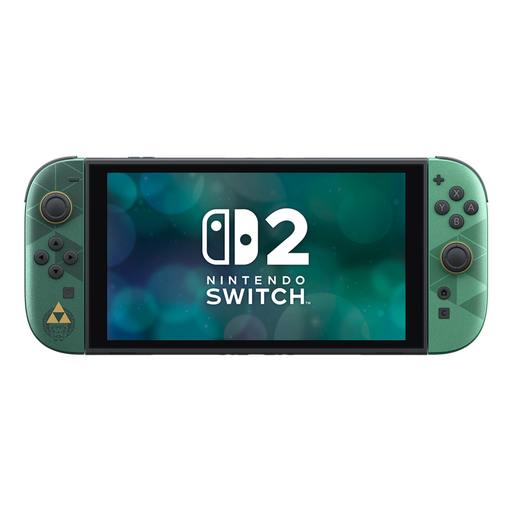
Consider this Switch 2 if the child’s games and friends are on Nintendo platforms and portable play matters.
It is the The Legend of Zelda 40th Anniversary Edition variant. Check the exact games’ online-membership conditions and how parental restrictions will work for everyone sharing the console.
 No image available
Consider this Xbox Series X if the child’s games and friends use Xbox and an adult will manage a linked child account.
The listed variant is black with 1TB storage. Confirm the intended games’ multiplayer requirements and current service terms before choosing it.
No. Platform controls can help limit access and communication, but games may still have chat, messages or other player interactions. Set up the child account, review the exact game’s online features and agree household rules for communication and reporting.
It helps you assess age suitability, but it is not a complete guide to the game’s online interactions. UK Government guidance says PEGI 12, 16 and 18 ratings have legal backing for sales and hire; also check content descriptors and the game’s communication features for the child.
The requirement depends on the platform and game. Sony Interactive Entertainment says most PS4 and PS5 online multiplayer games require PlayStation Plus; Nintendo says many compatible Switch and Switch 2 games require Nintendo Switch Online, though some free-to-play games do not. Check the exact game and current service terms.
Sometimes, under platform-specific conditions. Nintendo says its family membership covers up to eight Nintendo Accounts in one family group. Sony Interactive Entertainment says selected PlayStation Plus benefits can be shared on one PS5 with Console Sharing and Offline Play enabled and one primary PS4, subject to parental-control settings.
Create a separate child account with the correct date of birth, then review content, communication and multiplayer permissions for the intended games. Protect adult checkout access and check how restrictions apply to other users if the console is shared; Nintendo says Switch console parental controls apply to everyone using that console.