What should you check before choosing?
Confirm the friends’ game and platform combination first; then compare the accounts, online-play requirements and accessories needed for that choice.
Xbox Series S
Consider it when: The friends’ game and edition support Xbox play and the household is comfortable using digital games.
Trade-off: Xbox describes Series S as all-digital, so it cannot use physical game discs; check the intended game’s online membership separately.
PlayStation 5
Consider it when: The child’s friends use PlayStation for a compatible edition of the game they want to play together.
Trade-off: PlayStation UK says most PS4 and PS5 online multiplayer requires PlayStation Plus. The PS5 Digital Edition has no disc drive.
Nintendo Switch 2
Consider it when: The intended game supports the friends’ setup and the household wants both handheld and TV play.
Trade-off: Nintendo UK says online play requires a Nintendo Account, while certain games also require Nintendo Switch Online. Check the game’s chat arrangements separately.
| Priority |
What to check |
Your needs |
| Playing with friends |
Confirm the game title, edition and friends’ platforms. Check the game publisher’s cross-platform and account requirements for those players. |
I want my child to join their actual friends, not simply own a copy of the same game. |
| Child account and chat |
Set up a separate child account and review friend requests, messaging, voice chat and multiplayer permissions where available. Check the game’s own communication features too. |
My child should be able to play under rules that fit our household, without using an adult’s account. |
| Online membership |
Check the intended game’s listing for its online-play requirement. PlayStation UK says most PS4 and PS5 online multiplayer needs PlayStation Plus; Nintendo UK says certain games need Nintendo Switch Online; Xbox Support specifies at least Game Pass Essential for Minecraft online play on Xbox. |
I need to understand the membership required for the game my child will play before committing to it. |
| Connection and headset |
Check the console’s connection options, the game’s chat method and the headset connection. Nintendo UK says the Switch 2 dock has a built-in LAN port for wired use while docked. |
If the console will sit near the router, I may want a wired connection. I will only choose a headset after checking how chat works in our setup. |
Platform and brand references
Each platform has family-account tools, but the game and edition still determine whether the child can join their friends.
Xbox
Xbox Series X|S and Xbox family groups are relevant if the friends’ game supports Xbox play.
- Xbox Support says family-group organisers can manage child members’ privacy, communication and multiplayer settings.
- Xbox describes Series S as all-digital. Check each game’s online-play entitlement rather than assuming one membership rule applies throughout the library.
PlayStation
PS5 and PlayStation family management are relevant when the child’s intended game and friends’ setup support PlayStation play.
- PlayStation UK lists child-account controls for games and apps, online communication and spending restrictions.
- PlayStation UK says most PS4 and PS5 online multiplayer requires PlayStation Plus. Its PS5 Digital Edition cannot use game discs.
Nintendo
Switch and Switch 2 offer a route to consider when the child’s intended game supports the friends’ setup and handheld play matters to the household.
- Nintendo UK says a Nintendo Switch Online family membership can cover up to eight Nintendo Accounts in one family group; the Switch 2 dock has a built-in LAN port.
- Nintendo UK says online play requires a Nintendo Account and certain games require Nintendo Switch Online. Check the intended game’s communication features separately.
Joybuy console and headset options
These options include a PS5 Digital Edition for a household considering PlayStation play and two headsets to assess after choosing a compatible console and game. Check the friends’ game edition and chat method before buying either type of device.
 No image available
Sony PlayStation 5 Digital Edition, Slim Version
A PS5 option if the child’s intended game and friends’ setup support PlayStation play. This Digital Edition has no disc drive, so check that digital game access suits the household; confirm the game’s online-play and membership requirements before buying.
View on Joybuy
 No image available
Logitech ASTRO A10 Gen 2 Wired Headset, White
A wired headset to consider if voice chat is appropriate for the child’s game and account settings. Check its connection with the chosen console or controller and the game’s chat method before buying.
View on Joybuy
 No image available
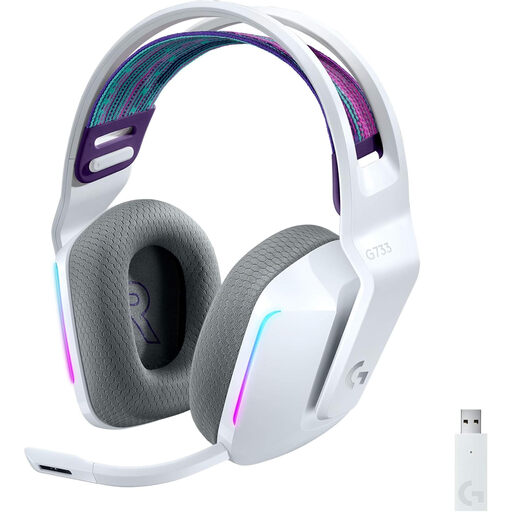
Logitech G G733 Lightspeed Wireless Headset, White
A wireless headset option for a compatible console and game-chat setup. Confirm the required connection, the intended game’s voice-chat support and the child’s communication permissions before choosing it; do not assume it will work with Xbox.
View on Joybuy
Common questions
Should I buy the same console as my child’s friends?
Start with the exact game and edition, not just the console brand. Ask which platforms the friends use, then check whether that edition supports play and chat between those platforms and what online entitlement each player needs.
Does my child need a separate account?
Use a separate child account within the chosen platform’s family arrangement rather than the adult account. PlayStation says each child needs one for its online services, while Xbox organisers can manage settings for child members of their family group.
Do all console games require a paid online membership?
Requirements vary by platform and game. PlayStation UK says most PS4 and PS5 online multiplayer needs PlayStation Plus; Nintendo UK says certain games need Nintendo Switch Online; Xbox Support specifies at least Game Pass Essential for Minecraft online play on Xbox. Check the intended game’s listing before subscribing.
Can I restrict who my child communicates with?
Platform family tools provide communication settings, but the available controls and the game’s own chat features need checking together. Xbox Support describes child-member communication settings, and PlayStation UK lists online communication among its child-account controls. Review the settings before the child plays and when their games change.
Are parental controls enough on their own?
No. UK government guidance says parental controls are helpful but cannot fix everything. Set them before online play, then keep talking with the child about friend requests, personal information and what to do if an interaction feels wrong.


