Parents choosing a first online console
Start with the games the child wants to play and the platforms their friends use. Then consider family-account settings, the household display and any accessories.


Choose the console around the child’s actual games and friends’ platforms, checking cross-network play and online membership requirements before buying. A compatible headset addresses private listening and supported voice chat; an extra controller is for people playing together on one console. If multiplayer or chat is unreliable, check the home connection and account permissions before replacing equipment.
Start with the games the child wants to play and the platforms their friends use. Then consider family-account settings, the household display and any accessories.
If the console already plays the intended games, check communication permissions, headset connections and the home network before assuming a new console is needed.
A second compatible controller may let another person join a game that supports local multiplayer. Friends playing remotely generally use their own devices and accounts instead.
Establish whether the purchase needs to solve game access, communication, local play or a connection problem; those needs call for different equipment.
| Priority | What to check | Your needs |
|---|---|---|
| Games and friends | Check each game’s console availability, friends’ platforms and cross-network-play support. Check multiplayer permissions and the game’s membership requirement; Xbox Support says cross-network play is available in some games, not all. | I want the child to join their friends in the games they actually play, rather than choose a console on hardware features alone. |
| Voice chat | Check the headset’s microphone connection against the exact console or controller, then check the game’s chat features and family communication settings. For Nintendo Switch 2 GameChat, Nintendo requires parental-controls setup for users under 16. | Private listening would help in a shared room, but I also need control over who can contact the child. |
| Family settings | Set up a separate child or supervised account and review content, communication, playtime, spending and friend settings available on the chosen platform. Use the game’s PEGI information when assessing content. | I want account settings that fit the child’s age and can be reviewed as their games and friendships change. |
| Local play | Check whether the game supports players on the same console and whether an additional controller works with that console generation. | When siblings or visiting friends play in the same room, another controller may matter more than a chat accessory. |
| Home connection | Check whether problems occur on other devices or in particular rooms. Try a suitable wired connection or a different console position before choosing network equipment; Ofcom notes that the wireless link inside a home can limit performance. | If online matches or chat falter where the console sits, I want to identify the connection problem before replacing gaming equipment. |
The child may be unable to join the intended group if a game is unavailable on that platform or does not support play across their friends’ platforms.
List the games and friends’ platforms, then check each game’s cross-network, account and membership requirements. PlayStation says most PS4 and PS5 online multiplayer requires PlayStation Plus; Xbox Support says paid-game online multiplayer requires Game Pass, while free-to-play titles are exempt.
A microphone cannot override account communication restrictions or enable a chat feature the chosen game does not offer.
Check the headset connection, the child account’s permissions and the game or party-chat settings before buying.
Using the adult account makes it harder to apply the platform’s child-specific content and communication settings to that player.
Set up a separate child or supervised account and review its communication, content, spending, playtime and friend settings before regular online play.
Ofcom notes that the wireless link between a router and devices can limit the experience inside the home; a different console or headset would not address that link.
Compare the connection in different rooms and, where practical, try a suitable wired connection before deciding whether home network equipment needs changing.
These platform references help narrow the console decision; check the child’s particular games and account requirements before settling on one.
Relevant when considering PS5 or PS5 Digital Edition and PlayStation family accounts.
Relevant when comparing Xbox Series X and Series S or setting up an Xbox family group.
Relevant for Nintendo Switch 2 households considering portable and TV play alongside GameChat.
These options cover console choice, a microphone headset and a home Wi-Fi mesh system. Match any purchase to the games, chat setup or connection issue it is meant to address.
 No image available
Consider this console if the child’s games and friends’ platforms fit Nintendo Switch 2 and portable or TV play matters at home.
For GameChat, Nintendo requires a persistent internet connection and Nintendo Switch Online membership; users under 16 need parental controls configured and parental approval.
 No image available
Consider Series X if the intended games fit Xbox and disc playback matters to the household.
This is the 1 TB variant. Check each game’s cross-network support; Xbox Support says paid-game online multiplayer requires Game Pass, while free-to-play titles are exempt.
 No image available
Consider Series S if the child’s games fit Xbox and an all-digital console suits the household.
This is the 1 TB variant. Check cross-network play for the intended games; Xbox Support says paid-game online multiplayer requires Game Pass, while free-to-play titles are exempt.
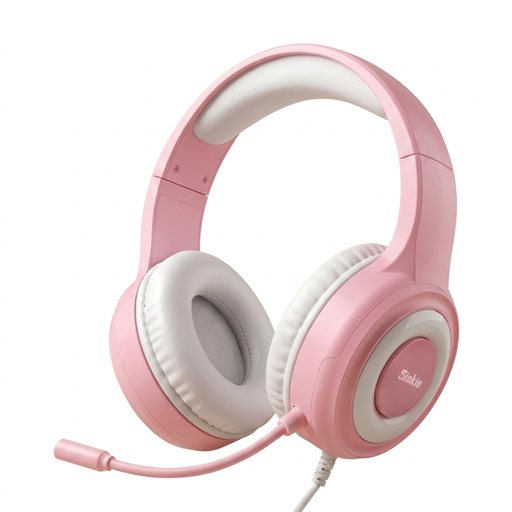 No image available
A microphone headset is relevant when the child wants private listening and the chosen game supports voice chat.
The product title lists USB and 3.5 mm connections and 50 mm drivers. Confirm which connection carries microphone audio on the exact console or controller; account and game settings still govern chat access.
 No image available
Consider home Wi-Fi equipment if testing points to poor wireless coverage where the console is used, rather than a game or account issue.
This is a three-pack mesh system. Check how it would connect to the existing modem and home network before choosing it.
Their platforms matter, but check the exact games too. Xbox Support says some games allow play across Xbox, Nintendo, PlayStation and sometimes PC; cross-network support is game-specific, and account privacy settings can also restrict play or communication.
No. The microphone must work with the chosen console or controller, and the game must offer the intended chat feature. Family settings, privacy permissions and any applicable membership requirements can also affect access.
Nintendo says GameChat requires a persistent internet connection and Nintendo Switch Online membership, alongside Nintendo Account and mobile-number setup. For users under 16, parental controls must be configured in the app and a parent or guardian must approve GameChat use and the friends they can chat with.
PlayStation says most PS4 and PS5 games require PlayStation Plus for online multiplayer. Xbox Support says paid-game online multiplayer requires Game Pass, while free-to-play titles are exempt. Check the requirement for the particular game before choosing a platform.
Try one where there is a suitable cable route and online play or chat is unreliable over Wi-Fi. Xbox Support describes wired networking as its fastest and most reliable connection method, while Ofcom notes that the in-home wireless link can limit performance.