
24/7 Customer Support

Free returns

Same-day & Next-day Delivery

Quality Guaranteed

Unlock Your Welcome Offers: FREE Delivery | Up to 80% OFF | Free 30-day JoyPlus trial
Download the APP
Buying gaming accessories often looks straightforward until compatibility issues, uncomfortable designs or misleading feature claims turn an affordable upgrade into an unnecessary expense. The right choice depends less on the longest specification list and more on how the accessory fits your devices, room and daily routine.
This guide explains the practical details to check before buying a gaming headset, charging cable or wired mouse, followed by recommendations matched to different UK user profiles.
Terms such as “surround sound”, “noise cancelling” and “fast charging” can describe different technologies. A 7.1 surround sound headset, for example, may use virtual processing rather than separate physical speakers. This can create a wider positional effect, but the result depends on software, game audio and personal preference.
Similarly, a noise-cancelling gaming microphone usually refers to reducing surrounding noise picked up by the microphone. It does not necessarily mean that the headset actively blocks all sound reaching your ears.
A USB headset may work with a PC, Mac or selected consoles but not every Xbox or mobile device. A headset with both USB and 3.5 mm connections offers more flexibility, but buyers should still check which functions work through each connection.
Charging cables require similar care. A USB-C to Lightning cable is not interchangeable with a USB-C to USB-C cable, and a cable’s maximum wattage does not guarantee that a phone, laptop or charger will accept that power.
A braided charging cable can resist everyday scuffs and bending better than a basic smooth cable, but it can still be damaged by tight knots, sharp bends or pulling from the wire. Stop using any cable with exposed wiring, fraying or unusually hot connectors.
For headsets, comfort also affects durability. Earcups that become hot or press tightly against the head may be unsuitable for long sessions, regardless of their audio features.
Before selecting wired gaming headphones, confirm:
For a multi-device charging cable, check the connector combination first. A 4-in-1 charging cable may include USB-A and USB-C input options alongside USB-C and Lightning outputs, which is useful for households with mixed devices.
Pay attention to:
An ergonomic wired mouse with adjustable DPI lets you alter cursor sensitivity. Lower settings can suit precise everyday navigation, while higher settings may reduce the physical movement needed across a large monitor. DPI alone does not determine gaming accuracy.
For shared offices, libraries or study areas, a silent click mouse can reduce button noise. Also check the number of buttons, USB compatibility, cable length and hand shape. A compact mouse may suit smaller hands or travel, while a curved design can provide more palm support.
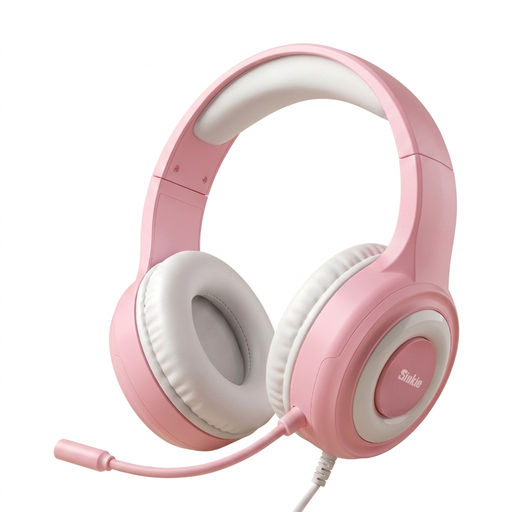
Why This Fits Their Persona: The USB and 3.5 mm connections suit starters using a mixture of PCs, consoles and handheld devices.
Its dual connection options reduce the risk of buying a headset that only suits one port type.
50 mm driver, over-ear design, noise-cancelling microphone and blue LED backlighting.

Why This Fits Their Persona: PC and Mac players who want USB connectivity, software controls and a lightweight over-ear format may find this configuration suitable.
The compatibility information clearly excludes Xbox, helping buyers avoid an unsuitable console purchase.
50 mm drivers, software-based 7.1 virtual surround controls, detachable microphone and RGB lighting.
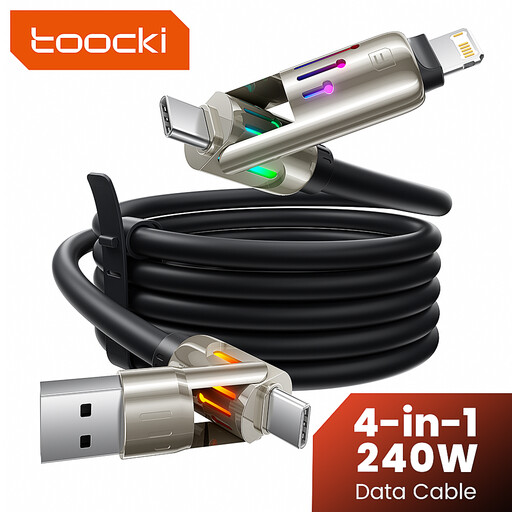
Why This Fits Their Persona: Travellers, households with several device types and users charging beside a desk or sofa can reduce cable clutter with one longer cable.
The connector layout and power conditions are specified, making it easier to check device and charger requirements before use.
2 m braided cable, USB-A/USB-C input options, USB-C and Lightning connectors, plus an integrated LED.
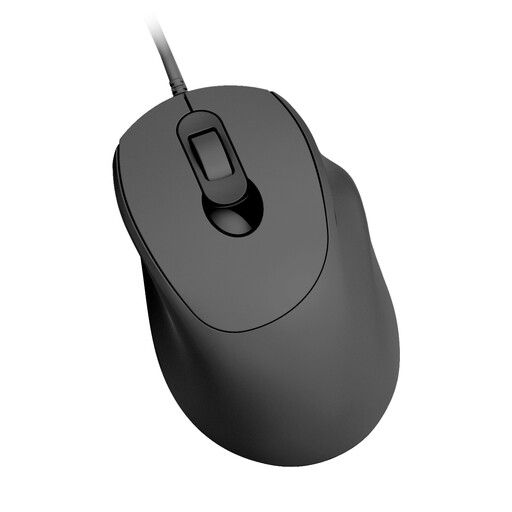
Why This Fits Their Persona: Students, home-office workers and light gamers who share a quiet room can use a simple USB mouse without wireless batteries or pairing.
Its specification states the three DPI levels and USB plug-and-play setup, avoiding vague sensitivity or driver promises.
1000/1200/1600 DPI adjustment, four buttons, silent clicking and Windows/Mac compatibility.
We have compiled a complete, real-time list of products that fully satisfy these strict selection criteria and UK safety regulations.
Wired accessories provide a direct connection without battery charging or wireless pairing. They can be practical for desktop gaming, study and home-office use. The trade-off is cable management and, for headsets, the need to check whether the USB or 3.5 mm plug matches the intended device.
Lifespan depends on bending, storage, connector strain and power conditions. Loosely coil a cable, hold the plug rather than the wire when disconnecting and replace it if the outer sleeve splits or the connector becomes hot. A braided cable may resist surface wear, but it is not damage-proof.
Not automatically. DPI changes cursor sensitivity; it does not by itself improve sensor tracking, comfort or control. Choose a mouse with a suitable shape, dependable USB connection and DPI settings that match your desk space and preferred sensitivity.