Who is each setup for?

Ranked PC multiplayer players

If you use voice chat throughout a match, consider microphone placement and your connection alongside directional audio. Check whether the processing feature you want needs a PC application: Logitech G, for example, says Blue VO!CE and DTS Headphone:X 2.0 on its PRO X wired headset require G HUB on PC.

PS5 competitive and co-op players

Check how both audio and the microphone connect to PS5. PlayStation Support provides headphone 3D-audio settings and microphone-input selection on the console, so a headset’s surround label is not a substitute for checking those settings and any required wireless adapter.

Xbox multiplayer players

Start with the connection method: a compatible controller headset, a supported Xbox wireless connection or another method explicitly supported by your console and headset. Xbox Support says Xbox One does not provide Bluetooth headset connectivity, so Bluetooth in a product name is not enough to establish console compatibility.

What should you check before buying?

Wired gaming headset

Consider it when: You want an integrated boom microphone and a direct connection without charging.

Trade-off: Software-based surround or voice features may work on PC but not through the console connection you plan to use.

Wireless gaming headset

Consider it when: Cable-free play matters and the exact headset version has a supported connection to your platform.

Trade-off: You need to charge it and account for its adapter and connection conditions; PlayStation Support notes that distance and interference can disrupt wireless headsets.

Headphones with a separate mic

Consider it when: You already favour particular headphones and can arrange a separate microphone, especially at a PC desk.

Trade-off: Game audio working does not establish that voice chat will work; check the microphone input, cables and any adapter on your platform.

Priority What to check Your needs
Directional audio Check the game and platform’s headphone-audio settings, then any operating-system or app requirement for a named surround feature. Xbox Support says Windows Sonic works with compatible headset connections; PlayStation Support provides PS5 headphone 3D-audio settings. I want to distinguish game cues without buying a headset solely because it carries a surround-sound label.
Team communication Check microphone position, mute control and the input your platform will use. For software voice processing, confirm whether it works outside PC. My teammates need to hear callouts, and I want to mute quickly during regular squad chat.
Platform connection Match the headset’s exact version and connection method to your console, controller or PC. For wireless use, check the required adapter rather than relying on Bluetooth support alone. Audio and chat both need to work on the devices I own, not just on one platform named in a compatibility list.
Wireless use Check the supported radio or console connection, battery claim and its stated conditions. Consider where the adapter will sit if the connection drops out. I would rather play without a cable, but I need to plan charging and avoid an unsuitable console connection.
Fit and volume Assess the headband, earcups and fit if you can. Royal Free London NHS Foundation Trust advises moderate headphone volume and regular listening breaks. For longer sessions, I want a fit I can tolerate without continually turning up the volume to overcome room noise.

What commonly goes wrong?

  • Buying for surround sound without checking where it works

    A feature advertised for a headset may depend on PC software rather than your console connection. Logitech G limits Blue VO!CE and DTS Headphone:X 2.0 on its PRO X wired headset to PC through G HUB; Razer limits the BlackShark V2 X 7.1 feature to Windows 11.

    Check the exact feature against your platform, connection and required application. Xbox Support also distinguishes its console audio formats, including the premium Dolby Atmos for Headphones format.

  • Assuming every wireless headset connects by Bluetooth

    Wireless methods are not interchangeable. Xbox Support says Xbox One lacks Bluetooth headset connectivity, while PlayStation Support describes pairing supported PlayStation wireless headsets through a USB adapter.

    Confirm the headset version and its supported console connection before choosing it for wireless play.

  • Planning game audio but not the microphone

    Headphones can provide game sound while leaving voice chat or muting unresolved. A separate-mic setup also requires a suitable input and room for its cables or equipment.

    Check the complete path from headphones and microphone to the PC, console or controller. On PS5, PlayStation Support says you can select an available microphone input in console settings.

    Depending on the setup, you may also need a compatible microphone, splitter, interface or cable.

  • Turning up volume to compensate for a poor fit

    A loose fit or background noise can make quieter cues harder to follow and tempt you to listen louder for longer.

    Assess fit and room noise rather than relying on more volume. Royal Free London NHS Foundation Trust advises keeping headphone volume below 60% of maximum and taking regular breaks.

Relevant brand ranges

SteelSeries

The Arctis Nova 5 range is relevant if you are comparing USB-adapter wireless play with Bluetooth use on other supported devices.

  • SteelSeries lists 2.4 GHz and Bluetooth switching and a USB-C dongle for the Arctis Nova 5.
  • SteelSeries identifies the Nova 5X as the Xbox-compatible variant; check the precise model rather than assuming every Nova 5 connects to Xbox.

HyperX

The wired Cloud III is a reference point for buyers checking one boom-mic headset against several device connections.

  • HyperX UK lists 3.5 mm, USB-C and USB-A connection options and names PC, PlayStation, Xbox, Switch, Mac and mobile compatibility.
  • Check which connection and features apply to your device; a broad platform list does not establish identical functions on every platform.

Razer

The wired BlackShark V2 X and wireless BlackShark V2 Pro illustrate different connection choices within Razer’s gaming-headset range.

  • Razer describes the BlackShark V2 X as a wired headset with a cardioid microphone.
  • Razer says its BlackShark V2 X 7.1 feature is available only on Windows 11; do not assume that processing transfers to console play.

Logitech G

The PRO X wired and PRO X 2 wireless ranges are relevant when comparing PC software features with connection flexibility.

  • Logitech G lists LIGHTSPEED wireless, Bluetooth and 3.5 mm options for PRO X 2.
  • According to Logitech G, Blue VO!CE and DTS Headphone:X 2.0 on the PRO X wired headset function only on PC through G HUB.

PlayStation PULSE

PULSE headsets are relevant to PS5-first players who want a PlayStation-oriented wireless setup.

  • PlayStation describes its PULSE 3D headset as connecting to PS5 and PS4 through the included adapter.
  • PlayStation Support provides PS5 3D-audio settings for compatible headphones, so a PULSE headset is not required solely to access that console setting.

Joybuy gaming headsets to consider

These wired and wireless boom-mic headsets are options for players who want game audio and team chat in one device. For each model, check the connection against your own platform; this selection does not cover a separate-headphones-and-microphone setup.
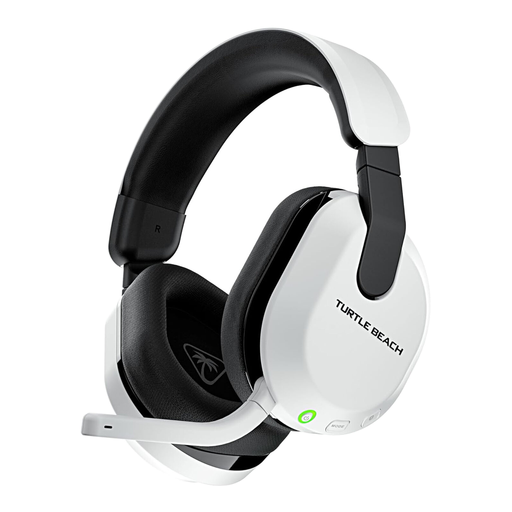
White Turtle Beach Stealth 600 Gen 3 XB wireless gaming headset

Turtle Beach Stealth 600 Gen 3 XB Wireless Headset, White

For wireless multiplayer chat, check that the transmitter and connection method suit your console or PC. The listed setup does not offer wired listening, so confirm that wireless-only use suits you.

View on Joybuy

White Logitech ASTRO A10 Gen 2 wired gaming headset

Logitech ASTRO A10 Gen 2 Wired Headset, White

A wired headset to consider for regular game chat. Check whether its cable and any splitter suit your device’s separate or combined audio and microphone inputs.

View on Joybuy
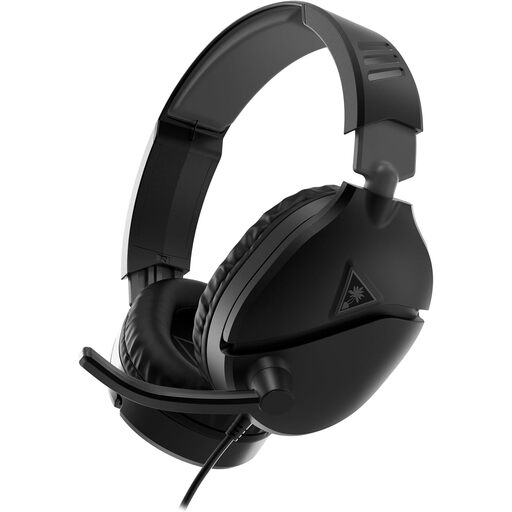
Black Turtle Beach Recon 70 gaming headset for PC and PS5

Turtle Beach Recon 70 Headset for PC and PS5, Black

For wired PC or PS5 play and voice chat, confirm how your device accepts the headset and microphone. If you use separate desktop audio and mic ports, check the splitter arrangement; spatial-audio availability also depends on platform settings and any required software.

View on Joybuy
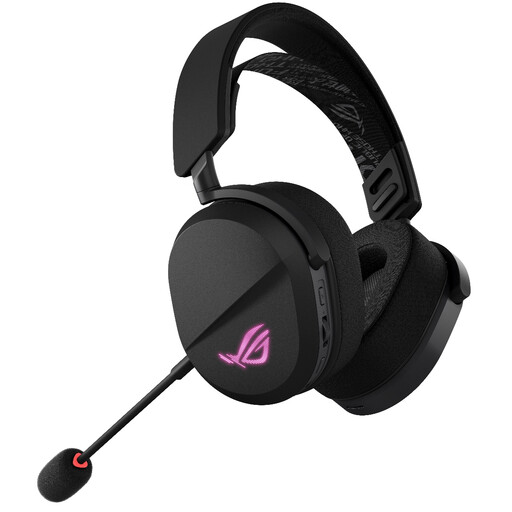
Black ASUS ROG Pelta wireless gaming headset

ASUS ROG Pelta Wireless Headset, Black

For cable-free gaming and team chat, confirm the connection method for your PC, PS5 or Switch. If buying for Xbox, establish compatibility with the exact version first; the battery-life claim cited for this headset applies to 2.4 GHz mode with RGB off.

View on Joybuy
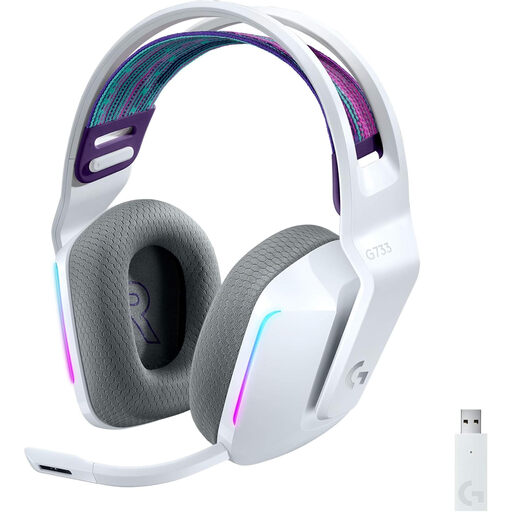
White Logitech G G733 LIGHTSPEED wireless gaming headset

Logitech G G733 LIGHTSPEED Wireless Headset, White

For wireless chat on PC or PlayStation, check that your setup can use its USB receiver; Switch use is described for docked mode. Confirm Xbox support separately, and check which audio and microphone customisation features require PC software.

View on Joybuy

Common questions

Do I need a surround-sound headset for positional audio on Xbox?

No special surround-sound label is required for Xbox’s Windows Sonic setting: Xbox Support says it can be used with any headset through a compatible connection. Xbox also describes Dolby Atmos for Headphones as a premium format that works with all headsets; check the console setting and any app requirement for the format you intend to use.

Does PS5 3D audio require a PlayStation headset?

No. PlayStation Support provides PS5 headphone 3D-audio settings for compatible headphones, including a personalised profile option. Check that your chosen headphones connect to the console and that your microphone input works for chat.

Will a Bluetooth headset connect directly to Xbox?

Do not assume it will. Xbox Support says Xbox One consoles do not provide Bluetooth headset connectivity. Check whether your particular console and headset support a controller connection, Xbox Wireless or another explicitly stated method.

Can I use headphones and a separate microphone for multiplayer?

Yes, if your platform can accept both the headphone output and your chosen microphone input. This arrangement is particularly practical at a PC desk; for console use, check the controller, USB or adapter path before buying. PlayStation Support says PS5 lets you select an available microphone input in its settings.

Will a headset’s special audio features work on every platform?

Not necessarily. Logitech G says Blue VO!CE and DTS Headphone:X 2.0 on its PRO X wired headset require PC and G HUB, while Razer limits the BlackShark V2 X 7.1 feature to Windows 11. Check the condition for the exact model and feature you want, rather than relying on the headset’s general compatibility list.