Choose a controller that works with your main gaming platform before weighing up immersive features. DualSense is worth considering for PS5 games that support its haptic feedback and adaptive triggers; an Xbox Wireless Controller suits players moving between Xbox, Windows PC and supported mobile devices. For longer sessions, physical access and control placement may matter more than either feature set.
Who these choices suit
PS5 players seeking tactile effects
If PS5 is where you play most story-led games, DualSense haptic feedback and adaptive triggers may be reasons to choose it. PlayStation says these effects depend on support in the individual game, so check the titles you intend to play.
Players switching between Xbox, PC and mobile
If you use several devices, start with their stated controller and connection support. Microsoft lists Xbox consoles, Windows PC, Android and iOS for the Xbox Wireless Controller, though the connection method varies by device.
Players who need adaptable controls
If a conventional gamepad makes buttons difficult to reach or position, look at the physical layout before optional performance controls. PlayStation’s PS5 Access controller offers configurable inputs and positioning for different mobility needs.
What matters when choosing
For cinematic adventures, confirm platform and game support first. Then decide whether supported tactile effects or a more adaptable physical layout will make the greater difference to your play.
| Concern |
What to check |
Who this matters to |
| Platform and game compatibility |
Check the exact console or operating system, the game’s controller support and the required connection method. |
If I play across devices, I need one controller that works with the games and platforms I actually use. Around 42% of consumers would put compatibility first. |
| Immersive feedback |
Check each game’s support for haptic feedback and adaptive triggers; PlayStation says PC haptic feedback requires USB. |
When a story game supports tactile effects, I want to feel those cues and am willing to check the connection requirements. Immersive feedback would come first for around 33% of consumers. |
| Comfort and adaptable controls |
Assess grip and button placement, remapping on your device, and whether mounting or external switches are needed. |
For a long session, I need controls I can reach and position comfortably rather than competitive-game extras. Around 25% of consumers would prioritise comfort or access. |
Buying pitfalls
-
Assuming PC connection unlocks every DualSense effect
A DualSense can connect to a PC without every game supporting its enhanced feedback. PlayStation says PC haptic feedback requires USB, while adaptive triggers depend on game support.
Check the game’s controller-support information and whether a wired PC connection suits your setup.
If you need USB for PC haptics, allow for a compatible cable: PlayStation says one is not included with the standard DualSense controller.
-
Treating Bluetooth as universal console compatibility
A wireless connection method does not establish support for every console. For example, 8BitDo specifies the Ultimate 2C Wireless for Windows and Android, with different connection methods for each.
Match the exact model and its stated connection mode to your main platform before ordering.
-
Choosing competitive controls to solve an access problem
Trigger adjustments cannot necessarily address difficulty reaching buttons, holding a fixed shape or placing a controller. PlayStation’s PS5 Access controller instead offers configurable button positions and compatible external inputs.
Identify the physical control you need to change, then check layout, mounting and remapping options.
Depending on the controls you need, an accessible setup may also involve external switches or combining controllers.
-
Looking only at the manufacturer’s warranty
A stated warranty is separate from statutory rights concerning faulty goods under the UK Consumer Rights Act 2015. A warranty period alone does not tell you how the seller will handle a fault.
Keep your order confirmation and product listing, contact the seller about a fault, and read the retailer’s change-of-mind return terms separately.
Brands to consider for different controller needs
PlayStation / Sony
DualSense serves conventional PS5 play, while the Access controller is a configurable PS5 option for different mobility needs.
- PlayStation lists DualSense use with PS5, PC, Mac and mobile devices; supported games can use haptic feedback and adaptive triggers.
- Enhanced effects depend on the game, and PlayStation says haptic feedback on PC requires USB. The Access controller is PS5-specific.
Xbox / Microsoft
The Xbox Wireless Controller is an option for players using Xbox consoles alongside Windows PC or supported mobile devices.
- Microsoft lists Xbox Wireless and Bluetooth connectivity, button mapping and a 3.5 mm headset jack for this controller.
- Check which connection method applies to each device rather than assuming the same setup works everywhere.
8BitDo
The Ultimate 2C Wireless is a Windows and Android option for players interested in additional controls.
- 8BitDo specifies Hall Effect sticks and triggers, extra bumpers, Windows use through 2.4G or a wired connection, and Android use through Bluetooth.
- Those model-specific specifications do not establish PS5 or Xbox compatibility.
PowerA
PowerA’s cited Wired Controller is an alternative for Xbox Series X|S, Xbox One and Windows 10/11.
- PowerA states that this model is officially licensed for Xbox Series X|S and has a two-year limited warranty.
- It requires a wired setup, so it does not meet a need for cable-free play.
Joybuy controller choices
These controllers cover PS5 play and an Xbox-style option for players who also use Windows PC or mobile devices. Choose by your main platform, then check the features supported by your games and connection method.
 No image available
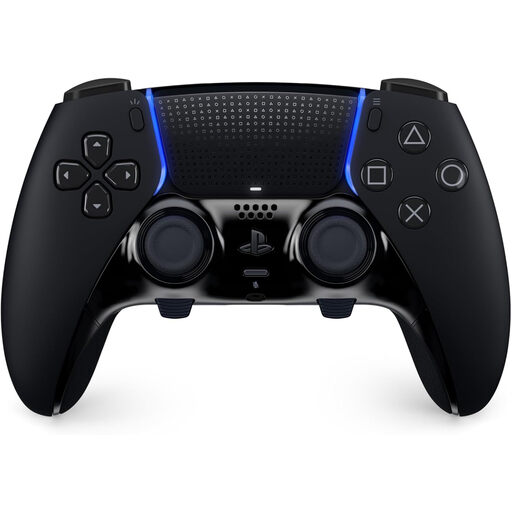
Sony DualSense Edge PS5 Wireless Controller – Midnight Black
Consider this PS5 wireless controller if you want to assess its controls for story-led play. PlayStation says DualSense Edge tactile features on PC are available only in select games; check support for the game and connection you plan to use.
View on Joybuy
 No image available
Xbox Wireless Controller – Carbon Black
This wireless controller suits players whose main setup includes Xbox and who may also use a Windows PC or supported mobile device. Microsoft lists Xbox Wireless and Bluetooth connectivity for the model; check which method applies to each device.
View on Joybuy
 No image available
Sony PlayStation 5 DualSense Wireless Controller V3 – Starlight Blue
For PS5 cinematic adventures, consider this wireless DualSense if supported haptic feedback and adaptive triggers matter to you. PlayStation says those effects depend on the game; on PC, haptic feedback requires USB.
View on Joybuy
Frequently asked questions
Will DualSense immersive features work in every PC game?
No. PlayStation says adaptive triggers require game support and haptic feedback on PC requires USB. Check the specific game before choosing DualSense for either effect.
Can I use an Xbox Wireless Controller away from an Xbox console?
Yes, on supported devices. Microsoft lists Windows PC, Android and iOS alongside Xbox consoles; confirm the connection method and your device’s support before buying.
What if a conventional controller is uncomfortable to use?
For PS5, PlayStation’s Access controller offers configurable inputs, positioning and ports for compatible external switches. Identify which controls are difficult to reach or operate, then check whether its PS5-specific setup addresses those needs.
Does a manufacturer’s warranty replace my rights if a UK purchase is faulty?
No. A manufacturer’s warranty is separate from statutory rights concerning faulty goods under the UK Consumer Rights Act 2015. Keep the order details and contact the seller about the fault; check any voluntary return policy separately for change-of-mind purchases.


