Try your console’s built-in button mapping first if it can move the awkward action to a control you can comfortably reach. Rear buttons or paddles become more relevant when you regularly need to use an action while keeping a thumb on a stick, or want layouts you can switch between games. Match the controller to your platform and check exactly which inputs it can change; PlayStation, Xbox and Nintendo differ in their mapping, profile and configuration rules.
Who might need custom controls?
Players who need an action within reach of a rear button
In games that call for frequent jumps, reloads or weapon changes while steering or aiming, moving a supported action to a rear control may be useful. PlayStation gives these as examples of back-button assignments, rather than a measure of how many players need them.
Players who need a different physical layout
If button reach or pressing several controls together is the main difficulty, reassignment may help only if the new positions are usable. Xbox describes external switches and joysticks for its Adaptive Controller, while PlayStation describes configurable positions and external inputs for its Access controller.
Players who use several games or devices
Saved layouts matter when different games call for different assignments. Check where those layouts live: Xbox says Elite Series 2 stores profiles on the controller, whereas Nintendo says its button-mapping presets stay on the console.
What should you check before choosing?
Start with the action you want to move, then check whether built-in mapping changes it sufficiently before considering extra physical controls.
| Priority | What to check | Your needs |
|---|
| Rear controls |
Check whether the controller has assignable rear buttons or paddles and whether they accept the exact game action you want. PlayStation cites jump, reload and weapon changes as DualSense Edge back-button examples. |
I want to trigger a frequent action without moving my thumb away from the stick. |
| Mapping range |
Compare the controller’s assignments with your console’s built-in mapping. Nintendo says stick directions cannot be mapped to button inputs and excludes certain system buttons from mapping. |
A different layout only helps me if it changes the particular control I find awkward. |
| Platform and setup |
Confirm console or PC compatibility and how settings are edited. Xbox says Windows configuration through the Xbox Accessories app requires USB or a compatible Xbox Wireless Adapter rather than Bluetooth. |
If I set up an Xbox controller on my PC, I need a connection that lets me edit its controls. |
| Saved layouts |
Check how many profiles you can use and where they are stored. Xbox Support says Elite Series 2 stores up to three profiles; Nintendo says its mapping presets stay on the console. |
I switch games or consoles and want to know whether my layout will follow me. |
| Control positions |
If reassigned pad buttons remain difficult to use, check the positions and compatibility of external inputs. Xbox and PlayStation describe adaptive-controller setups using additional controls. |
Rear paddles alone would not put every control where I can comfortably reach it. |
What commonly gets overlooked?
-
Assuming every input can be remapped
“Remappable” does not mean every system button or type of input can be reassigned. Nintendo, for example, excludes some system buttons and does not allow stick directions to become button inputs.
List the game actions you want to move, then check each proposed assignment against the controller and game settings.
-
Skipping the console’s own mapping settings
If a supported system-level reassignment puts the action within reach, rear hardware may not change the part of the layout that troubles you.
Try the available built-in mapping before deciding whether you need another physical button or faster changes between layouts.
-
Forgetting how profiles are configured and stored
Xbox says the Accessories app on Windows needs USB or a compatible Xbox Wireless Adapter to configure Elite Series 2; Nintendo says its mapping presets do not travel with a controller to another console.
Check the setup connection and profile-storage location, particularly if you share a console or play on more than one device.
-
Treating an adaptive controller as a complete pad
An arrangement built around external inputs depends on the switches, buttons or joysticks chosen for the player’s required layout.
Plan where each action will sit and check which compatible components the complete setup requires.
Depending on the arrangement, compatible external controls or mounts may be needed separately.
Relevant controller brands
PlayStation
DualSense Edge is PlayStation’s PS5-focused option for remapped buttons and custom profiles; the Access controller addresses more extensive physical layout changes.
- PlayStation says DualSense Edge can assign other button inputs to its back buttons and create custom profiles on PS5.
- Check whether the intended game supports the controller features you plan to use, as well as the particular assignment you need.
Xbox
Elite Series 2 offers paddles and stored layouts for Xbox and compatible Windows use. The Xbox Adaptive Controller takes a different approach through external inputs.
- Xbox Support says Elite Series 2 can store up to three custom profiles.
- Xbox says its Windows Accessories app cannot configure Elite Series 2 over Bluetooth; use USB or a compatible Xbox Wireless Adapter.
Nintendo
Nintendo offers console-level button mapping, while the Switch 2 Pro Controller adds assignable GL/GR rear buttons for Switch 2.
- Nintendo says GL/GR can be mapped to controller buttons.
- Nintendo says the Switch 2 Pro Controller is for Switch 2 only, and console mapping presets stay on the console.
8BitDo
The Ultimate 2 Wireless is a PC-oriented alternative to the console-specific controllers discussed here.
- 8BitDo lists remappable L4/R4 controls and three custom profiles for this model.
- Check the exact device compatibility; 8BitDo lists Windows and Android support, not PlayStation, Xbox or Nintendo console support for this model.
Joybuy controller options
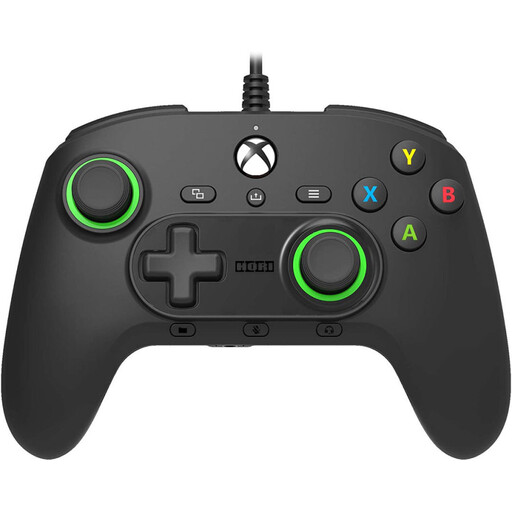
These two Xbox-oriented controllers offer different ways to change controls: consider the Elite Series 2 if rear inputs and saved layouts matter, or check the HORI controller if reassignment on a conventional pad is the change you need.
 No image available
Microsoft Xbox Elite Wireless Controller Series 2
Consider this Xbox One, Xbox Series X/S and PC controller if you want physical rear controls and different layouts for different games. Xbox Support says Elite Series 2 stores up to three custom profiles. For configuration through the Xbox Accessories app on Windows, Xbox specifies USB or a compatible Xbox Wireless Adapter rather than Bluetooth; check the exact controller variant and included components before choosing.
View on Joybuy
 No image available
HORI Horipad Pro Designed Controller (Xbox Series X/Xbox One S)
Consider this model if changing assignments on a conventional Xbox controller is more relevant than adding rear controls. Before choosing it, confirm that it can reassign the exact inputs you need, and check the connection and configuration requirements for this SKU.
View on Joybuy
Common questions
Can remapping fix any awkward game action?
No. Remapping changes only supported inputs and may not address a game’s own control limits. Nintendo says stick directions cannot be assigned to button inputs, so check both the controller’s mapping options and the game’s settings for the action in question.
Can I configure Xbox Elite Series 2 over Bluetooth on Windows?
Not through the Windows Xbox Accessories app. Xbox says to connect the controller by USB or a compatible Xbox Wireless Adapter when editing its configuration on Windows. Xbox Support also says the controller can store up to three custom profiles.
Will Nintendo button mappings follow my controller to another console?
No. Nintendo says mapping presets are saved on the console rather than the controller, so a controller paired with another console will not bring those presets with it.
When should I consider an adaptive-controller setup instead of rear paddles?
Consider one when moving actions to the back of a conventional pad still leaves controls out of reach. Xbox describes external switches and joysticks for its Adaptive Controller, and PlayStation describes configurable positions and external inputs for its Access controller. Check the full layout and compatible components you would need.


