Start with the controller designed for the platform where you mainly play: Xbox Wireless Controller for Xbox or Windows PC, DualSense for PS5, or Nintendo Switch Pro Controller for Nintendo Switch. For a long session, check your game’s controller support and charging arrangements before weighing up features that may depend on the game or connection.
Who this is for
Platform-first adventure players
If most of your games are on Xbox, PS5 or Nintendo Switch, establish which controller works with that console before comparing secondary features. Microsoft Xbox, PlayStation and Nintendo each describe their own controller’s platform support.
Long-session planners
If you spend hours exploring or following a story, consider how the controller feels in your hands and how you will keep playing when it needs power. Manufacturer descriptions of grips and battery life can guide what to check, but do not establish how comfortable a controller will feel to you.
Feature-aware PC players
If you play controller-supported PC adventures, distinguish basic input from features that require a particular game or connection. PlayStation says DualSense haptic feedback on PC requires USB and game support.
What matters when choosing
Xbox Wireless Controller
Choose when: Xbox or Windows PC is your main platform; Microsoft Xbox also lists Android and iOS compatibility.
Plan for: The standard controller’s rechargeable battery is an optional accessory, not a built-in battery.
DualSense Wireless Controller
Choose when: PS5 is your main platform, or a compatible PC game supports the DualSense functions you want.
Plan for: PlayStation says PC haptics require USB and game support; adaptive triggers also depend on the game.
Nintendo Switch Pro Controller
Choose when: You mainly play on Nintendo Switch and want Nintendo’s full-size controller for docked sessions.
Plan for: Nintendo’s approximately 40-hour figure is for a full charge and can be shorter depending on software and functions.
| Concern | What to check | Who this matters to |
|---|
| Platform and game compatibility |
Confirm your console or operating system, connection method and the game’s controller support. |
If my controller will not work with the adventure I mainly play, its other features cannot help me. Around 36% of consumers put platform and game compatibility first. |
| Long-session continuity |
Check the power arrangement and whether you have what you need to charge or continue playing. |
I want to get through an extended story chapter without an avoidable charging interruption. For around 29% of consumers, keeping a long session going is the primary concern. |
| Multi-device flexibility |
Check support for each device you use and whether the functions you want work over Bluetooth or USB. |
If I move between a console and another device, I need the controller to work in both places, even if some functions differ. Around 21% of consumers prioritise that flexibility. |
| Immersion and control options |
Read the game’s feature notes and any connection requirements for haptics, triggers or button mapping. |
I would value extra feedback or tailored controls, but only if my games and setup can use them. That is the leading concern for around 14% of consumers. |
Buying pitfalls
-
Assuming features work on every device
PlayStation says DualSense haptics on PC require USB and game support, while adaptive triggers need a supported game. Haptics are unavailable on Mac and mobile devices.
Check the controller’s device guidance and your game’s feature notes before choosing it for those functions.
If you need a USB connection, check whether you already have a suitable cable and whether one comes with the controller you choose.
-
Putting grip claims ahead of compatibility
A grip description cannot establish that a controller works with your console or game, or predict how it will feel throughout your session.
Confirm platform and game support first, then assess the layout and power arrangement among controllers that fit.
-
Treating battery figures as guaranteed play time
Nintendo says its Switch Pro Controller’s battery life can be shorter depending on software and functions. Microsoft Xbox says rechargeable-pack battery life varies with use and accessories.
Have a charging plan for longer sessions and check which power accessories come with the specific controller.
Relevant controller brands
Xbox
Microsoft Xbox’s standard Xbox Wireless Controller is a first-party route for Xbox consoles and Windows PC, with Android and iOS support also listed.
- Microsoft lists textured controls, a hybrid D-pad, Bluetooth and button mapping.
- For the standard controller, a rechargeable battery pack is optional rather than built in; check the power arrangement of the exact model you select.
PlayStation
DualSense is PlayStation’s first-party PS5 controller and can also connect to supported PC, Mac and mobile devices.
- PlayStation lists a built-in battery, USB-C port, touchpad and motion-sensor input.
- Feature support varies: PC haptics require USB and game support, while adaptive triggers require a supported game.
Nintendo
Nintendo’s Switch Pro Controller is an official full-size option for Nintendo Switch play.
- Nintendo describes wireless or docked pairing and approximately 40 hours of battery life from a full charge.
- Nintendo says that duration can be shorter depending on the software and functions used. Check the console generation when comparing Pro Controller models.
Joybuy controller choices
These choices span Xbox and PC play, DualSense use, a Nintendo Switch 2 controller and a tri-mode option for PC, Switch or Android. Match the exact console generation and game support to your setup; the Switch 2 model below is distinct from the Nintendo Switch Pro Controller discussed above.
 No image available
Microsoft Xbox Elite Wireless Controller Series 2 (Xbox One/Xbox Series X/S/PC)
Consider this Series 2 model if you play on one of the Xbox or PC platforms named in its title. Confirm its power accessories and the controls you want against the exact listing rather than applying the standard Xbox Wireless Controller’s battery arrangement to this model.
View on Joybuy
 No image available
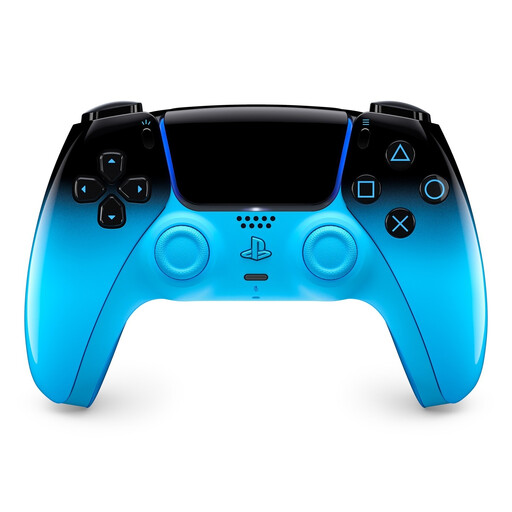
Sony DualSense Wireless Controller, HYPERPOP Rhythm Blue
This PS5 controller is also an option for supported PC, Mac and mobile play. PlayStation says PC haptics require USB and game support, and adaptive triggers require a supported game; check the cable supplied with this colour variant if you plan to use a wired connection.
View on Joybuy
 No image available
Nintendo Switch 2 Pro Controller, Black
Consider this model for Nintendo Switch 2 play, not on the basis of claims about the original Nintendo Switch Pro Controller. Check support for your particular game and the charging arrangements you need for a long session.
View on Joybuy
 No image available
Machenike G3 V2 Tri-mode Controller, White
This tri-mode controller is a choice to consider if you play on PC, Switch or Android. Check the connection required by your device and game, and plan how you would continue a long wireless session when charging is needed.
View on Joybuy
Frequently asked questions
Will DualSense haptics and adaptive triggers work in every PC adventure?
No. PlayStation says adaptive triggers need game support, while haptic feedback on PC needs both a supported game and a USB connection. Check the individual game’s controller information before choosing DualSense for those features.
Can I use a Nintendo Switch Pro Controller wirelessly for a long docked session?
Yes, Nintendo says the Nintendo Switch Pro Controller can pair wirelessly with Nintendo Switch or through its dock. Nintendo quotes approximately 40 hours from a full charge, though software and enabled functions can shorten that duration.
What if a controller bought from a UK trader is faulty?
Contact the trader and describe the fault; remedies under the Consumer Rights Act 2015 can include rejection, repair or replacement, depending on the circumstances. Keep your order confirmation and correspondence. A voluntary manufacturer warranty does not replace applicable statutory rights.
Is a Switch 2 Pro Controller the same model as a Nintendo Switch Pro Controller?
No. The Joybuy choice above is named Nintendo Switch 2 Pro Controller, whereas Nintendo’s controller guidance in this article concerns the Nintendo Switch Pro Controller. Choose against your actual console generation and check the particular game’s controller support.


