
24/7 Customer Support

Free returns

Same-day & Next-day Delivery

Quality Guaranteed

Unlock Your Welcome Offers: FREE Delivery | Up to 80% OFF | Free 30-day JoyPlus trial
Download the APP
Choosing gaming controllers is less straightforward than picking a colour or checking a star rating. A controller designed for a Nintendo Switch may not work correctly on Xbox, while a specialist arcade fight stick can feel excellent in fighting games but awkward for racing or adventure titles.
The right choice depends on platform compatibility, connection type and control layout. It is also worth looking beyond promotional language, as some features may not suit the way you actually play.
Bluetooth connectivity does not guarantee support across every console. A wireless Nintendo Switch controller may pair with a Switch or PC but not with an Xbox console. Similarly, some PlayStation accessories require platform-specific licensing or wired USB connection.
Always check the exact compatibility list, including whether the product supports:
A Nintendo Switch Joy-Con is designed around the Switch ecosystem, whereas a PC game controller may offer broader computer support but omit console-specific functions.
RGB lighting can personalise a setup, but it does not improve button placement, grip comfort or battery life. For longer sessions, check the shape, textured surfaces, stick position and trigger design first.
Also look at what is included. A two-controller bundle may provide better value for local multiplayer than buying two separate pads, but only if both controllers offer the functions your games require.
An arcade fight stick uses a joystick and large buttons rather than analogue sticks. This can be useful for titles such as Tekken 8, Street Fighter and other arcade-style games, but it may feel unsuitable for menus, platform games or first-person shooters.
Flight simulation equipment has the opposite issue: a HOTAS flight stick or yoke system provides detailed aircraft controls, but requires desk space, calibration and compatible software. Consider where the equipment will be stored before buying.
Compatibility should be confirmed from the product specification rather than inferred from the connector. For example, the HORI SERIES X Fighting Stick Alpha supports Xbox Series X/S, Xbox One and Windows 10 PCs, while the HORI PS5 Fighting Stick Alpha Tekken 8 Edition supports PS5, PS4 and Windows 10/11 PC using XInput.
For flight equipment, check the simulator and platform together. The Turtle Beach VelocityOne Flight Universal Control System is listed for Xbox Series X|S, Xbox One and Windows 10/11 PCs, with support for Microsoft Flight Simulator titles. The Thrustmaster T.Flight Hotas 5 is listed for PS5, PS4 and PC.
A wired USB controller avoids battery charging and can provide a stable connection, which is useful for competitive play. Check the cable length: the HORI fighting sticks include a 3-metre wired USB cable, giving more flexibility when sitting away from a television or monitor.
Wireless controllers offer a tidier setup and easier movement. The Armor3 NuChamp pack supports Bluetooth and USB-C wired play, while each controller is specified with around 8–10 hours of playtime per charge. Actual battery performance can vary with lighting, vibration and usage.
Standard pads are suitable for varied games, but specialist controls can be more appropriate for a particular genre:
Look for practical extras rather than decorative specifications. Remappable buttons, profiles, adjustable resistance, replaceable artwork and accessible maintenance panels can affect long-term usability.
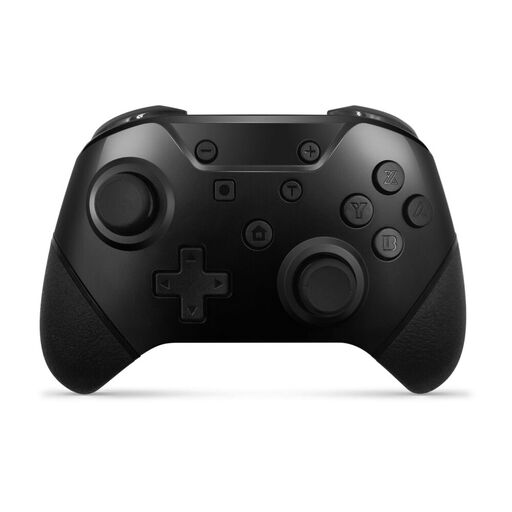
Why This Fits Their Persona: Two controllers in one pack suit households wanting local multiplayer without purchasing two separate pads. Bluetooth and USB-C connectivity also allow flexible use with Nintendo Switch and compatible PCs.
The specification states the supported Switch models, rechargeable batteries and wired alternative, rather than relying only on a wireless claim.
Dual-controller bundle, motion controls, vibration feedback, programmable turbo and rear paddle buttons.
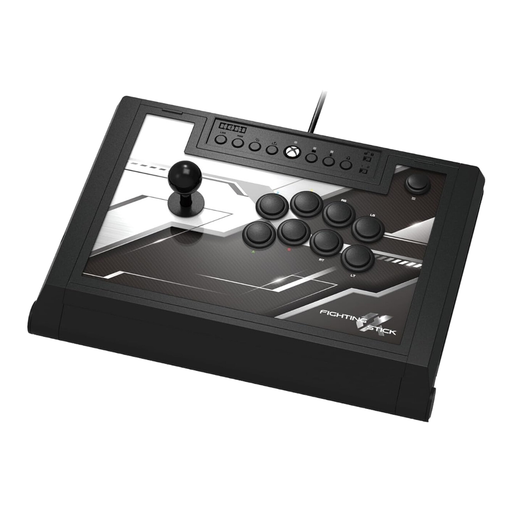
Why This Fits Their Persona: Xbox players who prioritise arcade-style control and customisation can use this wired stick for compatible Xbox and Windows gaming.
Its compatibility, 3-metre cable and easy-open chassis are clearly specified, helping buyers assess placement and maintenance before ordering.
Hayabusa lever, matte-finished buttons, four custom profiles, audio controls and replaceable top-panel artwork.
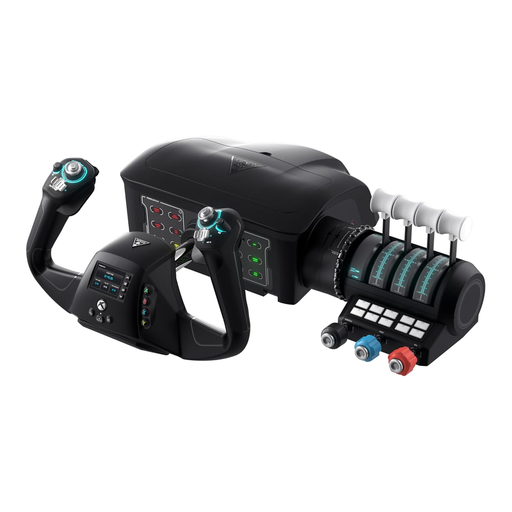
Why This Fits Their Persona: Flight simulation enthusiasts with a dedicated desk area can use its yoke, throttle quadrant and integrated rudder controls for Microsoft Flight Simulator on Xbox or PC.
It provides a complete control layout rather than requiring several separate purchases, while included clamps help secure it to a desk.
180-degree yoke rotation, dual throttle levers, trim wheel, flight management display and status indicator panel.
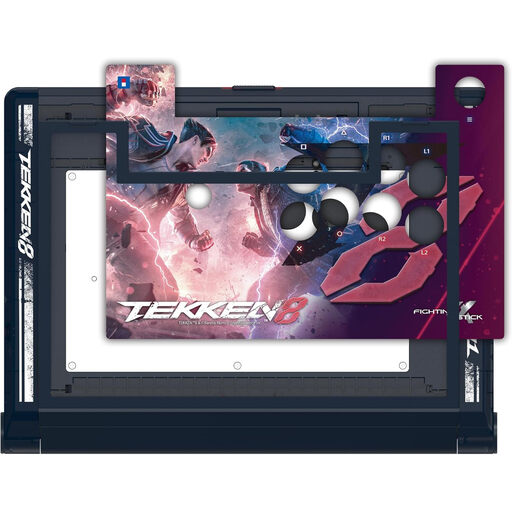
Why This Fits Their Persona: PS5 and PC players focused on Tekken 8 or arcade fighters may prefer its full-size stick layout, wired connection and customisable design.
The product states its PS5, PS4 and Windows XInput support, with no wireless mode hidden behind a general controller description.
HAYABUSA stick and buttons, touchpad button, four profiles, headphone controls and tool-free access to internal components.
For lighter Nintendo play, the official Nintendo Switch Joy-Con 2 (L) - Light Blue offers wireless use, motion controls and HD rumble support in compatible games. For PS5, PS4 and PC flight simulation, the Thrustmaster T.Flight Hotas 5 Flight Stick & Throttle provides a detachable throttle, five control axes and a twisting Z-axis.
We have compiled a complete, real-time list of products that fully satisfy these strict selection criteria and UK safety regulations.
Not always. Some games require features associated with official Joy-Con controllers, such as specific motion functions, HD rumble or an infrared camera. Check the game requirements before replacing Joy-Con controllers with a third-party wireless model.
A wired model avoids battery charging and maintains a direct USB connection. This may suit competitive fighting games, particularly when using an arcade fight stick. However, cable placement and seating distance matter, so check the cable length and desk or console position.
A HOTAS flight stick normally requires room for a joystick and throttle side by side. A yoke system can require more desk depth, especially when clamps and a separate throttle quadrant are used. Measure your available surface before ordering and ensure the clamps can attach securely.