
24/7 Customer Support

Free returns

Same-day & Next-day Delivery

Quality Guaranteed

Unlock Your Welcome Offers: FREE Delivery | Up to 80% OFF | Free 30-day JoyPlus trial
Download the APP
A new controller can improve comfort, control and audio convenience, but the wrong model may create frustration from the first session. Marketing descriptions often highlight lighting, “pro” features or low-latency performance while leaving out practical details such as platform support, cable length and whether a battery is included.
Before choosing among Xbox controllers, PS5 DualSense controllers, Nintendo Switch controllers or PC gaming controllers, check three common pitfalls:
Start with the device you use most. Xbox controllers typically need official console compatibility or a clearly supported wired connection. PS5 DualSense controllers offer Bluetooth and USB-C connectivity, while PC gaming controllers may use X-input, Bluetooth, a 2.4GHz dongle or direct USB.
Wired gaming controllers are straightforward: connect the cable and play without charging. They can also provide consistent input for desk-based gaming, although cable length and routing matter. A detachable cable is useful for storage and replacement, while a fixed cable may be less convenient if it is damaged.
For a living-room setup, wireless gaming controllers reduce cable clutter. Look for the included connection method, battery capacity and whether headset audio works wirelessly. USB-C controllers are convenient for modern devices, but USB-C describes the connector rather than guaranteeing wireless or wired operation.
Analogue sticks control movement and camera direction, so their feel matters more than decorative features. Check whether the model provides calibration or dead-zone adjustment through companion software.
Hall Effect controllers use magnetic sensing rather than relying solely on physical contact at the sensing point. This design can reduce wear-related concerns, but it does not guarantee that a controller will never develop a fault. Trigger travel is also important: longer analogue travel can suit racing games, while adjustable or hair-trigger settings may appeal to players who want shorter input movement in shooters.
Compare the controller’s shape, grip texture and weight with the length of your usual sessions. A lightweight wired model may suit desk play, while a wireless controller with a built-in battery can be more convenient for sofa gaming.
A 3.5mm headset jack allows direct audio and chat on compatible platforms. Dedicated game/chat controls can be useful when you need to adjust volume without opening a menu. Meanwhile, programmable gaming controllers with rear buttons can place frequently used actions closer to your fingers, but they are only worthwhile if the layout feels natural.
RGB gaming controllers are primarily a style choice. Check how many zones or effects are available and whether an app is required to customise them. Nintendo Switch controllers should also be checked for button mapping, motion control and docked compatibility if those functions are important to your games.
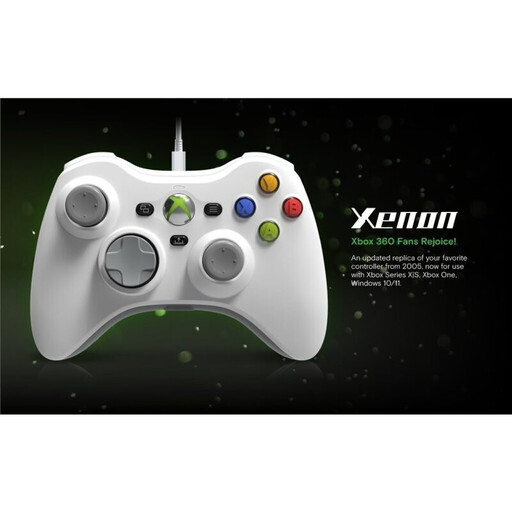
Why This Fits Their Persona: A practical option for UK players wanting a familiar Xbox layout without battery management. The 10-foot detachable cable suits desk or television setups.
Its wired USB connection avoids pairing and charging issues, while compatibility is clearly specified for Xbox consoles and Windows PCs.
Detachable 10-foot USB-C cable, Share button, 3.5mm headset jack and rumble feedback.
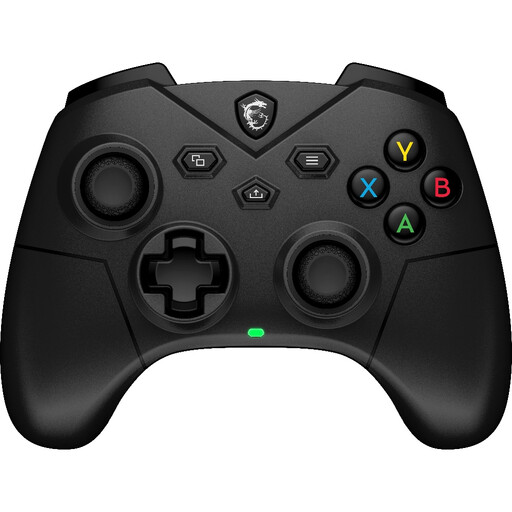
Why This Fits Their Persona: Suitable for PC and Android players who want wireless flexibility as well as a direct USB-C option for a more stable desk setup.
The specification lists 2.4GHz, Bluetooth and wired USB-C modes, rather than leaving the connection method unclear.
Hall Effect triggers, two rear programmable buttons, 3.5mm audio and a quoted battery life of up to 20 hours without vibration.
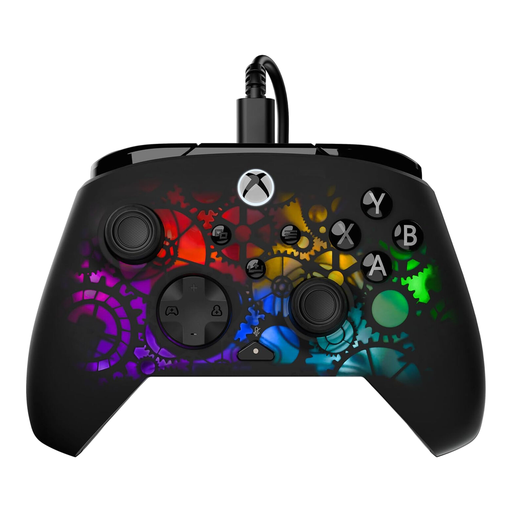
Why This Fits Their Persona: A considered match for Xbox and PC players who spend long sessions adjusting controls, lighting and headset audio.
The feature list gives specific lighting zones, effects, cable length and software support, making the customisation offer easier to assess.
Seven-zone RGB lighting, adjustable Hall Effect hair triggers, two mappable back buttons and a 10-foot USB-C cable.
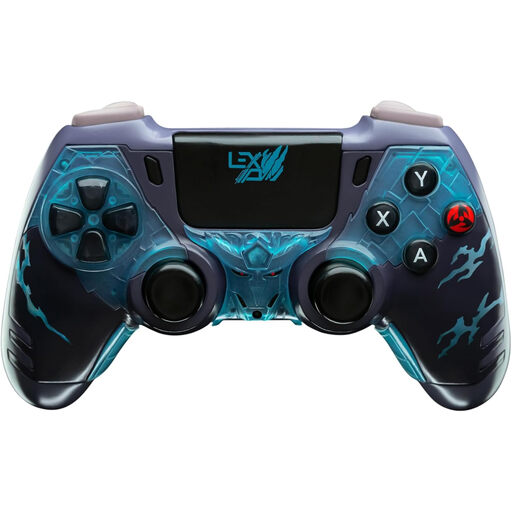
Why This Fits Their Persona: Designed for players who want a distinctive anime-themed finish while using one controller across a Windows PC and Nintendo Switch setup.
Its listed PC X-input and Switch support make the intended platforms clear, while the wired design avoids battery replacement.
Responsive analogue sticks, precision D-pad, fast-action buttons and a plug-and-play USB connection.
Before ordering, confirm:
We have compiled a complete, real-time list of products that fully satisfy these strict selection criteria and UK safety regulations.
Yes. Wired models are often simple to set up and do not need charging. Check that the controller supports the input standard required by your game or launcher, and choose a cable long enough for your seating position.
Hall Effect sensing can reduce wear at the sensing point, but no controller should be treated as immune to every fault. Look for calibration tools, warranty information and clear maintenance guidance before buying.
The main ongoing needs are electricity for charging and, depending on the model, replacement batteries or accessories. A rechargeable controller with a quoted battery capacity can be more convenient, while wired gaming controllers avoid battery charging altogether.