
24/7 Customer Support

Free returns

Same-day & Next-day Delivery

Quality Guaranteed

Unlock Your Welcome Offers: FREE Delivery | Up to 80% OFF | Free 30-day JoyPlus trial
Download the APP
Buying a replacement gamepad can seem straightforward until compatibility issues, short battery life or uncomfortable controls appear after a few sessions. Whether you need an Xbox controller, PS5 DualSense controller, Nintendo Switch controller or PC gamepad, the right choice depends on more than colour and price.
The following guide from the Joybuy Product Recommendation Officer focuses on practical specifications, common marketing traps and suitable options for different gaming habits.
A controller may advertise wireless connectivity but still support only selected devices. An Xbox controller, for example, may connect to Xbox consoles through Xbox Wireless while using Bluetooth for PC, Android or iOS. A Nintendo Switch controller may not support every original Joy-Con feature, while a mobile gaming controller may require a phone with a USB-C port.
Always check:
A wireless gaming controller removes cable clutter, but its battery still needs charging. Claimed play time can vary according to vibration, lighting, headset use and connection type. Some models use replaceable AA batteries rather than a rechargeable battery, which may suit occasional players but adds an ongoing purchase.
A wired gaming controller avoids battery management altogether, although the cable length and position of your gaming setup matter. For a sofa-based setup, an 8 ft cable may be more practical than a short USB lead.
Customisable controller profiles, turbo functions, adjustable thumbsticks and advanced vibration can be useful, but they can also increase cost and complexity. A competitive PC player may value a high polling rate or Hall Effect components, while a casual player may prioritise comfortable grips, dependable connectivity and a standard button layout.
Consider your games first. Racing and shooting games may benefit from responsive triggers, while platformers and fighting games often make greater demands on the D-pad.
A Bluetooth controller is convenient for compatible PCs, mobile devices and some consoles. However, Bluetooth pairing can introduce extra setup steps, and not every platform supports every controller feature.
A USB-C controller may mean either a wired connection or a charging port, so read the specification carefully. Wired models generally offer plug-and-play use and consistent signal transmission. Wireless models provide greater freedom of movement but require pairing and charging.
For mobile gaming, confirm that the controller physically fits your phone and does not obstruct the port, speakers or buttons. The REDMAGIC Shadow Blade Gamepad 2.0 uses a direct Type-C connection and is listed for iPhone and Android models with Type-C ports.
A rechargeable gaming controller should state whether the battery is built in and how it charges. The Turtle Beach Rematch Wireless Controller for Nintendo Switch lists up to 40 hours of gameplay and includes a charging cable. By contrast, the Xbox Wireless Controller – Carbon Black uses two AA batteries and can also support an official rechargeable battery pack sold separately.
For heavy users, compare stated battery life with your normal session length. A controller that lasts through several evenings may be more convenient than one requiring frequent charging.
Look for an ergonomic shape, textured grips and a layout suited to your hands. Weight is also relevant: a lightweight controller may feel easier during long sessions, while a heavier model can feel more substantial.
Haptic feedback, rumble motors and impulse or adaptive triggers can add tactile effects in supported games. They may also affect battery consumption and can be reduced or disabled in many games. Adjustable triggers, mappable buttons and stick sensitivity settings are useful for players who want to personalise controls, but check whether configuration requires a companion app.
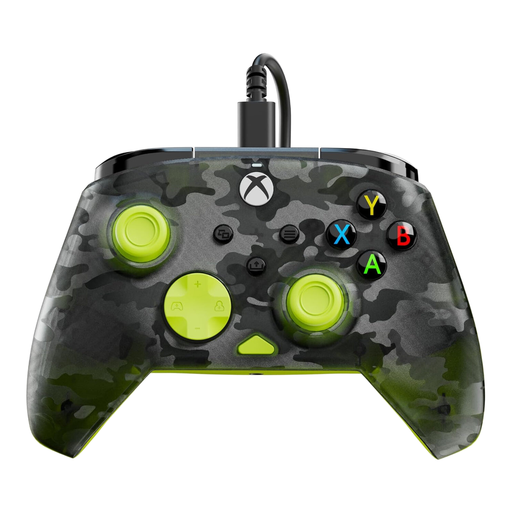
Why This Fits Their Persona: A practical wired Xbox controller for players who want reliable everyday control without charging or wireless pairing. It suits a desk-based Windows PC setup or an Xbox positioned near the screen.
The 8 ft USB-C cable provides a stable wired connection, while no battery is required. Compatibility is listed for Xbox Series X|S, Xbox One and Windows 10/11 PCs.
Dedicated D-pad audio controls, dual rumble motors, impulse triggers and Control Hub configuration support.
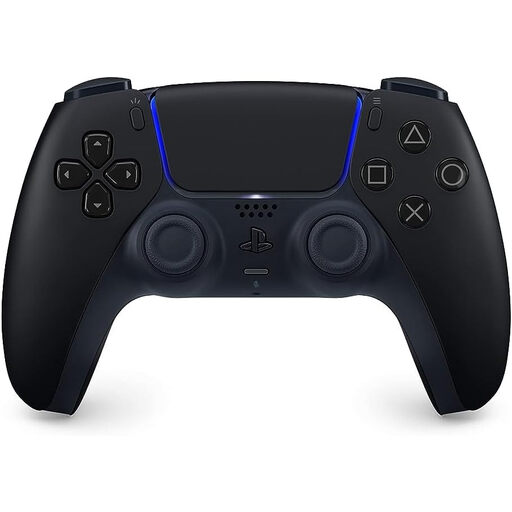
Why This Fits Their Persona: Designed for PS5 owners seeking first-party features, a rechargeable setup and a finish that suits a darker entertainment unit.
The listed PS5 compatibility reduces platform uncertainty, while Bluetooth and USB-C support cover wireless play and wired charging or connection.
Haptic feedback, adaptive triggers, a built-in microphone, motion sensors and a rechargeable battery.
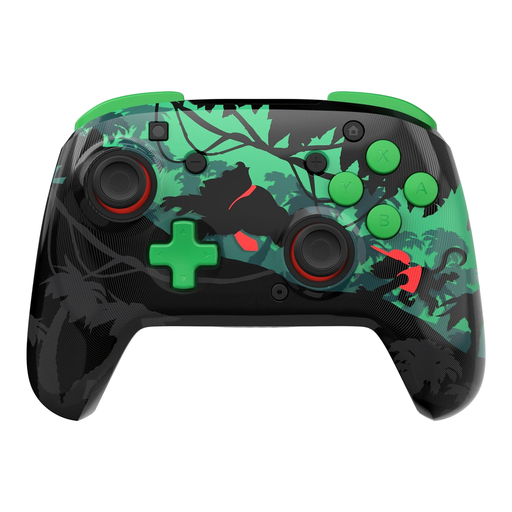
Why This Fits Their Persona: Suited to Nintendo players who want wireless freedom, extended sessions and a distinctive controller for family, party and action games.
The specification states compatibility with Switch, Switch Lite, Switch OLED and Switch 2. It also clearly notes that a C Button is not included.
Up to 40 hours of rechargeable use, a 30 ft wireless range, motion controls and two mappable quick-action buttons.
We have compiled a complete, real-time list of products that fully satisfy these strict selection criteria and UK safety regulations.
A wired gaming controller provides a direct physical connection and avoids wireless pairing or signal interruptions. This can be useful for competitive PC or console gaming. Modern wireless models can also provide responsive play, but performance depends on the connection method, receiver and device compatibility.
There is no single standard. Battery life varies with vibration, lighting, headset use and game settings. The Nintendo Switch controller above lists up to 40 hours, while other models may offer less. Check the stated figure and consider whether the controller supports wired play while charging.
Sometimes. A Bluetooth controller may pair with compatible Android or iOS devices, while a mobile gaming controller with a USB-C connection plugs directly into supported phones. Check the handset port, physical fit and game compatibility before purchasing. A controller may connect successfully but still not work with games that lack controller support.