
24/7 Customer Support

Free returns

Same-day & Next-day Delivery

Quality Guaranteed

Unlock Your Welcome Offers: FREE Delivery | Up to 80% OFF | Free 30-day JoyPlus trial
Download the APP
Buying gaming controllers can look straightforward until you compare platform compatibility, wireless standards, battery systems and button layouts. A controller that works well for a PS5 may not offer the same features on PC, while a visually appealing Joy-Con alternative may lack motion controls or proper rail attachment.
The wrong choice can mean paying for features your games do not support, replacing batteries frequently or discovering that a wired cable is too short for your seating position. This guide explains the specifications worth checking before you buy, followed by our top recommendations for different types of UK players.
Bluetooth compatibility does not automatically mean universal compatibility. A wireless gamepad may pair with Windows, mobile devices or a console family, but platform support can vary by model and game. Check whether the controller supports your exact console, operating system and intended connection method.
For example, a PS5 DualSense controller can connect to PS5, PC, Mac, Android and iOS, while some Nintendo Switch controllers are designed primarily for Switch systems. A PC gaming controller may also require a specific input mode for older games.
“Up to” battery figures depend on vibration, lighting, headset use and connection settings. Controllers using AA batteries can be convenient if you keep spares at home, while a rechargeable game controller reduces disposable battery purchases but needs regular USB charging.
Also check whether the controller supports wired play while charging. Some models only charge wirelessly or require a dedicated cable, which can matter during a long multiplayer session.
Custom gaming controllers and themed designs can add personality to a setup, but colour, RGB lighting or artwork should not distract from the practical details. Check the stick layout, grip texture, cable length, motion sensors, vibration and headset support.
A compact wired controller may suit smaller hands, but it may omit motion control. Similarly, a replacement controller with extra paddles may be unnecessary if you mainly play family or party games.
Start with the device you use most:
A wired gaming controller does not need pairing or battery charging and can be practical for a desk-based PC or competitive play. Measure the distance between your sofa and console before buying; an integrated 2.4-metre or 3-metre cable offers more flexibility than a short lead.
Wireless controllers reduce cable clutter and suit living-room gaming, but check pairing steps, range and charging arrangements. For shared households, a rechargeable game controller or a model with replaceable AA batteries can both work well, depending on your preference.
Look for textured grips, accessible triggers and a layout suited to your hand size. Competitive players may value adjustable thumbstick tension, trigger locks or remappable buttons. Families may prioritise simple pairing and a second controller in the box.
Do not overlook features that are easy to miss in product listings:
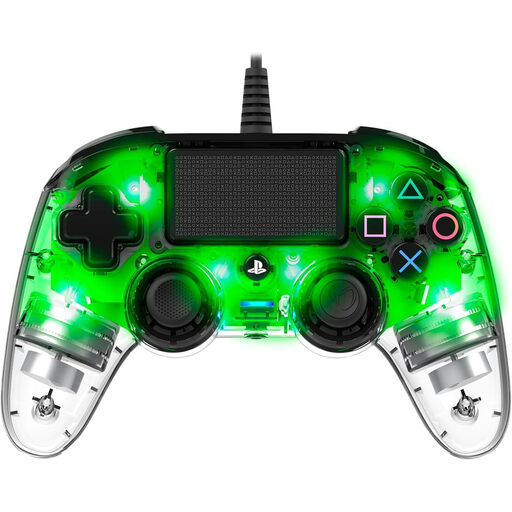
Why This Fits Their Persona: A practical spare for PS4 households, younger players or PC users who prefer a compact shape and do not want to manage wireless charging.
The integrated 3-metre USB cable removes battery and pairing concerns. Buyers should note that it has no motion sensor, so some motion-dependent PS4 games may not be suitable.
Compact body, RGB brightness control, touchpad, vibration, 3.5mm audio and PC X-Input support.
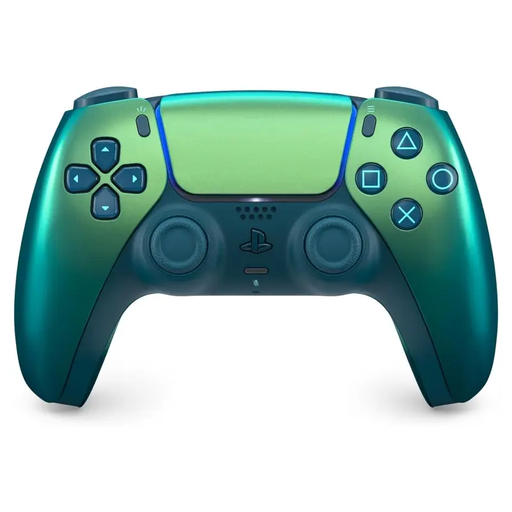
Why This Fits Their Persona: Suits PS5 owners who want first-party features with an iridescent finish that gives a living-room or gaming-desk setup a distinctive look.
It combines the stated PS5 DualSense feature set with clear USB Type-C and Bluetooth connectivity, rather than relying on appearance alone.
Haptic feedback, adaptive triggers, built-in microphone, motion sensor, headset jack and rechargeable USB-C battery.
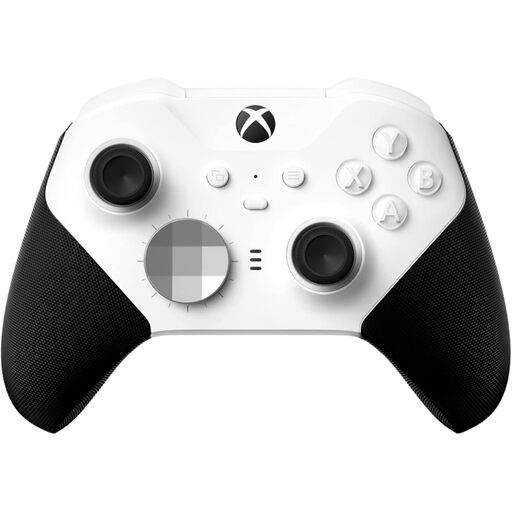
Why This Fits Their Persona: Designed for Xbox and PC players who want to adjust controls for competitive games and extended sessions.
Its adjustable-tension thumbsticks, shorter trigger locks and app-based button mapping provide tangible control options beyond cosmetic customisation.
Xbox Wireless, Bluetooth and USB-C connections, plus an internal rechargeable battery rated for up to 40 hours.
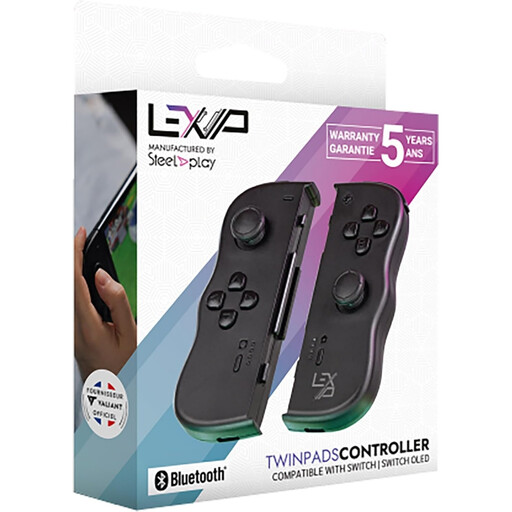
Why This Fits Their Persona: A useful Joy-Con alternative for households sharing a Nintendo Switch between handheld, tabletop and TV modes.
The pair is designed for separate use or clip-on play and includes rechargeable batteries, so buyers can plan for two-player sessions without purchasing two individual pads.
Bluetooth 4.0, an 8-metre stated range, six-axis gyroscope, vibration and up to eight hours of playtime.
We have compiled a complete, real-time list of products that fully satisfy these strict selection criteria and UK safety regulations.
They can be, provided your PC supports the controller’s connection method. Bluetooth is convenient for compatible devices, while USB or XInput support may offer easier setup for games designed around Xbox-style controls. Always check the product’s stated Windows compatibility.
Battery life varies according to vibration, lighting, headset use and connection type. Product listings may quote an “up to” figure, so treat it as a guide rather than a guaranteed session length. Keeping a USB-C cable nearby is useful for regular evening play.
A wired model removes wireless pairing and battery concerns and can provide a consistent connection. It is particularly practical at a desk. However, cable placement, length and comfort still matter, so choose a lead that reaches your seating position without tension.