
24/7 Customer Support

Free returns

Same-day & Next-day Delivery

Quality Guaranteed

Unlock Your Welcome Offers: FREE Delivery | Up to 80% OFF | Free 30-day JoyPlus trial
Download the APP
Choosing among modern gaming controllers is not simply a matter of colour or brand. UK shoppers need to consider compatibility, connection type, comfort, battery requirements and whether advertised features will actually suit the games they play.
A controller can look appealing online but prove unsuitable once it is connected. The most common buying mistakes are easy to avoid if you know which specifications matter.
An Xbox controller is not automatically suitable for Nintendo Switch, and a PC gaming controller may require a specific connection mode or software. Check the exact compatibility list before ordering.
For example, an Xbox Series X controller may also support Xbox One and Windows PCs, but that does not mean it will pair directly with a Switch. Likewise, some Nintendo Switch controllers work only in docked mode, handheld mode or through the console’s wireless protocol.
Wireless gaming controllers may use Bluetooth, a dedicated 2.4GHz receiver or a console-specific wireless system. These methods are not interchangeable. Also check:
A wired gaming controller avoids battery management and pairing, but the cable length and routing are important in a typical UK living room or desk setup.
A pro gaming controller may include rear buttons, adjustable triggers, interchangeable sticks and profile software. These can be useful for competitive shooters, racing games or fighting titles, but they add cost and may increase weight or setup time.
If you mainly play family games or occasional platformers, a straightforward officially licensed gaming controller may offer a more practical fit.
Confirm the controller supports your exact system, such as Xbox Series X|S, Xbox One, Nintendo Switch, Switch OLED or Windows 10/11 PC. For PC gaming controllers, check whether the product uses XInput, Bluetooth or USB, as some functions may depend on companion software.
For mobile gaming controllers, also check the phone connector, operating system and physical size. Telescopic models can support phones and tablets, but the stated maximum device size matters if you use a case.
A wired connection generally means plug-and-play use with no internal battery. Look for a detachable cable, a length of around 2.4 to 3 metres where appropriate and a compatible USB connector.
Wireless models offer more freedom, but battery figures are usually estimates and vary with vibration, lighting and usage. A controller with up to 40 hours of quoted playtime may still need regular charging if used daily.
Check the controller’s weight and grip design, particularly if you play for several hours. Larger handles can suit adults, while compact pads may be more comfortable for children or smaller hands.
Also identify features relevant to your games:
No single layout suits every genre, so focus on the games you actually play rather than the feature count alone.
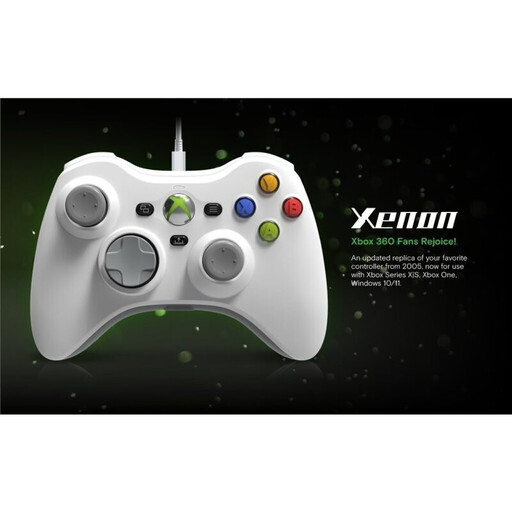
Why This Fits Their Persona: A sensible starting point for Xbox and Windows users who prefer a familiar layout, direct USB connection and no battery charging.
Its 3-metre detachable USB-C cable makes the wired-only design clear, avoiding unexpected battery or pairing requirements.
Xbox-licensed design, 3.5mm headset jack, Share button and compatibility with Xbox Series X|S, Xbox One and Windows PCs.
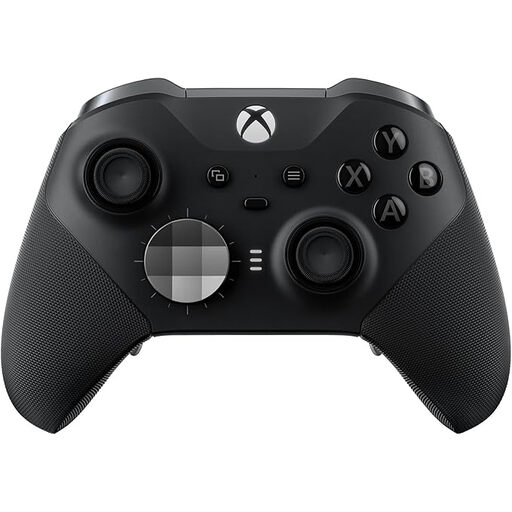
Why This Fits Their Persona: Designed for Xbox and PC players who want adjustable controls, onboard profiles and a rechargeable wireless setup.
The listed replaceable components and three onboard profiles show what can be customised before purchase.
Adjustable stick tension, trigger stops, rear remapping, Bluetooth, Xbox Wireless and up to 40 hours of quoted battery life.
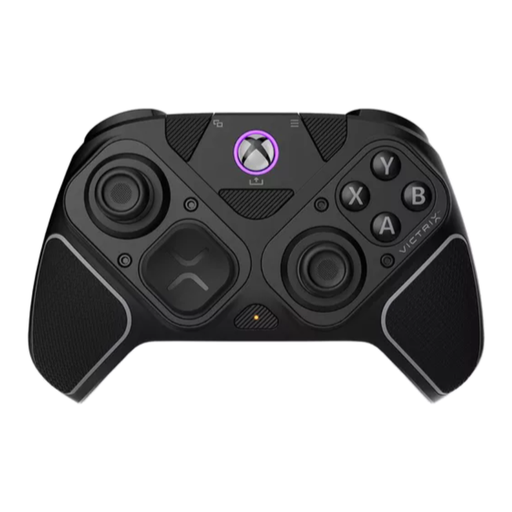
Why This Fits Their Persona: Suits competitive Xbox and PC players who switch between shooters, fighting games and other control-heavy genres.
The modular system is specified with interchangeable components, rather than relying on vague claims about personalisation.
2.4GHz wireless, Bluetooth and USB-C modes, Hall Effect thumbsticks and triggers, a six-button fightpad module and four remappable rear buttons.
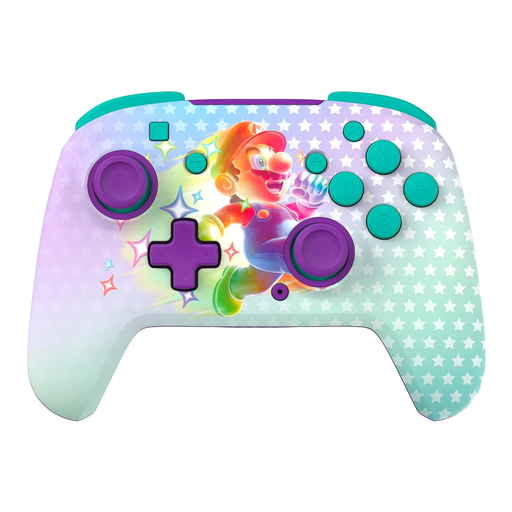
Why This Fits Their Persona: A themed Nintendo Switch controller for shared living-room play, family games and fans wanting wireless convenience.
The product listing states its supported Switch models, wireless range, battery estimate and the absence of the Switch 2 C Button.
Official Nintendo licensing, motion controls, two mappable quick-action buttons and up to 40 hours of quoted battery life.
We have compiled a complete, real-time list of products that fully satisfy these strict selection criteria and UK safety regulations.
They can be worthwhile if you want freedom from a desk or television, but compare battery life, charging time and connection type first. For a fixed PC setup or competitive play, wired gaming controllers can be simpler and more consistent.
Lifespan depends on use, storage and care. Keep the controller dry, avoid pulling cables and clean it with a soft, dry cloth. Models with replaceable or modular components may offer more flexibility if a part needs changing, but always check the manufacturer’s support terms.
Many Xbox controllers support Windows, but the connection method varies. USB is usually straightforward, while Bluetooth or Xbox Wireless may require pairing steps or an adapter. Confirm Windows compatibility and included accessories before purchase.