
24/7 Customer Support

Free returns

Same-day & Next-day Delivery

Quality Guaranteed

Unlock Your Welcome Offers: FREE Delivery | Up to 80% OFF | Free 30-day JoyPlus trial
Download the APP
Choosing among modern gaming controllers is not simply a matter of picking the most colourful design or the longest feature list. Platform support, connection type, button layout and long-session comfort can make a far greater difference to everyday use.
Many shoppers also encounter marketing claims that sound impressive but offer limited value in practice. Before comparing Xbox controllers, PS5 controllers, PC gaming controllers or specialist flight simulation controls, it helps to identify the common buying traps.
Wireless connectivity does not guarantee universal compatibility. A controller may support PS4 and PC but not Xbox, while another may work with Nintendo Switch and Windows through a specific input mode. Bluetooth, 2.4GHz wireless and console-specific wireless systems can also require different pairing processes or receivers.
Always check:
Professional gaming controllers and esports controllers can include adjustable triggers, rear paddles, interchangeable thumbsticks and software profiles. These can be useful for competitive play, but they may add weight, setup time and cost without improving a casual player’s experience.
If you mainly play story-driven games, platformers or local multiplayer titles, a comfortable standard controller may be more practical than a heavily customisable model.
A short cable can make a wired controller awkward to use from a sofa or monitor. Wireless models avoid that limitation but need charging, and rechargeable batteries gradually lose capacity over time.
Flight simulation controls create a different space issue. Yokes, throttles and HOTAS systems need a stable desk surface, secure clamps and enough room for the player’s hands. Check the dimensions and mounting method before ordering.
For Xbox controllers, look for explicit support for Xbox Series X|S, Xbox One and Windows PC if you use multiple devices. Some officially licensed models also provide a 3.5mm headset connection and console-native controls.
For PS5 controllers, features such as adaptive triggers and haptic feedback may depend on game and platform support. On PC, compatibility can vary between titles, so USB-C and Bluetooth connectivity should not be treated as a guarantee that every advanced feature will function.
For Nintendo Switch controllers, check whether the model supports docked play, wireless pairing and the button mapping required by your games. A PC controller may need a particular mode or software profile to work correctly.
Wired gaming controllers are powered through USB and do not need batteries. They can provide a consistent connection and are practical for desk-based PC gaming. Look for a detachable cable where possible, as replacing a standard cable is usually simpler than replacing a fixed lead.
Wireless gamepads offer freedom of movement and a tidier setup. Check battery capacity, charging method and whether the controller can be used while charging. A 2.4GHz receiver can be useful for PC gaming, while Bluetooth is convenient for compatible laptops, tablets and mobile devices.
Grip shape, weight and button spacing matter during long sessions. A slim controller may suit smaller hands, while textured grips can help reduce slipping. Adjustable stick tension, trigger stops and remappable rear buttons are more relevant to competitive players than to occasional users.
For flight simulation controls, consider the physical control range, throttle resistance, rudder input, mounting stability and software support. A yoke with integrated rudder controls may save desk space, while a HOTAS setup can offer more switches and aircraft-specific functions.
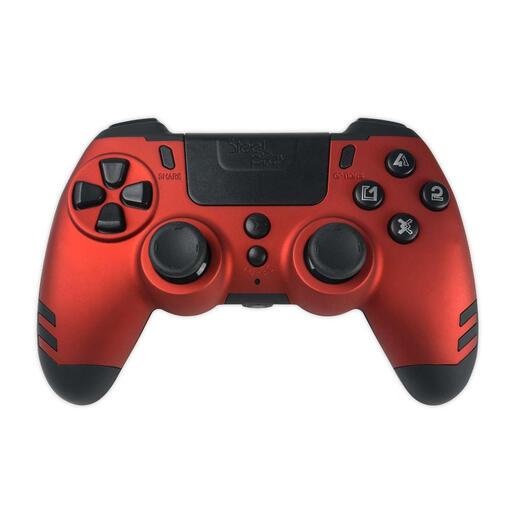
Why This Fits Their Persona: A practical choice for UK players who want wireless freedom across PS4 and Windows PC without moving into the higher-priced end of the market.
Its compatibility is clearly focused on PS4 and PC, helping avoid buying a supposedly universal pad that lacks support for your platform.
Wireless connection, slim lightweight body, vibration feedback and an included USB cable for charging or wired play.
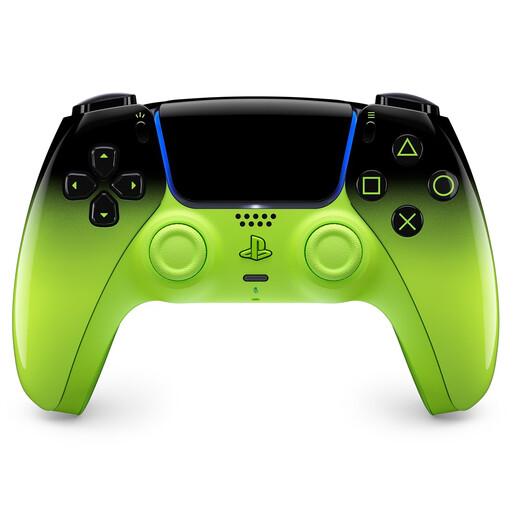
Why This Fits Their Persona: Suitable for PS5 owners who value platform-specific features, distinctive styling and support for PC, Mac and mobile devices.
The feature set is identified by platform: haptic feedback and adaptive triggers are available where supported, rather than promised as universal functions.
Bluetooth and USB-C connectivity, built-in microphone, 3.5mm headset jack, motion sensor and rechargeable battery.
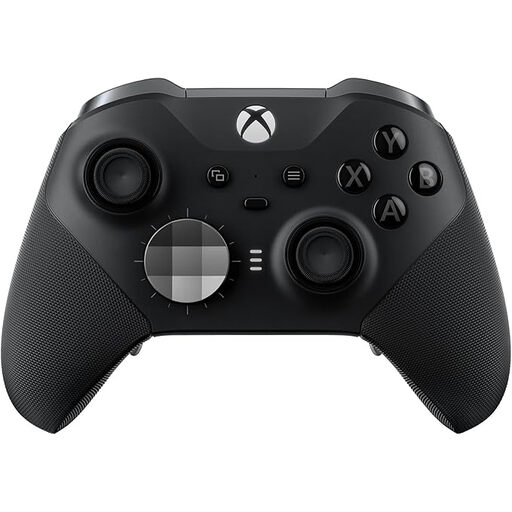
Why This Fits Their Persona: Designed for Xbox and PC players who regularly use custom layouts, trigger stops and multiple saved control profiles.
The interchangeable sticks, D-pad and rear buttons have a clear purpose for players who need different control arrangements.
Adjustable stick tension, four remappable rear buttons, three onboard profiles, Xbox Wireless, Bluetooth and USB-C.
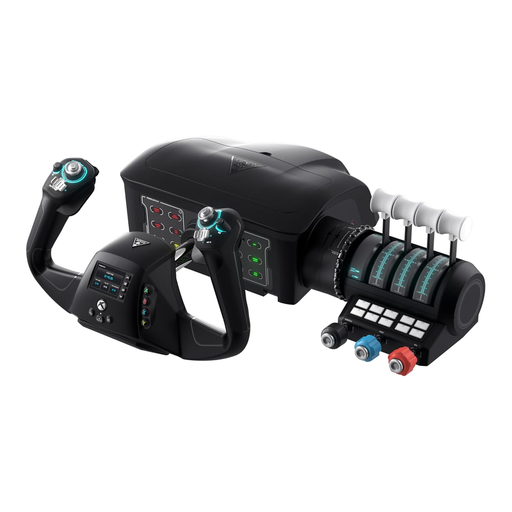
Why This Fits Their Persona: A console and PC option for Microsoft Flight Simulator users who want a yoke, throttle and rudder functions in one desk-mounted system.
Its included clamps and integrated controls make the desk-space requirements clear, avoiding the surprise of needing several separate accessories.
180-degree yoke rotation, integrated rudder and brake controls, modular throttle quadrant and Flight Management Display.
We have compiled a complete, real-time list of products that fully satisfy these strict selection criteria and UK safety regulations.
They can be more convenient for desk-based PC gaming because they do not require battery charging or wireless pairing. A long USB cable can also provide flexible positioning. Wireless models are more suitable if you move between a monitor, television or sofa.
Lifespan depends on usage, storage, cleaning and the design of the sticks, triggers and buttons. Hall-effect components are designed to reduce mechanical wear in certain inputs, but no controller is maintenance-free. Avoid moisture, impacts and excessive force, and check the manufacturer’s care instructions.
No. Most modern PC games support common input standards, but older or less typical titles may require X-Input, DirectInput, remapping software or a wired connection. Confirm the controller mode and the game’s control settings before purchase.