What matters when choosing
Choose between creator-oriented connectivity and higher-refresh gaming by your primary task, then check whether the particular monitor can be positioned on your desk.
Creator-oriented QHD
Choose when: Colour-focused map assets and a compatible USB-C laptop connection matter more to you than a high refresh rate. ASUS lists colour calibration, a USB hub and 96W USB-C power delivery for the ProArt PA278CFRV.
Trade-off: ASUS specifies the PA278CFRV at 100Hz, below the 165Hz BenQ EX2710Q and the Dell G2725D’s DisplayPort maximum of 180Hz.
Higher-refresh QHD gaming
Choose when: Playing or testing fast-moving games is a substantial part of your map-making routine. BenQ specifies 165Hz for the EX2710Q; Dell specifies up to 180Hz over DisplayPort for the G2725D.
Trade-off: Dell lists up to QHD 144Hz over HDMI for the G2725D, while BenQ gives the EX2710Q a 252.5mm-deep stand. Check connection limits and desk fit for the model you choose.
| Concern |
What to check |
Who this matters to |
| Desk fit and screen position |
Measure usable desk depth with your keyboard and mouse in place. Check the exact stand footprint, height adjustment and any intended arm’s mounting requirements. |
I need space to work and a screen position I can use comfortably through a long editing session. Roughly 31% of consumers put desk fit and positioning first. |
| QHD workspace and colour |
Confirm 2560 × 1440 resolution. For colour-sensitive assets, check the exact model’s stated colour space and calibration information against your project needs. |
With a map canvas and tools open together, I want enough editing space and colour features suited to my assets. Around 31% of consumers make workspace and colour their primary concern. |
| Game testing and play |
Check the supported refresh rate at QHD over the port you will use; a monitor’s maximum may differ by connection. |
My maps need frequent play-testing in fast-moving games, so the available gaming mode matters to me. About 25% of consumers prioritise game testing and play. |
| Laptop and peripherals |
For a one-cable setup, confirm USB-C video support, suitable power delivery and the connections needed for your peripherals. |
I work from a laptop and want fewer separate connections across the desk. Approximately 13% of consumers put laptop and peripheral connectivity first. |
Joybuy product choices
These models cover creator-oriented QHD editing and a higher-refresh gaming option. Compare each monitor’s actual footprint and connections with your desk and computer before choosing.
 Image unavailable
ASUS ProArt PA278CFRV IPS QHD 100Hz
Consider this model if map editing, colour-focused work and a compatible USB-C laptop connection take priority over higher-refresh play.
ASUS specifies a 27-inch QHD IPS display, 100Hz refresh rate, factory calibration to ΔE < 2 and USB-C with 96W power delivery for the PA278CFRV. Check the stand footprint against your desk and confirm that your laptop and cable support the connection you need.
View on Joybuy
 Image unavailable
ASUS ProArt PA278CV IPS WQHD
Consider this creator-oriented model if WQHD map editing matters more to you than choosing by gaming refresh rate.
The product name identifies an IPS WQHD display. Check its stand dimensions, colour specifications, connections and supported refresh mode against your intended setup.
View on Joybuy
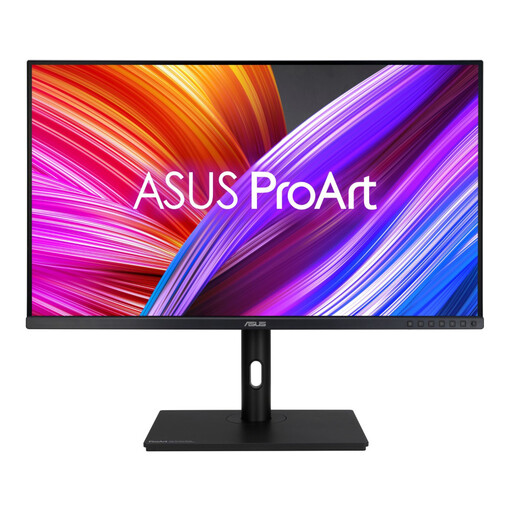 Image unavailable
ASUS ProArt PA328QV IPS WQHD
Consider this WQHD editing option only after checking that the complete screen and stand will fit your small desk.
The product name identifies an IPS WQHD display. Confirm its dimensions, available adjustments and supported gaming refresh mode for the exact model.
View on Joybuy
 Image unavailable
Samsung Odyssey G6 S27DG612 27-inch QHD OLED 240Hz
Consider this gaming-oriented option if high-refresh play and map testing are central to your use.
Its product name specifies a 27-inch QHD OLED display and 240Hz refresh rate. Check the refresh mode available from your computer, the stand footprint and any colour requirements for your assets.
View on Joybuy
 Image unavailable
ASUS ProArt PA24ACRV IPS QHD
Consider this QHD creator-oriented option if desk fit and your editing workflow are the main concerns.
The product name identifies an IPS QHD display. Check its exact stand footprint, supported refresh rate and laptop-connection requirements before deciding whether it suits your desk and game testing.
View on Joybuy
Common questions
What should I measure before putting a monitor on a small desk?
Measure usable desk width and depth with space allowed for your keyboard and mouse, then compare those measurements with the exact monitor and stand dimensions. BenQ lists the EX2710Q at 614mm wide and 252.5mm deep with its stand. For prolonged display work, the Health and Safety Executive advises positioning the screen top at eye level and the display about an arm’s length away.
Should I choose 100Hz, 165Hz or 180Hz for creating game maps?
Choose according to how much time you spend editing versus testing or playing fast-moving games. ASUS specifies the creator-oriented PA278CFRV at 100Hz, BenQ specifies the EX2710Q at 165Hz, and Dell specifies up to 180Hz for the G2725D over DisplayPort; Dell lists up to QHD 144Hz over HDMI. Check the connection you will use rather than choosing from the highest figure alone.
Can one USB-C cable connect and charge my laptop?
It can with a monitor and laptop that support the required USB-C video and power functions. ASUS specifies DisplayPort support, data transfer and up to 96W power delivery through the PA278CFRV’s USB-C port; check your laptop’s charging requirement and the cable’s compatibility before relying on one-cable operation.
How should I arrange take-back of an old monitor in the UK?
Check the seller’s electrical-waste take-back process when buying the replacement. GOV.UK explains that retailers must provide for take-back of electrical waste of the same type or function as the item purchased, including for online purchases, though qualifying retailers may use alternative arrangements such as the Distributor Take Back Scheme. Follow the particular retailer’s published process for handing over the old monitor.


