
24/7 Customer Support

Free returns

Same-day & Next-day Delivery

Quality Guaranteed

Unlock Your Welcome Offers: FREE Delivery | Up to 80% OFF | Free 30-day JoyPlus trial
Download the APP
Buying a gaming desktop PC should be simpler than building one from individual components, but prebuilt systems can hide important differences. A large graphics card name, RGB lighting or a high processor boost figure does not automatically mean the computer suits your games, monitor or working habits.
For UK buyers, three pitfalls appear regularly:
The right prebuilt gaming PC is therefore the one that balances graphics performance, processor capability, storage, connectivity, dimensions and support.
The GPU has the largest influence on gaming resolution and graphical settings. A system designed for 1080p esports does not need the same graphics hardware as a 4K gaming PC for demanding single-player titles.
NVIDIA RTX graphics cards support features such as ray tracing and AI-assisted upscaling in compatible games and software. However, actual frame rates vary according to the game, resolution, settings, drivers and other system conditions.
As a practical guide:
Check the dedicated graphics memory as well. Systems listed with 12GB or 16GB GDDR7 provide a different specification from older cards using DDR3 or smaller memory capacities.
A modern AMD Ryzen gaming PC and an Intel gaming PC can both be suitable, but processor generation, core count and platform features matter more than the brand name.
For gaming alongside Discord, browsers, recording software and creative applications, 32GB RAM is a useful target. A gaming PC with 32GB RAM gives more headroom than a 16GB configuration for multitasking, although the appropriate choice depends on your applications.
Pay attention to:
For example, the Lenovo Legion T7 lists 20 cores, 32GB DDR5 memory, a tool-less chassis and support for up to 128GB memory. Those are objective features worth comparing rather than relying on general performance language.
A gaming PC with NVMe SSD storage should boot Windows and launch compatible applications more quickly than a conventional hard-drive-based system. Capacity is equally important: a 1TB drive can fill quickly after Windows, applications and several large games are installed.
Choose 2TB NVMe SSD storage if you keep a large game library, record footage or store video projects locally. Also check whether the system offers spare M.2 or SATA expansion options.
Connectivity should match your room and peripherals. Useful features may include:
Remember that many desktop listings include the tower only. A monitor, keyboard, mouse and headset may need to be purchased separately.
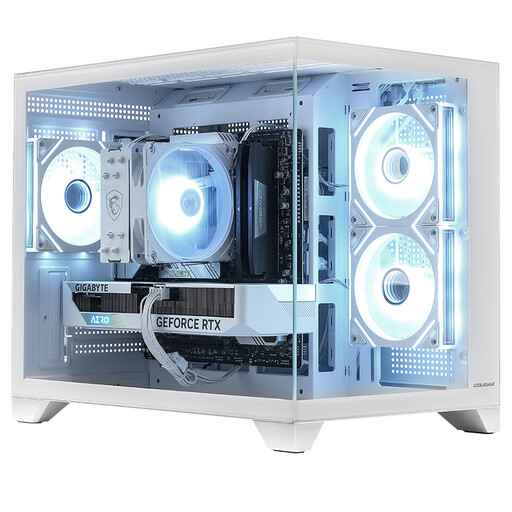
Why This Fits Their Persona: A straightforward Windows 11 gaming desktop for everyday gaming, study, entertainment and home use, with a compact white FV150 Mini case.
The listing states the CPU, GPU, 16GB DDR4 memory, 1TB NVMe SSD and 650W power supply, making the core specification clear.
RTX 5060 Ti 8GB graphics, 1TB NVMe storage and pre-installed Windows 11 Home.
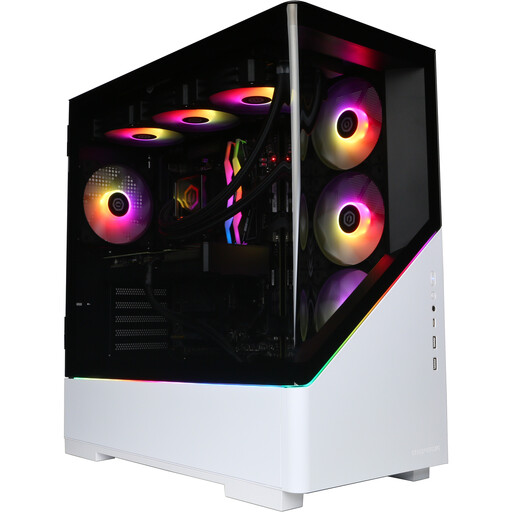
Why This Fits Their Persona: Suits buyers seeking a high-spec AMD Ryzen gaming PC for demanding games, streaming and content creation.
It clearly specifies 32GB DDR5, 2TB NVMe storage and a dedicated RTX 5080 rather than relying on a broad “high-performance” label.
Eight-core, 16-thread processor, 16GB GDDR7 graphics memory, Wi-Fi 5 and two HDMI plus two DisplayPort outputs.
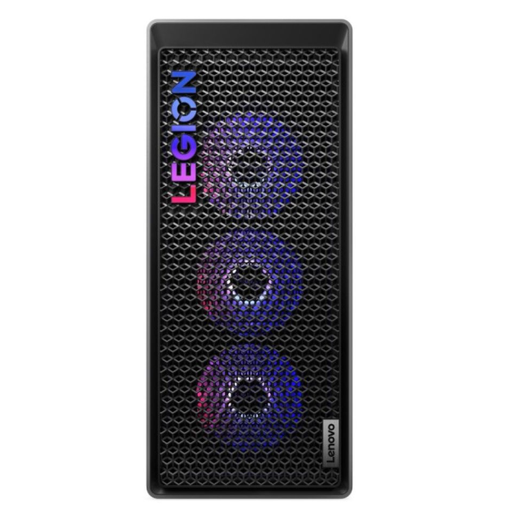
Why This Fits Their Persona: A suitable option for users combining high-refresh-rate gaming with video editing, streaming and other intensive desktop workloads.
The 850W power supply, 34-litre tower and tool-less design are stated, helping buyers assess power and upgrade requirements.
20-core Intel processor, 32GB DDR5 memory, Wi-Fi 6E, Thunderbolt 4 and 1TB PCIe 4.0 NVMe storage.
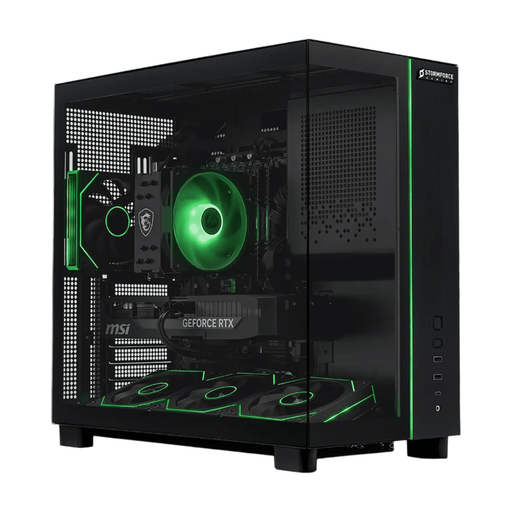
Why This Fits Their Persona: Designed for users who want gaming, streaming, large game libraries and creative applications in one ready-to-use tower.
It pairs 32GB memory with 2TB NVMe storage, avoiding the common combination of a capable GPU and restrictive base capacity.
Ryzen 7 5700X, RTX 5070, 2TB NVMe SSD and Windows 11 Home pre-installed.
We have compiled a complete, real-time list of products that fully satisfy these strict selection criteria and UK safety regulations.
Before ordering, confirm the tower dimensions and available desk or floor space. Keep all ventilation openings clear and avoid placing the computer on soft surfaces or inside a tightly enclosed cabinet.
Connect displays to the dedicated graphics card when the processor has no integrated graphics. Run Windows Update and graphics-driver updates during initial setup, then check that your monitor uses the intended refresh rate.
Also compare warranty wording. Cover may differ between parts and labour, and collection or repair arrangements are subject to the manufacturer’s terms. A desktop PC can remain useful for several years, but its practical lifespan depends on game requirements, cooling, dust management, component quality and whether memory or storage can be upgraded.
Running cost depends on hardware power draw, game settings, usage hours and electricity tariff. Higher-performance systems such as an RTX 5080 gaming PC can draw more power under demanding loads than an entry-level desktop. Use sleep settings when away and avoid leaving the computer running unnecessarily.
Yes. A system with a multi-core processor, 32GB RAM and NVMe storage can support office applications, browsers, editing software and gaming. For regular 4K editing, 3D rendering or streaming and content creation, prioritise a stronger CPU, larger SSD and dedicated graphics card.
Choose according to your monitor, games and workload. An RTX 5070 configuration can suit high-refresh-rate 1440p gaming and general creative work, while an RTX 5080 system provides a higher graphics tier for demanding settings, 4K targets and GPU-accelerated applications. Always compare the full system specification rather than the GPU name alone.