
24/7 Customer Support

Free returns

Same-day & Next-day Delivery

Quality Guaranteed

Unlock Your Welcome Offers: FREE Delivery | Up to 80% OFF | Free 30-day JoyPlus trial
Download the APP
Buying a gaming desktop PC should be simpler than assembling one from individual components. However, prebuilt systems can make comparison difficult when product pages emphasise graphics branding while leaving important details unclear. The right choice depends on how you play, what display you use and how long you expect the computer to remain suitable.
An RTX gaming PC may be suitable for 1080p, 1440p or 4K, but the same graphics card will not deliver identical results across every game. Ray tracing, ultra textures, high refresh rates and demanding open-world titles all increase the workload.
For a 1440p gaming PC, an RTX 5070 or RTX 5070 Ti configuration may provide a more appropriate balance than a lower-tier card. A 4K gaming PC generally benefits from a stronger GPU with more dedicated graphics memory, such as an RTX 5080 system. Actual frame rates still vary by game, settings, drivers and display.
A gaming PC with 32GB RAM is a practical choice for modern games, streaming, browser tabs and background applications. However, memory capacity cannot compensate for an underpowered graphics card or an older processor. Buyers should also check whether the system uses DDR4 or DDR5, as this affects platform generation, bandwidth and future upgrade choices.
A 16GB system can suit everyday gaming, but users planning to stream, edit video or run several demanding applications at once may find 32GB more convenient.
A stated 1TB or 2TB SSD does not represent the exact usable capacity after Windows, drivers and recovery files are installed. Large modern games can also occupy substantial space, so a gaming PC with 2TB SSD storage can reduce the need for immediate expansion.
Check the following before buying:
The GPU has the greatest influence on gaming image quality and frame delivery. An RTX 5060-class system is generally positioned for mainstream gaming, while an RTX 5070 gaming PC or RTX 5070 Ti gaming PC is more suitable for demanding 1440p play and selected 4K settings.
An RTX 5080 gaming PC is aimed at users with high-resolution monitors, ray-traced games, VR equipment or GPU-accelerated creative software. Features such as DLSS and ray tracing require compatible games and drivers, so do not treat them as guaranteed improvements in every title.
A Ryzen gaming PC with a processor such as the Ryzen 7 5700X or Ryzen 7 9800X3D can suit gaming, streaming and content creation, depending on the configuration. An Intel gaming PC with a Core Ultra 7 or Core i7 processor may appeal to buyers who want a high core count for multitasking, encoding and demanding desktop applications.
For gaming, processor model and architecture matter more than simply counting cores. For streaming, video editing and 3D workloads, additional threads and a capable GPU can make the system more flexible.
For a Windows 11 gaming PC, 32GB DDR5 provides a useful balance of capacity and newer platform technology. DDR4 systems can still offer suitable gaming performance, particularly where the graphics card is the main limiting component.
Also check monitor outputs. HDMI and DisplayPort connections should be available on the dedicated GPU, particularly when using high-refresh monitors, ultrawide displays or VR headsets. Wi-Fi standards vary between systems, so Ethernet remains a sensible option where low-latency online play is important.
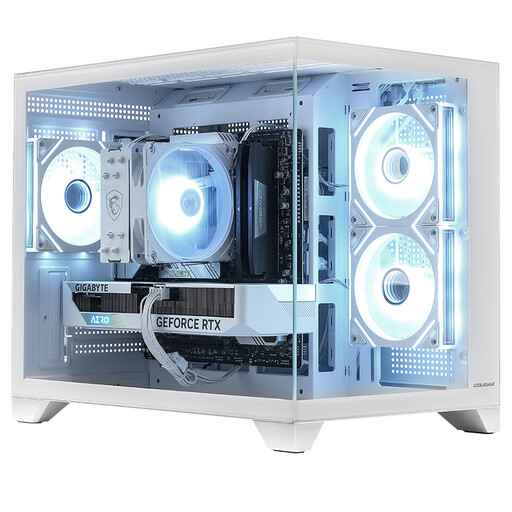
Why This Fits Their Persona: A ready-to-use option for everyday gaming, study and entertainment, with a compact white chassis that can suit a small-footprint UK gaming setup.
The listing identifies the Ryzen 5 5500, RTX 5060 Ti 8GB, 16GB DDR4, 1TB NVMe SSD and 650W power supply, making the core specification easier to assess.
Includes Windows 11 Home, 1TB NVMe storage and Wi-Fi connectivity in a mini tower format.
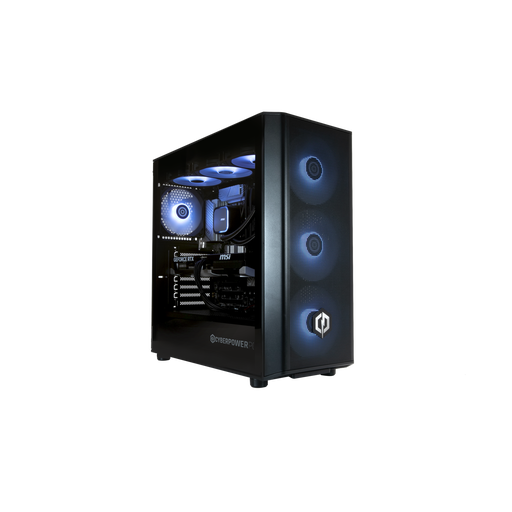
Why This Fits Their Persona: Suits gamers who want a current Intel platform, 32GB memory and a dedicated RTX 5070 for modern games and multitasking.
It clearly states the KF processor has no integrated graphics, so displays must connect to the RTX 5070 outputs rather than the motherboard.
Offers 20 CPU cores, 32GB DDR5, Wi-Fi 5, two HDMI outputs and two DisplayPort outputs.
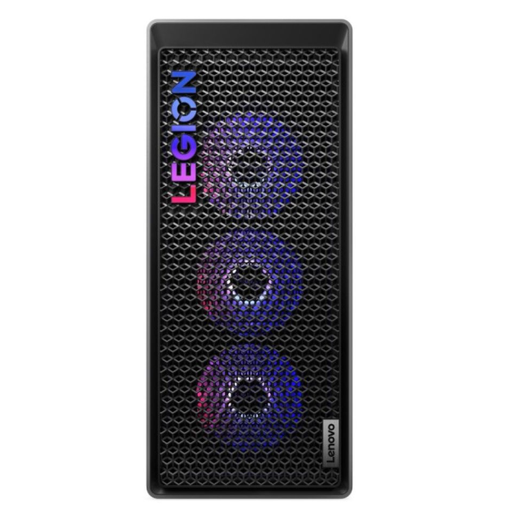
Why This Fits Their Persona: A substantial gaming tower for buyers prioritising DDR5 memory, strong connectivity and easier internal access for future upgrades.
The 34-litre tool-less chassis, 850W power supply and stated memory limit of 128GB provide useful information beyond the graphics card name.
Includes an Intel Core Ultra 7 265K, RTX 5070 Ti with 16GB GDDR7, Wi-Fi 6E and Thunderbolt 4.
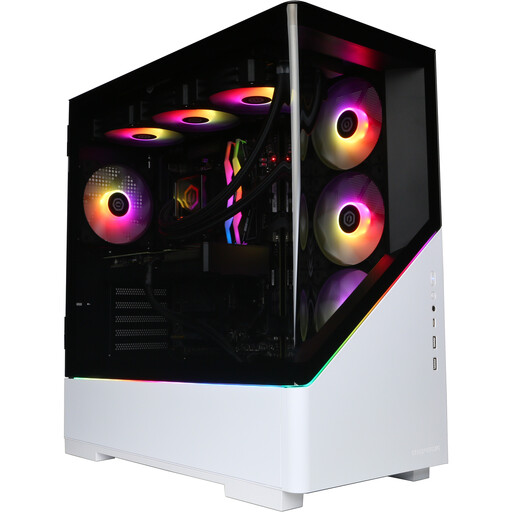
Why This Fits Their Persona: Its processor, graphics card, memory and storage combination suits users combining high-resolution gaming with recording, editing and heavy multitasking.
The listing states the actual performance depends on the game, resolution, settings and drivers, rather than presenting one universal frame-rate promise.
Provides 16GB GDDR7 graphics memory, 32GB DDR5, a 2TB NVMe SSD and two years of parts cover with five years of labour cover, subject to warranty terms.
We have compiled a complete, real-time list of products that fully satisfy these strict selection criteria and UK safety regulations.
Before ordering, confirm that the package includes only the tower or also includes peripherals. Several systems list the monitor, keyboard, mouse and headset separately, so budget for these if you are starting from scratch.
Place the tower on a stable, dry surface with clear intake and exhaust airflow. Avoid enclosed cabinets, soft furnishings and blocked vents. Use an undamaged, correctly rated power cable and disconnect the system from mains power before cleaning or moving it. For heavier full-tower systems, check that the desk or floor location can safely support the unit.
A prebuilt gaming PC should also arrive with Windows setup, drivers and warranty information. Install system and graphics updates before downloading games, then check the monitor is connected to the dedicated graphics card.
It can be, provided the system has a suitably capable graphics card and enough graphics memory. RTX 5080 configurations are positioned for high-resolution gaming, while RTX 5070 and RTX 5070 Ti systems may suit 1440p and selected 4K settings. Results depend on each game and chosen graphics options.
There is no fixed lifespan. A well-specified system can remain useful for several years, but newer games may require reduced settings over time. Choosing 32GB RAM, a spacious SSD, an adequate power supply and an upgrade-friendly chassis can delay the need for replacement.
Power consumption varies with the processor, graphics card, game and time under load. Higher-tier RTX systems generally require more power than mid-range configurations. Check the stated PSU capacity, enable suitable Windows power settings when not gaming and avoid leaving the computer running unnecessarily.