Parents managing online contact
If your child wants to play with friends, compare the device-family settings with the intended game’s own chat controls. Ofcom advises parents to check account ages and available settings.


Start with the games your child wants to play and how their friends communicate, then check the child-account and game-level settings on a device you already have. A console may suit a particular console library, while a tablet, phone or PC may suit compatible games and other uses; device settings alone do not determine who can contact a child inside a game. Before buying, check the exact game, account requirements, multiplayer arrangements and ongoing costs.
If your child wants to play with friends, compare the device-family settings with the intended game’s own chat controls. Ofcom advises parents to check account ages and available settings.
Before choosing a first or replacement device, find out which games and platforms your child’s friends use and how they communicate. Check compatibility and any online-play requirements for each intended game.
If your child already has a usable console, tablet, phone or PC, review its child-account options and the controls in each game before deciding whether new hardware or an accessory is needed.
Consider when: your child’s current device runs the intended games and supports a suitable child account.
Trade-off: account settings may not cover every game’s chat, spending or communication features.
Consider when: the current device does not fit the games, platform or way of playing your child wants.
Trade-off: new hardware may also mean checking separate accounts, multiplayer requirements and ongoing costs.
For consumers considering a first device or changing an existing setup, these are the needs to compare before settling on a device or account route.
| Concern | What to check when buying | Who this matters to |
|---|---|---|
| Who can contact the child | Check child-account permissions, friend-list rules and the intended game’s chat options; tighter settings may also limit communication with intended friends. | I want to know who can contact my child and whether game chat follows the same rules as the console account. Around 28% of consumers put contact controls first. |
| Playing with friends | Confirm the exact games, supported device versions, friends’ platforms and how they communicate. Check online-service requirements for each game or feature. | If my child’s friends use particular games, I need the device and online service to fit how they play and chat. Around 22% of consumers prioritise friends’ games and communication. |
| Supervising an existing device | Identify the operating system, supported software version, family-account status and games used; account setup may not cover every in-game feature. | When a device already works, I would rather check its child account and game settings before replacing it. Around 22% of consumers make existing-device supervision their main concern. |
| Spending and ongoing costs | Check the exact game’s membership rules and available purchase controls. Store approvals may not cover payments made outside that store’s billing system. | I need to understand the continuing costs of online play and which controls cover each payment route. Around 17% of consumers put spending and ongoing costs first. |
| Portable play and other uses | Choose a form that fits where the child will play, then check game availability and controls on that exact device. | If I want one device for different places or family uses, I need to check that it also runs the intended games. Around 11% of consumers prioritise flexible use. |
A game may have its own friend lists and voice or text permissions, separate from the device or platform settings.
Review both the child’s device account and the account for each game they use before changing chat access or replacing hardware.
A new device will not necessarily support the intended games or the same way of meeting friends.
List the games and friends’ platforms first, then confirm compatibility and online requirements for each one.
Google Play purchase approvals apply to purchases made through Google Play’s billing system; a game may have other payment settings.
Check both the device store’s controls and each game’s own payment and spending settings.
Nintendo says Switch 2 GameChat voice can use the console’s built-in microphone, while video chat requires a compatible camera.
Confirm the device, game and approved communication method before choosing an accessory. If you use headphones, consider listening volume and duration.
The settings below are documented features of particular products and account ecosystems; check the exact model, account and game, as device controls do not necessarily govern in-game communication.
Relevant when the intended games and handheld or TV play suit the household.
Relevant when the intended games, friends or an existing Windows-and-Xbox household point towards this route.
Relevant when the child’s intended games and friends use PlayStation and the household wants child-account management.
Relevant for households considering compatible mobile games and uses beyond gaming.
Relevant when considering a compatible supervised Android device or Chromebook, including one the child already uses.
These Joybuy choices cover Nintendo Switch consoles, Xbox Series S consoles and a child-focused Android tablet. Check intended games, account settings and communication requirements for the exact device and game before choosing.
 No image available
A handheld console option for portable play; Nintendo says Switch parental restrictions apply to the console, not individual users.
The listing says this model has no TV output. Check online-play requirements for each intended game; Nintendo notes that some Switch games can be played online without a Nintendo Switch Online membership.
 No image available
For families considering handheld and TV play, Nintendo lists a 7.9-inch LCD screen for Switch 2.
Nintendo says console restrictions apply to all users. GameChat requires Nintendo Switch Online, and children under 16 need the app and additional parent approval.
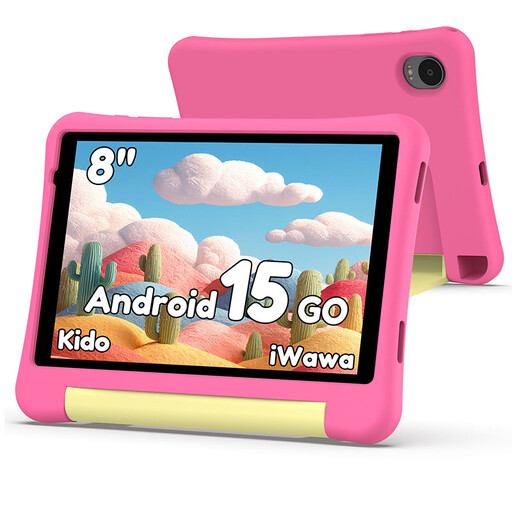 No image available
A child-focused tablet option for compatible mobile games and other uses. The listing names Child Lock and a protective case.
The listing says no adapter is included. Check what the tablet’s controls cover, whether the intended games run on this model and how their own accounts handle chat.
 No image available
A console option for households considering Xbox games and Microsoft family settings. The listing identifies this model as all-digital with 512GB storage.
Microsoft documents family settings for Xbox; check the intended games’ own account and chat controls separately.
 No image available
An Xbox Series S option listed with 1TB storage for households considering Xbox games and Microsoft family settings.
Check the intended games’ compatibility, multiplayer requirements and in-game communication controls before choosing.
Not necessarily; check the existing device’s child-account settings and the game’s own contact controls first. Ofcom advises parents to check account ages and settings, and Apple, Microsoft and Google document controls for supported devices.
No; review the intended game’s chat and child-account permissions separately. Nintendo says Switch 2 GameChat voice can use the built-in microphone, so that feature alone does not require a headset.
Nintendo says Switch and Switch 2 parental restrictions apply to the console, not individual users. For Switch 2 GameChat, children under 16 need the app and additional parent approval; check those settings separately.
It depends on the game and feature. Nintendo says some Switch games can be played online without Nintendo Switch Online, while Switch 2 GameChat requires membership. Sony says paid PlayStation Plus is required for online multiplayer on the PS5 Digital Edition; check the applicable game terms.
No; UK government guidance concerns the sale of PEGI 12-, 16- and 18-rated games to people below the relevant age, not ownership of a console. Check the intended game’s rating and account requirements separately.