Parents coordinating play with friends
Confirm that the specific game and multiplayer mode work with the platforms used by your child’s friends. Cross-network play and communication may have separate settings, as Xbox Support explains.


Start with the exact games your child wants to play and the platforms their friends use, then compare the account controls available on each suitable device. Consoles, PCs and tablets can involve separate platform, store and game-account settings, so check who can communicate and spend through each account; a headset does not replace those permissions. If the device will be shared, check whether its restrictions apply to one child or everyone who uses it.
Confirm that the specific game and multiplayer mode work with the platforms used by your child’s friends. Cross-network play and communication may have separate settings, as Xbox Support explains.
Set up a child account with the friend and chat permissions you want, and check the game account too when it has its own social settings. Xbox, PlayStation and Epic Games provide platform- or account-specific controls.
Check whether restrictions apply to an individual child or to everyone using the device, and consider how purchase and play-time arrangements will work. Nintendo says its console parental restrictions apply to all users of the console.
| Concern | What to check when buying | Who this matters to |
|---|---|---|
| Playing with friends | Check the named game and multiplayer mode on each device, the friends’ platforms, and any membership requirement. | If my child wants to join a particular game and group of friends, I would make that social fit the deciding factor; around 33% of consumers may put playing with intended friends first. |
| Managing contact | Check friend requests, voice and text chat permissions on the child’s platform and game accounts, including cross-network settings. | When my main concern is who can contact my child, I would prioritise workable permissions on the accounts they will use; around 27% of consumers may put communication controls first. |
| Controlling spending | Check which account handles payments, where purchase approvals apply, and whether the chosen online feature or game requires a membership. | To keep game and in-game spending predictable, I would prioritise adult approval and limits; around 20% of consumers may put spending control first. |
| Sharing the device | Check whether restrictions apply to a child account or everyone using the device, and whether time limits fit the household. | If several people will use the same device, I would prioritise rules that work for everyone sharing it; around 20% of consumers may put shared-device management first. |
A device may not support the exact game version, mode or cross-platform arrangement your child needs.
Confirm the game, mode and friends’ platforms first, then check the child account’s permissions and any membership needed for that play.
Game, platform and store settings can differ. Epic has its own social permissions, while Google Play purchase approvals apply only to purchases made through Google Play billing.
Review the platform, store and game accounts your child will actually use, and check the permissions in each.
Managing separate platform, store and game accounts can mean completing setup in more than one place.
Nintendo says its Switch and Switch 2 console parental restrictions apply to everyone using the console.
Before choosing a shared console, consider whether console-wide restrictions fit the household and check the separate Nintendo Account settings for eShop restrictions.
Nintendo’s introductory free-use offer ended in March 2026; GameChat requires a Nintendo Switch Online membership.
Include the membership requirement when deciding whether your child will use GameChat, and check the separate setup requirements for the child’s age.
A console option for households considering handheld and TV play, with parental settings that differ between console use, eShop access and Switch 2 GameChat.
A console option for families who want to manage child-account multiplayer, communication, friends and spending requests through Xbox family settings.
A console option when the child’s intended games and friends use PlayStation and the household wants child-account spending and social-feature controls.
An iPad route to consider when the intended games support the device and the family wants to use Family Sharing and Screen Time.
A route for managing compatible Android devices and Google Play activity through Family Link.
The listings below cover handheld gaming consoles, Nintendo Switch consoles and an Android tablet. Match the intended game and multiplayer mode to the device, then check its account and communication controls.
 No image available
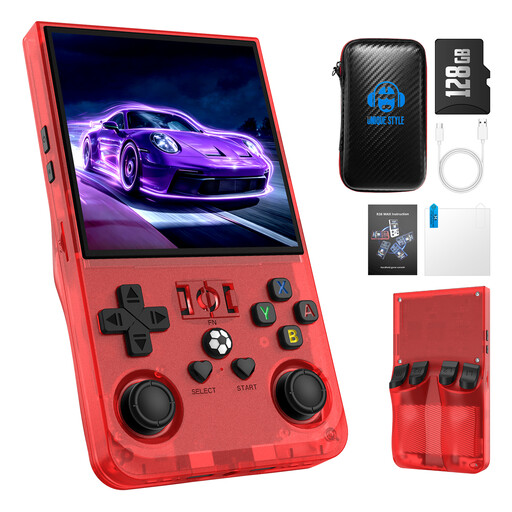
Consider this handheld if portable retro gaming is the priority; before choosing it for online play, confirm that the intended game, multiplayer mode and family-account controls are supported.
4.0-inch IPS display; 720 × 720 resolution; Linux system; 128GB storage; 4000mAh battery.
 No image available
Consider this bundle if the child’s intended games and friends fit the Nintendo Switch 2 ecosystem; check the family setup for shared-console restrictions and any GameChat requirements.
Nintendo says Switch 2 console parental restrictions apply to everyone using the console. For GameChat, users under 16 need parental-controls app setup and additional approval, and a Nintendo Switch Online membership is required.
 No image available
Consider this handheld-only console if portable Nintendo Switch gaming suits the child’s needs; check that its game and multiplayer requirements fit before buying.
32GB internal storage; 275g. Handheld mode only, with no TV output or dock. The product details state that online play requires a Nintendo Switch Online subscription.
 No image available
Consider this console if the intended games and multiplayer arrangements fit Nintendo Switch 2; check how its console-wide restrictions will work for everyone sharing it.
Nintendo says console parental restrictions apply to all users. Switch 2 GameChat requires a Nintendo Switch Online membership; users under 16 need parental-controls app setup and additional approval.
 No image available
Consider this tablet if the child’s intended games support Android and portable play suits your household; check each game’s account and communication settings separately.
8-inch display; Android 15; Child Lock; Unisoc T310; 3GB RAM + 32GB storage; 5G Wi-Fi; 5000mAh battery. The listing specifies no adapter.
No. Check the exact game and mode, the friends’ platforms, the child’s multiplayer and cross-network permissions, and any separate game-account chat settings. Xbox Support documents cross-network controls, while Epic Games distinguishes its own controls from platform-level settings.
Nintendo says the console must be linked to its Parental Controls smart-device app and a parent must configure additional GameChat controls. GameChat requires a Nintendo Switch Online membership and a persistent internet connection.
Do not assume it will. Google says Play purchase approvals apply only to purchases through Google Play billing. Check the billing route and any separate game account; Apple also notes that not all parental controls are available on every Apple device.
The UK Government’s Kids Online Safety guidance identifies age restrictions on the sale or hire of games rated PEGI 12, 16 or 18; it does not prescribe a console, PC or tablet for family online play. That guidance concerns game ratings, not which device or account controls a household should choose.
No. Use the relevant platform and game-account permissions to decide who may contact the child, then consider a compatible headset if voice play is permitted and wanted.