Choose a device ecosystem whose child account and family controls the supervising adult can use consistently, rather than choosing on gaming hardware alone. Consoles offer gaming-focused family settings, while phones, tablets and Windows computers can fit other household needs; whichever route you choose, check the intended games’ separate payment and communication settings before relying on device-level controls.
Who is choosing?
Parents prioritising purchase approval
If downloads or in-game spending are the main concern, check which transactions require adult approval. Xbox, Nintendo and Google each describe payment routes that their respective restrictions do not fully cover.
Parents supervising multiplayer and communication
If the child wants to play or chat with others, look at both the platform’s family settings and the accounts used by individual games. Xbox and PlayStation provide platform controls, while a service such as Roblox has its own parent-account arrangement.
Parents coordinating shared-device routines
If gaming has to fit around a shared console, computer or other screen, consider who will set playtime rules and how they will manage them. PlayStation, Apple and Microsoft provide scheduling options under their respective family-account arrangements.
What matters when buying?
Start with the games the child wants to play and the child account the household can manage. Then check purchases, communication and playtime on both the device ecosystem and each intended game.
Games console
Consider it when: Gaming is the device’s main purpose and an adult wants console-family settings.
Allow for: The child needs the appropriate family account, and store restrictions can have payment-route exceptions.
Phone or tablet
Consider it when: The household wants a portable device and can manage its Apple or Google family-account setup.
Allow for: App-store approvals do not replace checks on a game publisher’s own accounts, payments or chat.
Windows computer
Consider it when: The child also needs a computer for schoolwork or the intended PC games.
Allow for: Microsoft Family Safety depends on the intended signed-in child account; an administrator account can change its settings.
| Concern | What to check | Who this matters to |
|---|
| Purchase and download approval |
Check which store transactions need approval and whether the intended games use gift cards, account balances or separate billing. |
I want to approve downloads and spending before my child can make them, including when a game offers its own purchases. Around 33% of consumers put purchase approval first. |
| Communication and multiplayer |
Review platform controls and each game’s settings for chat, friends and multiplayer access. |
When my child plays with others, I need to know which conversations and multiplayer features I can manage. For around 27% of consumers, that supervision is the primary concern. |
| Playtime and household supervision |
Check how the adult sets schedules and whether the child’s account works across the household devices they will use. |
If screens are shared, I need playtime rules I can maintain as our routine changes. Keeping that supervision practical comes first for around 20% of consumers. |
| Games and account compatibility |
Confirm the intended games run on the device, then review their age ratings and child-account requirements. |
My child needs access to the games they expect to play without losing the account boundaries our household wants. Around 20% of consumers make game access and compatibility their first priority. |
Common setup mistakes
-
Assuming store approval covers every payment
Xbox says a child can still make purchases using gift cards or money already in their Microsoft account. Nintendo says its spending restriction does not prevent adding eShop card or code funds, while Google Play approval applies only to Google Play billing.
Before choosing a device, check how the intended games take payment. Set the relevant store restrictions and review gift cards, account balances and game-service payment settings separately.
-
Letting the child use an adult or shared account
Family controls depend on the right account arrangement: Apple uses a separate Child Account within Family Sharing, Nintendo child accounts sit under a parent or guardian’s account, and Roblox parental management requires linked accounts.
Create the child’s own account with the correct age and connect it to the adult’s family-management account before setting up games.
-
Relying on platform settings for every game feature
A console or device setting does not necessarily manage a publisher’s own chat, social features or payment options. Roblox, for example, has separate parental controls and age-related changes to account management.
Check each intended game’s account, communication, friends and reporting settings alongside the device controls.
-
Setting up a Windows child account as an administrator
Microsoft says an administrator can change or break Family Safety settings. Its web filtering also depends on the child using the supported browser while signed in to the intended Microsoft account.
Use a standard Windows account in the family group, then test the browser and time settings the household intends to use.
Relevant ecosystems and brands
Microsoft / Xbox
Relevant to households considering an Xbox console, a Windows gaming computer or both.
- Xbox Family Settings covers screen time, age-based content, social communication and multiplayer. Microsoft Family Safety also offers time settings for connected Windows and Xbox devices.
- Xbox purchase approvals do not cover gift cards or money already in a child’s Microsoft account. On Windows, account permissions and supported-browser conditions matter.
PlayStation
A console ecosystem for households willing to manage a child’s family settings through the PlayStation Family app.
- The app supports playtime, spending, online-communication and privacy management.
- The child needs to use their own child family account for the adult’s chosen settings to apply.
Nintendo
A console ecosystem with child-account purchase restrictions and a separate console parental-control setup.
- A parent or guardian can create a Nintendo child account and configure eShop purchase restrictions.
- Restrictions are not enabled by default. Nintendo says spending restrictions do not stop eShop card or code funds being added, and console-use restrictions are configured separately.
Apple
Relevant to households considering an iPhone or iPad and prepared to use Family Sharing.
- Screen Time manages device-use times, apps, content and communication; Ask to Buy supports requests for app downloads and purchases.
- Remote child management requires Family Sharing and a separate Child Account. Some controls also require compatible, updated family devices.
Google
Relevant to households considering an Android phone or tablet with a Family Link-managed account.
- A parent in the family group can require approval for eligible Google Play purchases or downloads.
- Google says those approval settings apply only to transactions through Google Play billing; other game payment routes need separate attention.
Joybuy product choices
These choices cover Xbox home consoles, a Windows gaming notebook, an Android phone and an Android tablet. Compare each device with the child’s intended games and the family-account setup you can maintain.
 No image available
Xbox Series X 1TB Digital Edition console, white
For a household choosing a dedicated gaming console and willing to set up an Xbox child account. This 1TB Digital Edition has no disc drive, so check that the intended games are available digitally.
Xbox Family Settings includes screen-time, content, communication and multiplayer controls. Xbox says purchase approvals do not cover gift cards or money already in the child’s Microsoft account; review each game’s own settings too.
View on Joybuy
 No image available
Xbox Series X 1TB console, black
For a household choosing a dedicated Xbox console with a 1TB configuration. Set up the child’s family account before relying on Xbox screen-time, content, communication or multiplayer settings.
Xbox says child-account purchase approvals do not cover gift cards or money already held in the account. Check payment and communication settings in the games the child will use.
View on Joybuy
 No image available
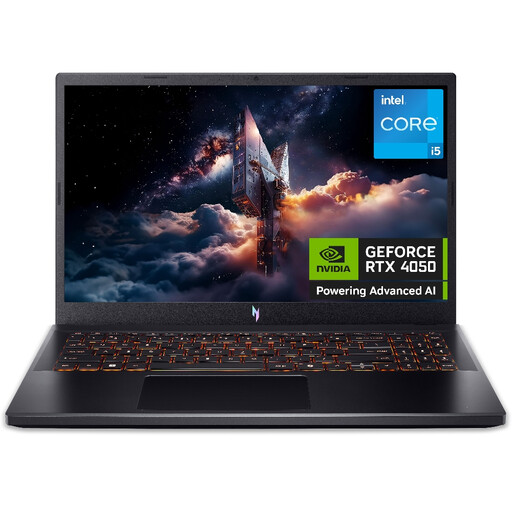
Acer Nitro V 15 ANV15-52 gaming notebook, RTX 4050, 16GB RAM, 512GB SSD
For a child who needs a Windows computer as well as access to intended PC games. The named configuration includes an NVIDIA RTX 4050, 16GB RAM and a 512GB SSD; confirm the games’ requirements and the notebook’s exact display and processor configuration before buying.
For Microsoft Family Safety, use a standard child account in the family group. Microsoft says an administrator can change the settings, and web filtering depends on supported-browser and sign-in conditions.
View on Joybuy
 No image available
Google Pixel 9a 128GB unlocked phone, Obsidian
For a household considering a portable Android phone that the child may also use for games. Confirm that the intended games work on the Pixel 9a and that their accounts meet the household’s supervision needs.
Google Play approvals can be used with a Family Link-managed account, but Google says they apply only to Google Play billing. Check the games’ separate payment and communication settings.
View on Joybuy
 No image available
Alldocube Kido 8-inch Android 15 tablet, 3GB RAM, 32GB storage, blue case
For a household considering a portable Android tablet for the child’s apps and games. The named variant includes a blue protective case and specifies no adapter; check game compatibility and what is needed to charge it.
Check what the tablet’s child-lock setting actually manages before relying on it for chat, multiplayer or playtime. Google Play approvals for a Family Link-managed account apply only to Google Play billing, so review each game’s payment route separately.
View on Joybuy
Questions parents and carers ask
Do console purchase controls prevent every type of spending?
No: the payment route still matters. Xbox says a child can purchase with gift cards or money already in their Microsoft account, and Nintendo says its restriction does not stop eShop card or code funds being added, although purchases using those funds can be restricted. Check balances, gift cards and the intended games’ own payment settings.
Will Family Link approve every purchase on an Android device?
No. Google says Google Play purchase approvals apply only to transactions through Google Play billing. Check whether each intended game uses another payment method or a separate publisher account.
What does Apple remote child management need?
Apple’s remote child-management setup needs Family Sharing and a separate Child Account. Apple also advises keeping family devices updated so settings can sync and newer controls can be used; check the devices the household intends to connect.
Does a device’s parental-control app manage every Roblox setting?
No. Roblox says its parental controls require a parent-privileged Roblox account linked to the child’s account. Roblox also says that at age 13 children begin managing some privacy settings and its spending limits no longer apply, so review the service account as the child gets older.
What should I set up on a Windows gaming computer?
Use the intended signed-in child account in the Microsoft family group and keep it as a standard Windows user. Microsoft says an administrator can change or break Family Safety settings; its web filters also depend on supported-browser use while signed in.


