Families choosing a first gaming device
Check that the child’s intended games run on the device, then consider the account and content settings you want in place before play begins.


Start with the games your child wants and where they will play them, then check the account, game and store settings that apply to those activities. Consoles, tablets and PCs handle content, communication, playtime and purchases differently; shared-device rules, separate chat settings and online memberships can all affect what you need to manage. Ofcom advises parents to check account ages, talk with children about who they play with and review platform settings, while recognising that settings cannot remove every online risk.
Check that the child’s intended games run on the device, then consider the account and content settings you want in place before play begins.
If your child wants to play or chat with others, check who can contact them through the account and whether the game has separate communication settings.
When several people use a device, find out whether restrictions apply to each account or to the whole device, and how purchase approvals work.
Confirm that the intended games work on the device, then check how its accounts, games and stores handle content, communication, playtime and purchases.
When it fits: The child’s games are available on the console and gaming is its main use.
Trade-off: Restrictions can work differently by platform; some consoles are digital-only, and online play may require a separate membership.
When it fits: The wanted games are available for the tablet’s operating system and gaming will share time with other apps.
Trade-off: Store approvals cover particular transactions and do not necessarily control communication within a game.
When it fits: The required games or family library call for a computer, and an adult can manage the accounts and services the child uses.
Trade-off: Operating-system settings and individual game services may need separate setup.
| Concern | What to check when buying | Who this matters to |
|---|---|---|
| Wanted games and device fit | Check each game’s supported platform and version, then confirm whether handheld, TV or app-based play suits the child’s routine. | If I am choosing a first device, I want the child’s actual games to work before I compare other features. Around 28% of consumers put game fit first. |
| Communication | Review account-level chat and multiplayer permissions as well as communication settings in the intended games. | When my child plays online, I want to know who can contact them and whether game chat has separate controls. Around 28% of consumers make communication their primary concern. |
| Purchases and memberships | Check how the game is bought, which payment routes the approval setting covers, and whether online play requires a membership. | If I need oversight of game or in-app purchases, I want to know which transactions the account setting actually covers. Around 17% of consumers put spending controls first. |
| Age-appropriate access | Set up the appropriate child or supervised account and check restrictions on the device, store and intended game. | Before play starts, I want the account age and content access to reflect the child using the device. Around 16% of consumers prioritise age settings. |
| Playtime and oversight | Check whether time limits apply per account or device, and whether they need a companion app or connected family account. | If I am setting household routines, I want to know what activity I can manage without sharing the child’s sign-in. Around 11% of consumers put routine oversight first. |
Nintendo says Switch and Switch 2 parental restrictions apply to the console, not separately to each user. eShop restrictions are managed separately through a parent or guardian’s Nintendo Account.
For a shared console, decide whether the same restrictions work for everyone and set up the relevant supervised accounts and store settings.
Allow time for adult account setup, especially when children sharing the device need different rules.
Google says Play purchase approvals apply to purchases made through Google Play billing. Apple’s Ask to Buy also has specific exceptions, including some redownloads, updates and redemption-code use.
Check the game’s purchase routes and the account permissions that apply before adding a payment method.
Some supported console games require or use a separate membership for online features. A digital-only console also cannot use game discs.
Check the specific games’ online requirements and whether you plan to use discs, downloads or other accessories before choosing a setup.
A microphone mute controls audio input; it does not decide who can contact a child’s account.
Review the platform and game communication settings first, then check the headset’s compatibility, fit and microphone controls if voice chat is wanted.
Nintendo Switch and Switch 2 suit families considering handheld and TV play, with console restrictions and separately managed account settings.
PlayStation 5 is a TV-console option for games available in its ecosystem, with family management tied to accounts.
Xbox Series consoles provide family-member settings for content, screen time, social features and multiplayer.
iPad is a tablet option when the intended games are available as iPad apps and the family can manage a child Apple Account.
On supported Android devices, Family Link and Google Play settings can help families manage app access and store restrictions.
For a Windows gaming PC, Microsoft Family Safety provides connected-account time tools.
These options cover portable gaming through handheld consoles and child-focused tablets. Check each intended game’s compatibility and the account controls available on the chosen device before buying.
 Image unavailable
Consider this portable handheld option only after checking that the child’s intended games are supported on the model.
4.0-inch IPS display; 720 × 720 resolution; Linux system; 64GB storage; 4000mAh battery.
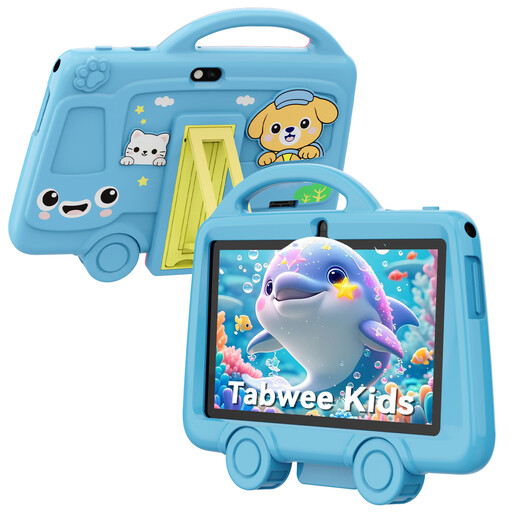 Image unavailable
Consider this child-focused tablet for games only after checking the intended apps and the account controls available on the device.
7-inch display; 3 GB RAM; 32 GB storage. Product information says it is not suitable for children under 3 and advises adult supervision.
 Image unavailable
Consider this child-focused tablet for games only after checking the intended apps and the account controls available on the device.
7-inch display; 2 GB RAM; 32 GB storage. Product information says it is not suitable for children under 3 and advises adult supervision.
 Image unavailable
Consider this tablet if the wanted games are supported and its account settings meet your family’s needs.
11-inch WiFi model with 128GB storage. Listed features include screen-time limits, content filtering and activity monitoring. Product information recommends use from age 3 with parental guidance.
 Image unavailable
This handheld console suits portable Nintendo Switch gaming when the intended games support handheld mode.
Handheld mode only: the product information says it has no TV output, kickstand or detachable controllers. Nintendo says parental restrictions apply to the console rather than each user.
Do not assume that one setting covers both. Nintendo separates console restrictions from eShop settings and Switch 2 GameChat controls, while Google says Play purchase approvals apply only to Google Play billing. Check the specific game and payment route.
Create or supervise the appropriate child account, check its registered age and review content, communication and purchase settings. Ofcom also advises talking with children about whom they play with and revisiting settings; these steps do not remove every online risk.
Start with the child’s actual games and check which devices and versions support them. Then compare the accounts and services you will need to manage: a console may use device-wide or family-account controls, a tablet may use account and store settings, and a PC may need separate operating-system and game-service settings.
No; membership requirements depend on the platform and game. Nintendo describes online play as a membership feature in supported titles, and PlayStation states that its separately sold PlayStation Plus subscription is required for online multiplayer under its stated terms. Check the requirements for each intended game.
No. A microphone mute controls audio input, while account and game communication settings determine different aspects of online interaction. Review those permissions separately, whether or not your child uses a headset.