Families choosing a first device
A separate child account, content restrictions, time limits and purchase settings matter most when an adult needs to set up and maintain the device before the child uses it independently.


Choose around what the child will use most: a games console suits controller-based games, while a tablet offers a portable screen for video and app-based games. Consider a phone when communication and use away from home are genuine needs too. Before choosing hardware, check how the child account works, which controls the family can maintain, and what the intended games require for online play.
A separate child account, content restrictions, time limits and purchase settings matter most when an adult needs to set up and maintain the device before the child uses it independently.
If the child wants to play with friends or family, check the intended games’ multiplayer requirements alongside voice chat, account permissions and any membership needed for online access.
For video, app-based games and portable use, a tablet or phone may fit better than a dedicated console, provided the chosen device works with the family-account controls the adult intends to use.
For a child watching video and playing online games at home, settle the main activity and device type first, then check account setup and the requirements of the actual games.
Choose when: Controller-based games are the main activity and an adult can manage the console’s family account.
Allow for: Multiplayer permissions and a membership requirement that depends on the game and platform.
Choose when: A portable screen for video and app-based games matters more than a dedicated controller-led setup.
Allow for: Family controls that depend on the operating system, child account and services used.
Choose when: The child also needs communication and a device to use away from home.
Allow for: More app and contact settings to review before handing over the phone.
| Concern | What to check | Who this matters to |
|---|---|---|
| Child account and controls | Confirm how to create the child’s own account and whether the intended devices support the family’s content, time and communication settings. | If this is my child’s first personal device, I need controls that I can set up and continue to manage. Around 33% of consumers put child-account setup first. |
| Online play | Check each intended game’s multiplayer permissions, chat features and membership requirements; exceptions vary by title. | Playing online with friends or family is the reason for this device, so access to those games matters before other features. For roughly 27% of consumers, online play is the primary concern. |
| Video and app use | Decide whether the child needs portable video and app-based games or mainly wants controller-based games. | I want one portable device for watching video as well as playing app games. That flexibility comes first for about 20% of consumers. |
| Purchases and communication | Review each game’s PEGI rating, purchase settings and online contact options using the child account. | Before allowing downloads or online play, I want to manage what my child can buy and who can contact them. Purchase and communication safeguards are the leading need for around 20% of consumers. |
Parental-control functions depend on the account and supported device, not just the device category. Google says Family Link cannot supervise iPhones or iPads, while Apple notes that control availability varies by device.
Decide which adult will manage the family group, then check the account setup and every device the family expects to supervise.
Nintendo says many Switch and Switch 2 games require Nintendo Switch Online for online features, although exceptions exist. PlayStation says most PS4 and PS5 online multiplayer games require PlayStation Plus.
Check the intended games individually for multiplayer, account and membership conditions before choosing a console.
A game’s PEGI rating helps with age suitability, but the game may also have voice chat, messaging or in-game purchases.
Check those features and their settings while signed in to the child account, as well as checking the rating.
On PlayStation, an unrestricted new account or guest login can undermine restrictions set on a child account. PlayStation also advises securing the console restriction passcode.
Use a separate child profile and review guest access, new-user creation and the adult-only passcode.
An iPhone or iPad route for families prepared to use Family Sharing and a child Apple Account.
A family-account route to consider with a supported Android tablet or phone.
A console route for families who can manage the child through an Xbox family group.
A PS4 or PS5 route using PlayStation child accounts and family settings.
A Switch or Switch 2 route for families considering its portable and home-console format.
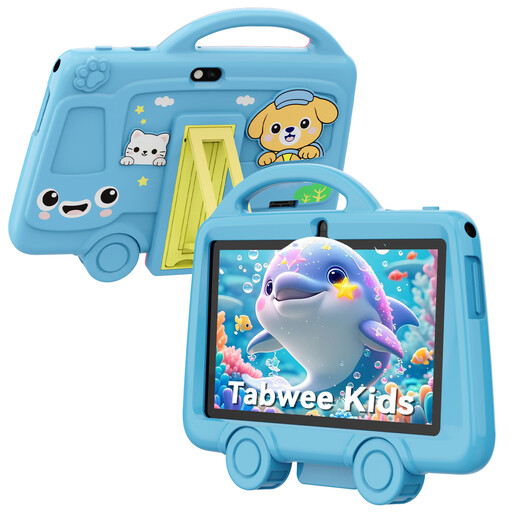
These tablets are options for families considering portable video and app-based games. Before choosing one for online play, check the intended games and how the device handles the child account and family settings; the console and phone routes involve different choices.
 No image available
Consider this tablet if a larger portable screen for video and apps is the priority.
The product name specifies an 11-inch display, Wi-Fi and 128 GB of storage. Check which child-account, communication and purchase controls it offers, and whether the intended online games work on it.
 No image available
This is an 8-inch tablet to consider for portable apps, games and video.
The product name specifies Android 15, 3 GB RAM, 32 GB storage, a child lock and a blue protective case. No charging adapter is included. Check the scope of the child lock and whether the intended online games and account settings work as needed.
 No image available
Consider this smaller tablet if portable app and video use is the main need.
The product name specifies 32 GB storage, a 3,000 mAh battery and a 3.5 mm headphone jack. The RAM information conflicts between the title and detailed specifications, so confirm the variant before purchase. Also check the child-account system and intended games; the product information calls for adult supervision and says it is not suitable for children under three.
 No image available
This smaller tablet is another option for portable apps and video.
The product name specifies 32 GB storage, a 3,000 mAh battery and a 3.5 mm headphone jack. Its title and description disagree about RAM, so confirm the variant before purchase. Check the child-account system and intended games too; the product information calls for adult supervision and says it is not suitable for children under three.
Set up a separate child account in the relevant family system before regular use. Apple Support says a child should have their own Apple Account rather than share someone else’s; Google, Xbox, PlayStation and Nintendo also provide family or supervised-account routes for child-specific settings.
Not necessarily: check the exact game and platform. Nintendo UK Support says many Switch and Switch 2 games require Nintendo Switch Online for online features, with exceptions; PlayStation Support says most PS4 and PS5 online multiplayer games require PlayStation Plus.
Yes. UK government online-safety guidance says PEGI 12, 16 and 18 games cannot be sold or hired to someone below the relevant age. Check the rating when choosing a game, then review its communication and in-game-purchase features separately.
No. Platform controls address different combinations of content, time, purchases and communication, so review the specific game and service as well. UK government online-safety guidance identifies voice chat, messaging, in-game purchases and contact with strangers among the features families should consider.
Use the child’s real date of birth and check the platform’s account setup for the UK. Apple Support says a parent or guardian creates an Apple Account for a child under 13 within Family Sharing; Nintendo UK Support says the parent or guardian creating a Nintendo child account must be at least 18.