What to check before buying
Match the game and the friends’ session first, then check how the household will manage communication, ongoing access and any accessory needs.
| Concern |
What to check when buying |
Who this matters to |
| Joining the right games and friends |
Check the exact game edition, supported multiplayer platforms and session type. Mojang and Microsoft’s Minecraft documentation distinguishes Bedrock and Java Realms; Valve updates Steam Deck compatibility game by game. |
If my child needs to join friends who already play a particular edition, I would check that exact game and session before choosing a device. About 31% of consumers put matching the game and multiplayer platform first. |
| Managing accounts, communication and spending |
Check whether controls apply to a child’s account or a shared console, and where chat and purchase settings are managed. Sony Interactive Entertainment, Microsoft and Nintendo UK document different control scopes and settings. |
If equipment is shared at home, I need to know which restrictions affect other family members and how to manage the child’s chat and spending. About 25% of consumers put family-management controls first. |
| Understanding ongoing access |
Check the intended game’s multiplayer entitlement, any required membership and which benefits can be shared. Sony Interactive Entertainment, Microsoft and Nintendo UK set out different service conditions. |
If I want to understand the continuing cost of the planned online activity, I would check the specific game and service before buying hardware. About 19% of consumers put ongoing-cost clarity first. |
| Playing away from a shared screen |
Check that the intended game and communication service work on the portable device. Nintendo Switch 2 GameChat has separate requirements; Apple documents family controls for iPad. |
If my child needs to play away from the shared television, I would confirm that the portable device supports the same game and communication arrangements. About 13% of consumers put portable play first. |
| Fixing communication or input |
Verify microphone input and voice-chat permissions for the exact device and game. Nintendo UK states that Bluetooth microphones cannot be used with Nintendo Switch audio; account restrictions can also affect chat. |
If the existing device already runs the game, I would check the headset microphone and communication settings before replacing it. About 12% of consumers put improving an existing setup first. |
Joybuy products
These options cover gaming-capable computers and Nintendo consoles for computer, portable and console gaming setups.
 No image available
Lenovo LOQ Essential 15ARP11 Gaming Laptop
A computer route to consider when the intended games and friends’ sessions support the required PC setup.
Windows 11; AMD Ryzen 7 170; 16GB RAM; 1TB SSD; GeForce RTX 5050; 15.6-inch 144Hz FHD display.
Joybuy
 No image available
CyberPowerPC JOYB1004 Gaming PC Bundle
A listed desktop bundle for a family looking at a PC-based setup with peripherals included.
AMD Ryzen 5 7500F; NVIDIA GeForce RTX 5060 8GB; 16GB DDR5; 1TB NVMe SSD; Windows 11 Home. The bundle lists a monitor, keyboard, mouse, headset and mousepad; the exact monitor model and some peripheral specifications may vary by bundle configuration.
Joybuy
 No image available
Nintendo Switch 2 Console + Nintendo Switch Sports Resort
A handheld and docked-console option when the intended games and friends’ sessions support Nintendo Switch 2.
The listing describes Joy-Con 2 controllers, a dock, a game and a three-month Nintendo Switch Online membership. GameChat also requires an internet connection and a registered phone number; Nintendo sets separate supervision arrangements for children under 16.
Joybuy
 No image available
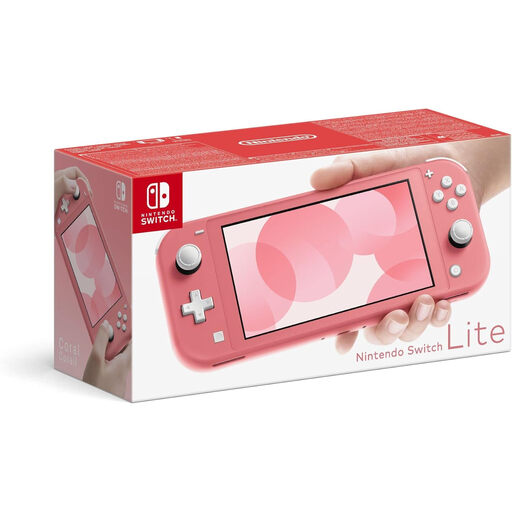
Nintendo Switch Lite - Coral
A dedicated handheld option if the intended Nintendo games and online arrangements fit the household.
The listing describes Wi-Fi and online multiplayer. It is handheld-only, with no TV output or detachable controllers; the listing states that online play requires a Nintendo Switch Online subscription.
Joybuy
 No image available
Nintendo Switch 2 Console (UK Version)
A handheld or docked option when the intended games and friends’ sessions support Nintendo Switch 2.
The listing describes a dock, Joy-Con 2 controllers and 256GB internal storage. Nintendo Switch 2 GameChat requires a Nintendo Account, an internet connection, Nintendo Switch Online and a registered phone number; children need parental approval.
Joybuy
Frequently asked questions
How can I check that my child can play with their friends?
Confirm the exact game edition, device or operating-system requirements and the friends’ multiplayer session before choosing equipment. Mojang and Microsoft document different platform groups for Minecraft Bedrock and Java Realms, while Valve advises checking Steam Deck compatibility for each game.
Does a game’s age rating tell me whether its online chat is suitable?
No: check content classification and communication settings separately. Nintendo manages GameChat separately from ordinary game communication restrictions, and Ofcom recommends checking age settings, discussing who children play with and reviewing parental controls.
What does a child under 16 need to use Nintendo Switch 2 GameChat?
Nintendo requires parental-controls app setup before users under 16 can use GameChat. The service also requires an internet connection, Nintendo Switch Online and a registered phone number; Nintendo’s welcome offer ended in March 2026.
Will a playtime limit always stop a game automatically?
Not necessarily. Nintendo distinguishes a playtime notification from the Suspend Software setting, which automatically puts the console into sleep mode when the limit is reached. Check which setting is enabled and agree how your child should leave an online session.
Does every online game require a paid subscription?
No single subscription rule applies to every game and platform. Microsoft says Xbox online console multiplayer for free-to-play games is available at no charge; for other titles, check the game’s current online-access requirements. Nintendo Switch 2 GameChat has its own Nintendo Switch Online requirement.


