Buy for the problem that limits play in your shared home: a compatible headset for personal audio and voice chat, another controller for shared controls, a separate display when the television is occupied, or Ethernet when a fixed playing position has an unreliable wireless connection. Check the connection and device before choosing: wireless headset systems differ by platform, Nintendo Switch Bluetooth audio does not accept Bluetooth microphones, and a monitor’s advertised refresh rate does not establish what a console and game can output.
Who this is for
Voice-chat players beside other household members
If speakers would disturb someone nearby, you need personal game audio and a microphone that works with your console, PC or handheld. Confirm the chat connection before weighing up wireless convenience; Nintendo’s Switch Bluetooth-audio guidance, for instance, rules out Bluetooth microphone input.
Players competing for the household TV
When the main screen is in use, a separate monitor needs a place to sit and must accept your device’s output. Handheld or tabletop play is another route if your gaming device supports it; Nintendo Switch OLED offers both modes alongside TV play.
Players with unreliable room-to-router Wi-Fi
For a fixed playing position, assess whether an Ethernet cable can reach the network equipment without obstructing a shared walkway. Xbox’s networking guidance also makes the location of the router or network point relevant to that decision.
What to check before buying
Identify whether sound and chat, screen access, the network connection or shared controls are causing the difficulty. Each points to a different purchase, and none is resolved simply by adding more equipment.
| Concern |
What to check |
Who this matters to |
| Personal audio and voice chat |
Confirm that the headset’s connection carries both audio and microphone input on your exact device. Check how you will mute the microphone when others are nearby. |
If I need to hear the game without using shared speakers, I also need friends to hear me through the intended device. Around 33% of consumers put personal audio and working voice chat first. |
| Access to another screen |
Check the space for a monitor or tabletop device and whether your console supports the intended video connection and modes. |
When someone else needs the television, I want somewhere practical to continue playing. For around 27% of consumers, access to a personal or secondary display is the primary concern. |
| A stable connection |
Check for an Ethernet port or suitable adapter and a safe route to the router or network point. If you remain on Wi-Fi, consider placement and interference. |
If online play falters at my usual spot, changing the network route matters more to me than changing the screen. Around 20% of consumers prioritise connection stability. |
| Shared controls and portable play |
Confirm controller compatibility with each intended device, or whether your gaming device supports the handheld or tabletop mode you plan to use. |
When we take turns or move between rooms, I need controls or a play mode that fits those arrangements. Roughly 20% of consumers make that flexibility their first concern. |
Buying pitfalls
-
Assuming Bluetooth headphones also provide Switch voice chat
Nintendo says Nintendo Switch Bluetooth audio cannot use a Bluetooth microphone. It also notes possible audio latency and disconnection during local communication.
Check how your game handles voice chat before choosing headphones; if microphone input is essential, confirm a separately supported connection for it.
-
Assuming every wireless headset connects to every console
Connection methods differ even among console-oriented models: PlayStation’s PS Link headsets use a USB adapter with PS5, while the Xbox Wireless Headset does not offer a 3.5 mm wired connection.
Match the full headset model and its audio and microphone connection to each console or computer you intend to use.
-
Treating a monitor’s refresh rate as guaranteed console output
PlayStation’s guidance makes PS5 120 Hz and variable refresh rate use conditional on the connected display and supported game. A monitor specification alone cannot establish the mode you will see.
Check the relevant video connection, display support and games, then inspect the console’s output settings with the monitor connected.
-
Planning Ethernet without planning the cable route
A router in another part of the home may require a long cable, as Xbox’s network guidance notes. A loose cable across a shared walkway can make a fixed setup impractical.
Measure the route and choose a position where the cable can be managed without creating a trip hazard.
Brands to consider for these setups
PlayStation
Relevant to PS5 households considering headset connections, controllers or a separate monitor.
- PlayStation Support describes connecting compatible PS Link headsets to PS5 with the included USB adapter.
- PS5 display modes, including supported 120 Hz output, depend on the connected display and game. Check the active output rather than relying on a monitor’s headline specification.
Xbox
Relevant to households choosing Xbox voice-chat equipment or assessing a wired network route for a fixed setup.
- Xbox Support lists Xbox Series X|S and Xbox One among the supported devices for its Wireless Headset.
- That headset has no 3.5 mm wired connection. An Ethernet route also needs a cable path that works in the room.
Nintendo
Relevant when handheld or tabletop play could free up the main television.
- Nintendo Switch OLED supports TV, tabletop and handheld modes; its dock has a wired LAN port for TV mode.
- Nintendo says Switch Bluetooth audio cannot use Bluetooth microphones and may have latency or disconnect during local communication.
SteelSeries
Relevant when comparing wired and wireless Arctis headsets for more than one gaming platform.
- SteelSeries lists both wired and wireless models in its Arctis range.
- Its compatibility guidance distinguishes connections by model. Confirm the full model name and connection method for each intended device.
Headsets for shared-home play
These Joybuy options address personal game audio and voice chat when other household members are nearby. Choose by the device you use and the connection its microphone requires; a headset will not by itself free up the television, add another controller or change the network connection.
 No image available
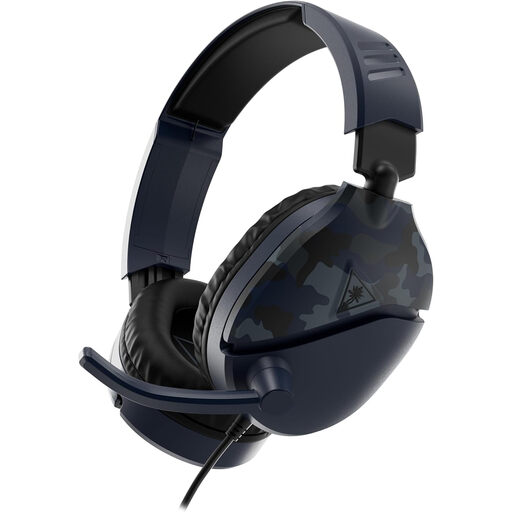
Turtle Beach Recon 70 Headset – Blue Camo
Consider this for personal audio and chat when playing near others. The product name lists Xbox Series X|S, Xbox One, PS5, PS4, Nintendo Switch and PC; confirm that your intended device or controller accepts microphone input through the headset connection.
View on Joybuy
 No image available
LOGITECH ASTRO A10 Gen 2 Wired Headset – White
A wired option for keeping game audio off shared speakers while using voice chat. Before choosing it for a particular console or computer, confirm that the intended connection supports both headset audio and microphone input.
View on Joybuy
 No image available
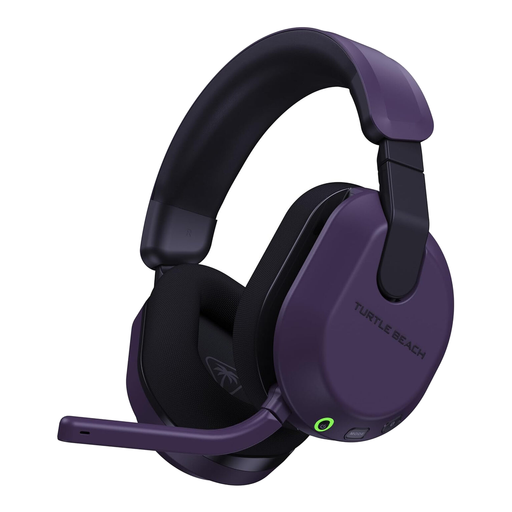
Turtle Beach Stealth 600 Gen3 Wireless Headset – Purple
Consider this wireless model if you want personal audio without a headset cable at an Xbox or PC setup. Its product name specifies Xbox Series X|S, Xbox One and PC; check the exact audio and chat connection, particularly if you also intend to use a PlayStation device.
View on Joybuy
 No image available
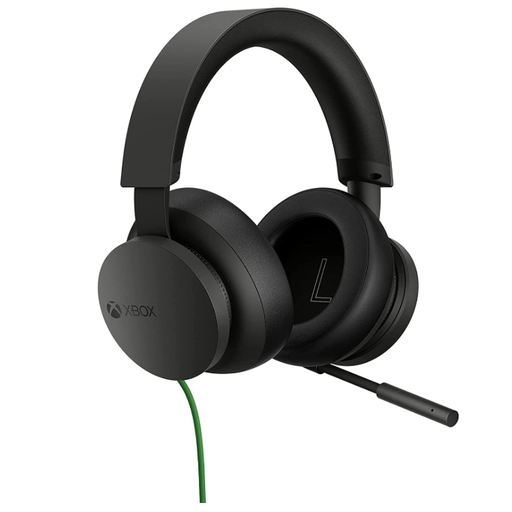
Official Xbox Stereo Wired Headset – Black
A wired headset to consider for personal audio and chat on an Xbox setup. Confirm that the controller you intend to use has a compatible headset connection; do not assume this Xbox model has the same connection options as an Xbox wireless headset.
View on Joybuy
 No image available
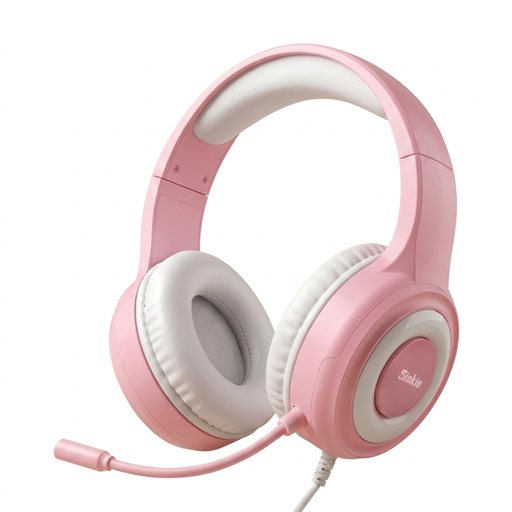
Siukie CH25 Wired Headset – 50 mm, Blue LED
Consider this for personal audio at a fixed playing position, provided its microphone connects to your intended device. The product name specifies a 50 mm driver, USB and a 3.5 mm jack; confirm which connection carries microphone input for your console or controller.
View on Joybuy
Common questions
Can I use a Bluetooth headphone microphone for Nintendo Switch voice chat?
No: Nintendo UK says Nintendo Switch Bluetooth audio cannot use Bluetooth microphones. Confirm how your game handles voice chat and choose a separately supported microphone connection if you need one; Nintendo also notes that Bluetooth audio may have latency and disconnects during local communication.
Will a 120 Hz monitor automatically give me 120 Hz gaming on PS5?
No: PS5 120 Hz output requires a supported display and game. PlayStation advises checking the console’s video-output settings and provides a way to test supported 1440p modes after connecting a display.
Should I run Ethernet instead of using Wi-Fi in a shared room?
Assess Ethernet first if your playing position is fixed and you can route a cable safely. Xbox describes lower interference from a wired connection in its Windows/Xbox app guidance, but that does not guarantee a cure for every network problem or make a cable across a walkway sensible.
What if a new headset, controller or monitor is faulty?
For qualifying faulty goods, the UK Consumer Rights Act 2015 provides a short-term right to reject, subject to its statutory conditions. Keep your order record and tell the retailer about the fault; a return simply because you changed your mind is a separate question from a remedy for faulty goods.


