What to check before buying
For a child playing online with known friends, check the game and account first, then choose any audio, controller or network equipment that addresses a specific need.
| Concern |
What to check when buying |
Who this matters to |
| Playing with friends |
Check support for the particular game and the friends’ platforms; cross-network play is game-dependent, according to Xbox Support. |
I need to know my child can join friends on their actual devices before replacing a console. Around 31% of consumers put game and platform compatibility first. |
| Child account and communication |
Review the child account’s communication permissions and feature-specific setup. Nintendo requires parental-controls app setup for GameChat users under 16. |
When setting up a child’s first online account, I want to understand which communication settings apply before enabling a feature. Around 25% of consumers prioritise account and communication arrangements. |
| Headset and voice chat |
Match the exact headset connection and microphone route to the device and chat method. PlayStation specifies a USB adapter for PULSE Elite use with PS5. |
If my child needs a microphone as well as game audio, I want to know the headset works with the existing setup and intended chat method. Around 19% of consumers prioritise headset and voice-chat compatibility. |
| Connection where they play |
Identify where the connection problem occurs and inspect the console dock before buying an adapter. Nintendo says a dock with a built-in LAN port needs no separate USB LAN adapter for wired use. |
When play is affected by the connection in a particular room, I want to address that issue rather than replace equipment unnecessarily. Around 13% of consumers prioritise the connection in the playing room. |
| Extra controller and power |
Check console compatibility and the controller’s power method. Xbox’s UK listing specifies a 3.5 mm headset socket; Microsoft’s UK store lists AA batteries for the standard Wireless Controller. |
If another controller is needed, I want it to suit the console and fit the household’s usual charging or battery routine. Around 12% of consumers prioritise an additional controller and its power needs. |
Relevant brands
These references apply to the named platforms, products and features; a brand’s inclusion is not a statement about availability or an endorsement of its full product range.
Nintendo
Switch 2 is a console option for households considering its GameChat feature.
- Nintendo says users under 16 need parental-controls app setup before using GameChat.
- That requirement does not establish that GameChat works with every cross-platform game or removes the need for household supervision.
PlayStation
Relevant to households using PS5, child-account controls or PlayStation headsets.
- PlayStation documents communication restrictions for child accounts and specifies a USB adapter for PULSE Elite use with PS5.
- The headset connection information does not establish compatibility with other consoles.
Xbox
Relevant to households already using Xbox multiplayer, family settings or controllers.
- Xbox documents family communication and multiplayer settings; its Wireless Controller has a 3.5 mm headset socket.
- Cross-network play depends on the game, and these details do not describe every Xbox accessory.
SteelSeries
The wired Arctis Nova 1X is a headset option for households checking a 3.5 mm connection across devices.
- SteelSeries describes multi-system support for this model’s 3.5 mm connection.
- That statement does not confirm microphone or chat-service behaviour on every device.
TP-Link
The Deco X50 is a home-network equipment option when the household has identified Wi-Fi coverage as a concern.
- TP-Link specifies mesh capability and Ethernet ports for the cited Deco X50 version.
- Manufacturer coverage and speed claims do not establish that this system will fix a particular gaming connection.
Joybuy product choices
These choices cover a home gaming-computer or console setup, an additional Xbox controller and wired headset options.
 No image available
CyberPowerPC JOYB1004 Gaming PC Bundle
A bundle option for setting up a gaming PC with listed peripherals; check whether its headset connection suits the intended chat setup.
AMD Ryzen 5 7500F; NVIDIA GeForce RTX 5060 8GB; 16GB DDR5; 1TB NVMe SSD; Windows 11 Home. The bundle lists a monitor, keyboard, mouse, headset and mousepad, but their exact specifications may vary by configuration.
Joybuy
 No image available
CyberPowerPC JOYB1010 Gaming Desktop PC
A desktop option for a household choosing a gaming-computer setup; allow for the separate display and peripherals when planning the full setup.
Intel Core Ultra 7 265KF; NVIDIA GeForce RTX 5070 12GB; 32GB DDR5; 1TB NVMe SSD; Windows 11 Home. A monitor, keyboard, mouse and headset are not included.
Joybuy
 No image available
Nintendo Switch 2 Console + Nintendo Switch Sports Resort
A console option for a household considering Switch 2 GameChat; check the account and membership requirements before relying on that feature.
The listing describes a console, dock, Joy-Con 2 controllers and an included game. Nintendo says GameChat requires Nintendo Switch Online membership and parental-controls app setup for users under 16.
Joybuy
 No image available
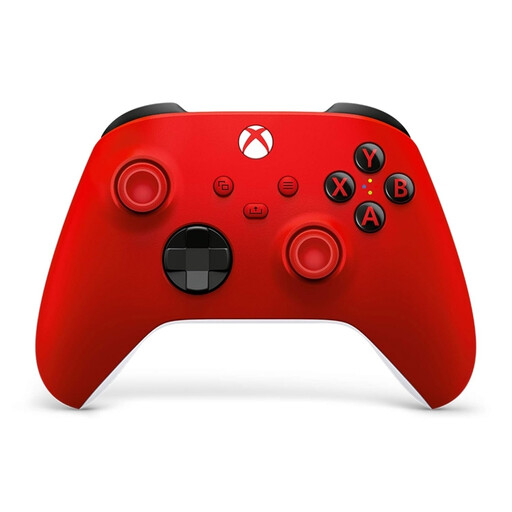
Microsoft Xbox Wireless Controller – Pulse Red
An additional controller option for an Xbox setup; check that the intended device and headset connection match.
The listing specifies Xbox Wireless and Bluetooth connectivity, a 3.5 mm jack and AA-battery power.
Joybuy
 No image available
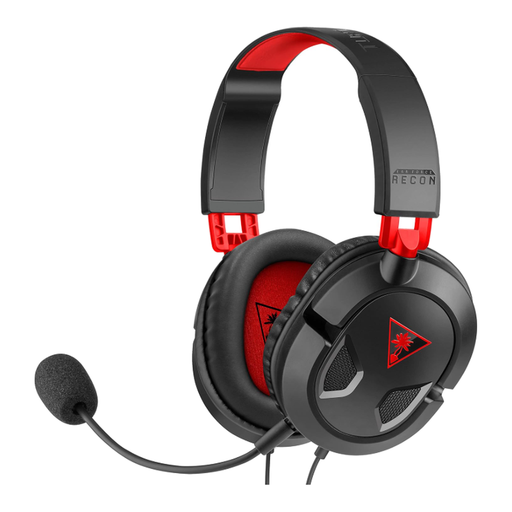
Turtle Beach Recon 50 Wired Gaming Headset
A wired headset option for compatible devices when a 3.5 mm connection suits the setup.
The listing specifies a 3.5 mm connection, 40 mm speakers, in-line volume and microphone-mute controls, and a removable microphone. It names Xbox, PlayStation, PC and mobile compatibility; check the exact device connection before buying.
Joybuy
Frequently asked questions
Can children play and talk together if their friends use different consoles or computers?
Sometimes, but check the particular game’s cross-network support first. Xbox Support notes that some games allow play across networks; voice chat, platform privacy settings and child-account permissions need separate checks.
What setup does Switch 2 GameChat require for a child under 16?
Nintendo says a parent or guardian must set up Parental Controls through its smart-device app before a user under 16 can use GameChat. Nintendo also states that GameChat requires a Nintendo Switch Online membership and a persistent internet connection; its free welcome offer ended in March 2026.
Do I need a USB LAN adapter for a Nintendo Switch dock?
Not if the dock has a built-in LAN port: Nintendo says a separate USB LAN adapter is not needed for a wired connection in that case. Check which dock is part of the setup before choosing an adapter.
What online-play membership requirements should I check?
Check the requirement for the specific platform and feature rather than assuming one rule applies to every game. PlayStation lists online multiplayer as a PlayStation Plus benefit, while Nintendo says Switch 2 GameChat requires Nintendo Switch Online membership.
Do a gaming headset or parental controls prevent online harm?
No. A headset is an audio accessory, and account controls manage access; neither establishes that online interactions are safe. Ofcom advises parents to review settings and talk with their child about whom they play with.
What if newly bought gaming equipment is faulty?
UK consumer-rights guidance distinguishes the short-term right to reject qualifying faulty goods from repair or replacement remedies after that period. GOV.UK explains that repair or replacement may be available when a fault is discovered more than 30 days after purchase or delivery; the appropriate remedy depends on the circumstances.


