Choose around the household bottleneck: a shared-screen setup may call for a console, compatible controller or separate display; a player with dedicated desk space may prefer a PC; and voice chat calls for a headset that works with the chosen device. If a fixed console or PC has an unreliable Wi-Fi connection, test a practical Ethernet connection before replacing gaming hardware—but a cable will not free up the television or remove demand from other people using the broadband connection. Where children play, check game ratings and set up the platform’s available child-account and communication controls separately from any accessory purchase.
Who is this for?
The useful purchase depends on whether the constraint is a screen, a way to play together, communication or the connection.
Families sharing one main gaming screen
If adults and children take turns with the television, check when it is available and whether the intended games support additional local players before buying another controller or display. Ofcom reported in May 2026 that 55% of UK children aged 8–17 used a games console to go online; that figure describes console use, not demand for another screen.
Families arranging online play and voice chat
A headset can keep game audio and conversation out of a shared room, provided its audio and microphone connections work with the chosen device. Set up available child-account and communication controls separately. Ofcom reported in May 2026 that 72% of UK children aged 8–17 participated in online gaming; the figure does not measure headset purchases.
Homes sharing a broadband connection
When gaming problems coincide with streaming or video calls, note which activities are happening and whether the affected device uses Wi-Fi. Ofcom’s household broadband guidance identifies simultaneous data-heavy use as something to manage and suggests a direct Ethernet connection where practical.
What should you check first?
Identify the activity that is being interrupted, then check whether the proposed device or accessory changes that particular setup. A second screen, another controller and a wired connection address different problems.
| Priority |
What to check |
Your needs |
| Screen access |
Check who uses the main television and when. A separate monitor needs space and compatible connections; it does not provide another console or PC. |
When the television is occupied, I need another place to use the gaming device—not necessarily another gaming device. |
| Playing together |
For a shared-TV console setup, check the exact console, game support and number of local players before adding controllers. A controller does not create a second online session or screen. |
We want to play locally or take turns without assuming that every game supports an extra player. |
| Dedicated space |
For a gaming laptop or desktop PC, check desk space, power and the intended display. Compare that arrangement with the room and screen access a shared console would need. |
A player has a desk or room of their own and needs a personal screen rather than regular access to the household television. |
| Connection reliability |
Compare problems at different times and during simultaneous gaming, HD streaming or video calls. If one fixed device uses Wi-Fi, check whether it can be connected directly to the router by Ethernet; Ofcom’s broadband guidance recommends considering a wired connection. |
Games become unreliable while other people use the connection, so I want to know whether the problem is at one device or affects the household connection more broadly. |
| Voice chat |
Check the headset’s connection, game audio and microphone compatibility with the exact console or PC. Review the platform account’s communication settings separately. |
I want conversation and game sound away from shared-room speakers, without treating a headset as a contact-control setting. |
| Child accounts and games |
Check the chosen platform’s child-account setup and available content, playtime and communication settings. PEGI says its age ratings concern content suitability, not how difficult a game is to play. |
Before a child uses the setup, I need accounts and settings I can manage, as well as games suited to the player; the controls still need configuring and review. |
Common buying mistakes
-
Treating Ethernet as a fix for every gaming problem
A wired link may help a fixed device’s connection to the router, but it cannot free up the main television or remove simultaneous demand on the broadband connection.
Note when problems occur and what else the household is doing online. Try a direct cable only if its route to the device is practical and safe.
-
Buying a headset before checking voice-chat compatibility
A headset’s audio connection does not establish that its microphone will work with the intended console, PC or chat arrangement. It also does not determine who a child can contact.
Check audio and microphone support for the exact device, then configure the child account’s available communication settings separately.
-
Letting everyone use one unrestricted adult account
Xbox and PlayStation describe family settings built around configured family members or child accounts. Sharing an adult login can defeat the purpose of individual settings.
Create the relevant accounts, review the chosen platform’s available controls and protect access to the adult or organiser account.
-
Reading a PEGI rating as a difficulty rating
PEGI rates age suitability of game content, not the skill needed to play. The label alone also does not configure online communication.
Consider the game’s controls and online features alongside its PEGI rating, then review the platform settings for the player’s account.
Platform references for family setups
Family-management features are platform-specific and need setting up; a brand reference here is not a claim that every device from that brand offers identical controls.
Xbox
Relevant when considering an Xbox family group and the account arrangements around a console or connected gaming setup.
- Microsoft Xbox Support describes Family Settings for screen time, age-based content, social communication and multiplayer settings.
- The relevant family members must be added and their settings configured; check availability for the accounts and location concerned.
PlayStation
Relevant when a household is choosing a PlayStation console and plans to manage a child’s account.
- Sony Interactive Entertainment describes child-account parental controls, playtime and privacy settings in its PlayStation Family guidance.
- Adding a child and configuring the available settings are separate steps from buying the console.
Nintendo
Relevant to households considering Nintendo Switch 2 or Nintendo Switch for play in more than one part of the home.
- Nintendo describes a Parental Controls app that can be linked with Nintendo Switch 2 and Nintendo Switch to check play activity.
- Check how the controls apply to the intended console, players and communication features rather than assuming one setting covers every use.
Joybuy product options for shared-home gaming
These options cover a console setup, a headset, a compatible extra controller and a separate monitor. Match each item to the household problem it addresses: accessories and another display do not replace a gaming device, and none of these purchases alone resolves shared broadband demand.
 No image available
Nintendo Switch 2 Console + Nintendo Switch Sports Resort
Consider this console bundle where the family wants a gaming device that need not always occupy the main television. Check the space and accessories required for the way you plan to play, and set up child-account and communication controls before a child uses online features.
View on Joybuy
 No image available
Sony PlayStation 5 Slim Disc Edition
The disc-edition console is an option for a household planning a shared-screen PlayStation setup and using physical games. Confirm where it will be installed and whether the intended games and accessories support the household’s way of playing. PlayStation child-account settings require separate setup.
View on Joybuy
 No image available
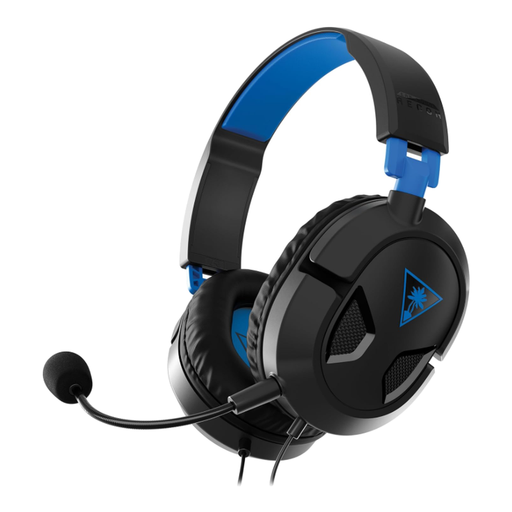
Turtle Beach Recon 50P Wired Headset for PS5 and PS4
A wired headset may suit a player who needs game audio and voice chat away from shared-room speakers. Confirm both audio and microphone compatibility with the intended device, and check the fit for its user. A headset does not replace the platform’s communication settings.
View on Joybuy
 No image available
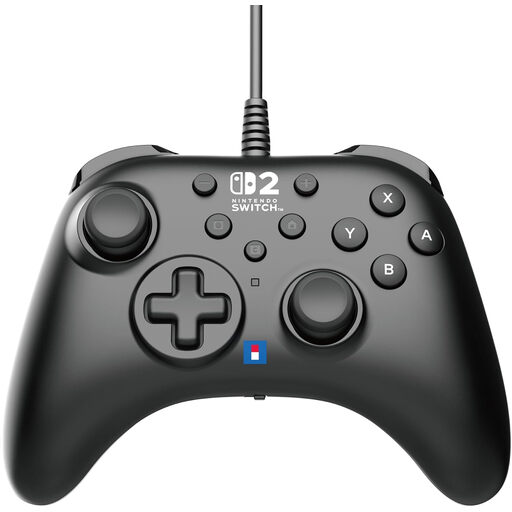
HORI HORIPAD Turbo Wired Controller for Nintendo Switch, Black
Consider an extra controller when turns or supported local multiplayer are the problem, rather than screen access. Check compatibility with the exact console and game, and make sure a wired controller can be used comfortably from the playing position.
View on Joybuy
 No image available
CRUA 32-Inch 1500R Curved QHD 165Hz Monitor, Black
A separate monitor addresses competition for the main screen if there is room for another gaming position; it does not add a console or PC. The product title specifies 2560×1440 resolution, HDMI and DisplayPort connections, and VESA 100×100 mm mounting. Check which resolution and refresh rate the intended device can output through its chosen connection, as well as the available desk or wall space.
View on Joybuy
Questions families ask
Does a PEGI rating tell me whether a game is easy enough for a child?
No. PEGI says its ratings address the age suitability of game content, not playing difficulty. Check the game’s controls and online features separately when deciding whether it suits the player.
Do parental controls make a console safe by default?
No. They are settings to configure and review, not an automatic outcome of buying a console. Set up the relevant child or family-member account and check the content, playtime and communication options the chosen platform provides.
Should we upgrade broadband when games lag at home?
Not before checking what is happening on the connection. Test at different times and note simultaneous streaming, gaming or video calls. For a fixed console or PC, Ofcom’s broadband guidance suggests trying a direct Ethernet connection where practical; that will not by itself remove demand elsewhere on the household connection.
Will an extra controller let two people play the same game?
Only if the exact console and game support the intended local multiplayer arrangement. Check those requirements and the controller’s compatibility before buying; another controller does not supply a second screen or independent gaming device.


