Competitive team-chat players
If quick callouts matter during arena matches, check microphone operation, mute access and voice-chat compatibility on your gaming platform—not just whether the headset plays sound.


Choose a headset that supports both game audio and voice chat on your exact platform before deciding between wired and wireless play. Wired models avoid headset charging but leave you with a cable; a dedicated 2.4 GHz wireless model removes the cable only if its particular edition and transmitter support your device. For matches in a dark room, put accessible volume and mute controls, a usable microphone and a comfortable fit ahead of decorative lighting.
If quick callouts matter during arena matches, check microphone operation, mute access and voice-chat compatibility on your gaming platform—not just whether the headset plays sound.
If you wear a headset through extended matches, compare its stated weight and cushion design, then consider how the fit works with your head shape or glasses. A specification cannot settle comfort for every wearer.
If you adjust audio without looking away from the game, easy-to-find volume and mute controls may matter more than headset lighting. A visible mute indicator can also help you check whether teammates can hear you.
Start with the connection that supports chat on your main device, then weigh freedom from cables against charging and setup. These connection routes serve different circumstances rather than forming a performance ranking.
Choose it when: You want to avoid charging and have confirmed that the headset’s supplied connection carries game audio and chat on your device.
Trade-off: The cable needs a suitable socket and can restrict movement around a controller or desk.
Choose it when: You want cable-free play and the exact platform edition supports your device through its supplied transmitter.
Trade-off: You need to manage charging; Bluetooth in the same headset does not establish console compatibility.
Choose it when: You mainly use one console family and want its documented adapter-based connection. PlayStation, for example, specifies a PlayStation Link USB adapter for PULSE Elite on PS5.
Trade-off: Check the connection and chat features again if you expect to use the headset with other devices.
| Concern | What to check | Who this matters to |
|---|---|---|
| Platform and connection | Confirm the exact edition, supplied connector or transmitter, and game-audio and microphone-chat support on your device. | If my headset cannot carry team chat on my console or PC, its other features will not solve the problem; around 36% of consumers put connection compatibility first. |
| Microphone and mute | Check microphone placement and whether you can mute it directly; look for a mute-state cue if you need one. | When callouts need to be quick, I want to know whether my microphone is on without interrupting play. Around 29% of consumers prioritise team-chat operation. |
| Long-session fit | Compare stated weight, cushions and glasses-friendly design where relevant; assess fit for yourself. | I may wear the headset through several matches, so pressure and cushion feel matter to me; around 21% of consumers put comfort first. |
| Dark-room controls | Look for reachable physical volume and mute controls, plus a useful mute indicator rather than lighting for its own sake. | In low light, I want to change volume or mute without searching for a control. Dark-room operation comes first for around 14% of consumers. |
A Bluetooth-capable headset is not necessarily a wireless-chat headset for your console. Xbox Support states that Xbox One does not connect to headsets through Bluetooth.
Check the headset’s exact console edition, supported wireless method and supplied transmitter before ordering.
Wireless headset families can have different platform editions, so a connection or chat feature described for one version may not apply to another.
Match the full variant name to your primary device and confirm how both game audio and microphone chat connect.
Manufacturer descriptions of microphones or positional audio do not establish how clearly teammates will hear you in your room and chat setup. Fit and platform settings can also affect what you hear.
Use the stated features to narrow your choice, check the seller’s applicable return terms, and assess mute operation, voice chat and comfort promptly after purchase.
Headsets are electrical products, and wireless models may contain batteries. GOV.UK directs consumers to appropriate electrical and battery collection routes rather than household rubbish for items marked with the crossed-out wheelie-bin symbol.
When the headset reaches the end of its life, use an appropriate collection point or household waste recycling centre.
Worth considering if you want to compare wired connection and mute-control options.
Relevant if you are comparing a dedicated wireless connection with Bluetooth switching.
Relevant to players comparing wireless connection choices and stated headset weight.
Relevant if game-audio presets are among the features you want to examine.
These wired and wireless gaming headsets offer different starting points for arena play. Match the listed model to your platform and voice-chat setup before choosing by controls, fit or freedom from cables.
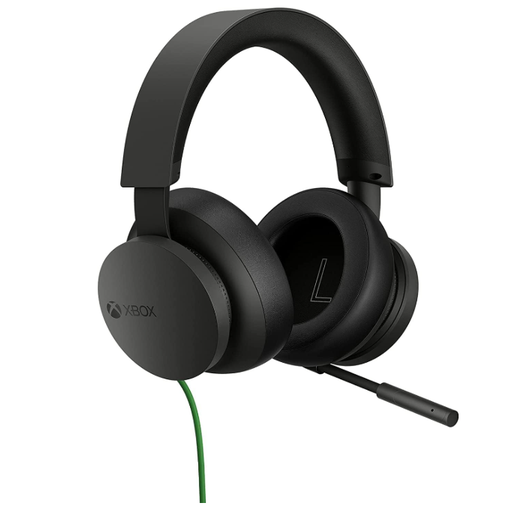 No image available
Consider this wired model for an Xbox setup if its connection and microphone-chat operation match your controller or device.
Before ordering, confirm where you will plug it in and whether its controls suit use in a dark room.
 No image available
This wired option may suit players who prefer not to charge a headset and want to check microphone muting for team chat.
Confirm the connection and chat behaviour on your particular gaming device; assess fit rather than relying on weight alone.
 No image available
Consider this wireless model if cable-free play is important and its connection method supports both audio and chat on your platform.
Check the exact platform compatibility and allow for charging during longer sessions.
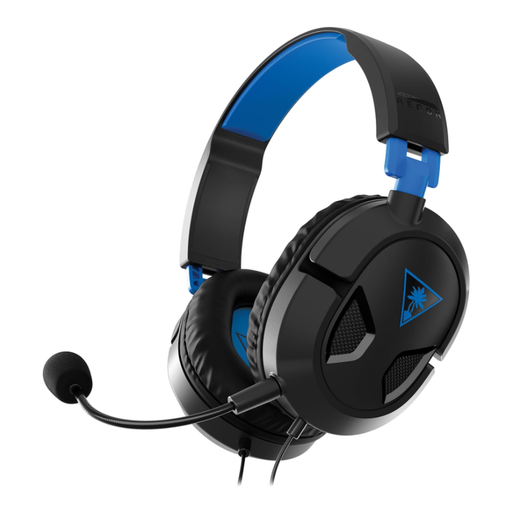 No image available
This wired PS5 and PS4 variant is a starting point if you want to avoid headset charging while playing on those platforms.
Confirm the intended device’s connection and voice-chat setup, and consider fit if you play for extended periods.
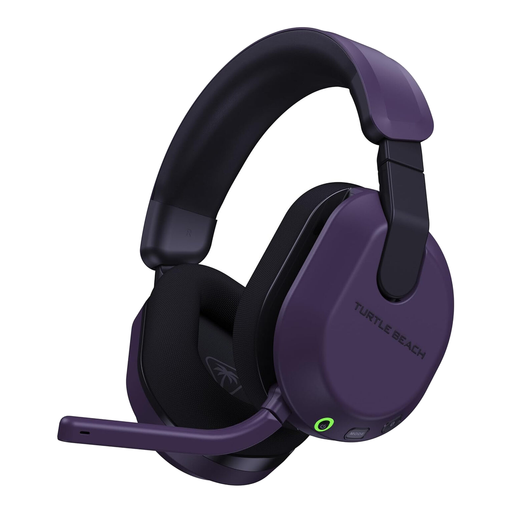 No image available
Consider this Xbox and PC variant for cable-free play if its supplied connection supports your exact device and team-chat setup.
Turtle Beach describes a flip-to-mute microphone for the Stealth 600 Gen 3. Check the edition’s connection details and plan for charging; do not assume its Xbox wireless route also provides PlayStation chat.
No. Lighting does not establish better positional audio or make team chat clearer. Prioritise controls you can find by touch and, if it helps you, a visible microphone-mute indicator; HyperX lists an LED mute indicator on the Cloud III wired model.
No—do not use Bluetooth support alone as your compatibility check. Xbox Support states that Xbox One has no Bluetooth functionality for headset connection. Confirm the exact headset edition, its Xbox connection method and microphone-chat support.
Check fit, microphone position, direct volume and mute operation, and the charge on a wireless headset. For listening level, Hinckley & Bosworth Borough Council advises setting volume in a quiet environment and lowering it if you cannot hear nearby speech.
Check the seller’s terms for the exact listing before ordering, particularly how to handle a headset that does not suit your setup. A wireless model also needs charging, so consider how that fits your usual session length.
Use an appropriate electrical collection route rather than putting a headset marked with the crossed-out wheelie-bin symbol in household rubbish. GOV.UK identifies collection points and household waste recycling centres as routes for electrical products; check the appropriate battery collection route if the headset has a battery.