TV-and-console mystery players
If you play from a sofa, identify the console, controller port and intended wireless method before choosing audio features. Xbox Support notes that Xbox One cannot connect a headset through Bluetooth.


Choose the connection for your console or PC before weighing up surround-sound features. A wired 3.5 mm headset is a straightforward option if your controller or device has the right port and the cable reaches your seat; for wireless play, confirm that the exact headset variant and connection method support your platform. For long detective adventures, assess fit and your ability to follow dialogue, while treating spatial audio as an optional feature whose availability depends on the game and platform.
If you play from a sofa, identify the console, controller port and intended wireless method before choosing audio features. Xbox Support notes that Xbox One cannot connect a headset through Bluetooth.
If spoken clues and extended listening matter to you, consider ear-cup fit, cushioning and how much room noise you want to hear. Published weight and materials can help you shortlist a headset, but they cannot establish how it will feel on your head.
If you move between a PC, console and handheld device, check the connection available on each one. A 3.5 mm plug still requires a suitable port, while a wireless dongle needs explicit support for the device and headset variant.
For a large-screen setup, settle the connection and seating distance first. Then assess long-session fit and whether avoiding a cable is worth managing a receiver and charging.
| Concern | What to check | Who this matters to |
|---|---|---|
| Platform and connection | Confirm support for the exact console or PC and connection method. For wired use, check the controller or device for a 3.5 mm port. | If I switch systems, I need a headset that connects to the devices I actually use, rather than relying on a general wireless label. Around 40% of consumers put connection compatibility first. |
| Comfort and dialogue | Consider over-ear fit, cushion material and isolation; check whether an advertised audio mode works on your platform. | During a long story session, I want to follow spoken clues without the headset becoming uncomfortable. For around 30% of consumers, sustained listening is the primary concern. |
| Cable-free sofa use | Check the supported wireless mode, receiver and port requirements, plus the conditions attached to battery claims. | If my seat is far from the screen, I would rather manage charging than have a cable across the room. Cable-free use comes first for around 30% of consumers. |
A headset having Bluetooth does not establish that the console accepts Bluetooth game audio. Xbox Support specifically says Xbox One cannot connect a headset through Bluetooth.
Check the exact console and headset variant, then confirm whether you will use a supported wireless connection or a controller with a suitable 3.5 mm port.
Surround-labelled features can depend on software or operating-system settings. Razer states that the BlackShark V2 X 7.1 surround feature is available only on Windows 11; it should not be treated as a console feature.
Check the feature's platform and setup requirements before making it a deciding factor. Xbox Support describes Windows Sonic as a spatial-sound option for compatible headset connections.
Lighting can change a published runtime. Logitech G states up to 90 hours without lighting and up to 40 hours with lighting for its G522 LIGHTSPEED.
Compare battery claims under settings you expect to use, then decide whether charging or a cable would be less disruptive in your seating arrangement.
A stated weight or cushion material cannot account for your head shape, glasses or tolerance for a close-fitting ear cup.
Use those details to narrow the options, but try the fit promptly if possible and check the seller's applicable return terms before buying.
Relevant when comparing wired and wireless Arctis Nova models across several devices.
Relevant if you are considering a wired 3.5 mm headset for more than one platform.
Relevant to buyers comparing wired headsets with PC-oriented wireless options.
These choices cover wired headsets for setups with a suitable connection and wireless models for cable-free play on their stated platforms. Check cable reach or receiver compatibility against your own large-screen arrangement before choosing.
 No image available
Consider this wired headset if your controller or device can accommodate its connection. Check the port and cable reach from your seat before buying.
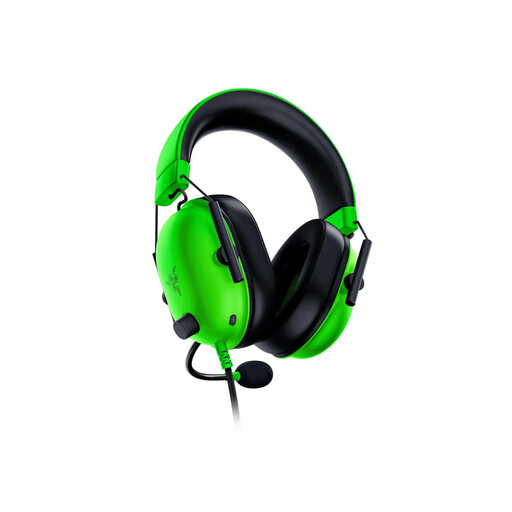 No image available
This wired model is worth considering if you can sit within cable reach and want to assess a lighter headset for extended play. Razer states a 240 g weight and memory-foam cushions; its advertised 7.1 surround feature is limited to Windows 11. Confirm compatibility with your exact console and connection.
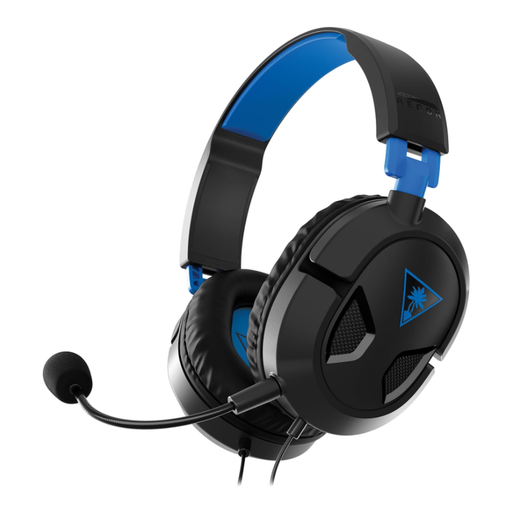 No image available
Consider this PlayStation-labelled wired model if a cable suits your seating position. Check the connection on the controller or device you intend to use and make sure the cable reaches comfortably.
 No image available
This wireless model may suit a sofa setup once you have confirmed support for your exact platform. Check the receiver and available ports, and compare battery expectations under the settings you plan to use; do not assume Xbox compatibility.
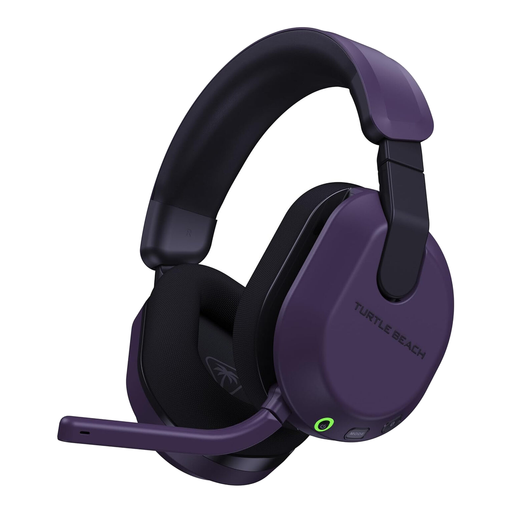 No image available
Consider this Xbox-labelled wireless model if avoiding a cable matters in your seating layout. Confirm that its transmitter setup suits your console, and check the battery conditions if charging frequency will affect your choice. Do not assume the Xbox wireless connection applies to PlayStation.
No. Prioritise a working connection and a fit you can tolerate through a long session. Xbox Support says Windows Sonic can be used with a stereo headset on a supported controller or Xbox wireless connection, while Razer limits its BlackShark V2 X 7.1 surround feature to Windows 11. Check what your game and platform offer rather than assuming a surround label applies everywhere.
Not to an Xbox One through Bluetooth: Xbox Support says that console does not support Bluetooth headset connections. For your exact Xbox model, choose an expressly supported wireless route or check whether your controller has a suitable 3.5 mm port for a wired headset.
Choose wired if your controller or device has the right connection and the cable reaches your seat without getting in the way. If cable-free sofa play matters more, check the wireless headset's exact console support, receiver and required port before buying; the TV screen itself does not settle compatibility.
Look for an electrical-recycling route rather than putting it in ordinary waste. Recycle Your Electricals says headphones with a plug, battery or cable can be recycled; check which local collection or take-back option accepts your headset.