What matters when choosing
For dark-room footage review, start with the factor most likely to interrupt your work: wearing comfort, room distraction, hard-to-follow cues or a connection that does not suit your playback devices. Then check the other factors against your actual setup.
| Concern |
What to check |
Who this matters to |
| Fit for long sessions |
Check stated weight and pad materials, and try the fit with glasses if you wear them. |
If I work through a full match, pressure from the pads or headband could make me stop before I finish. Around 33% of consumers put long-session fit first. |
| Isolation from room noise |
Check whether the earcups are closed-back and whether noise reduction is passive or active. |
With a fan or household noise nearby, I want to follow the recording without raising the volume to drown out the room; around 27% of consumers prioritise isolation. |
| Game and voice cues |
Compare familiar clips in stereo and any available processing mode; confirm that optional modes work on your device. |
I replay quiet actions and team calls, so I need to judge them clearly rather than assume a surround label will help. Roughly 20% of consumers make cue playback their primary concern. |
| Device connection |
Match the connector or wireless receiver to each review device, including any required adapter. |
When I move clips between devices, an awkward connection can interrupt the review even if the headset otherwise suits me. Around 20% of consumers put connection and workflow first. |
Joybuy product choices for footage review
These headsets offer wired and wireless starting points for reviewing tournament footage. Compare each one against your playback device, the length of your sessions and how much room noise you need to manage; product names and feature labels alone cannot establish how clearly subtle cues will sound in your clips.
 No image available
Logitech ASTRO A10 Gen 2 Wired Headset, White
Consider this wired model for a fixed review station where charging would be inconvenient. Check the connection on your playback device and whether the fit suits a full session.
View on Joybuy
 No image available
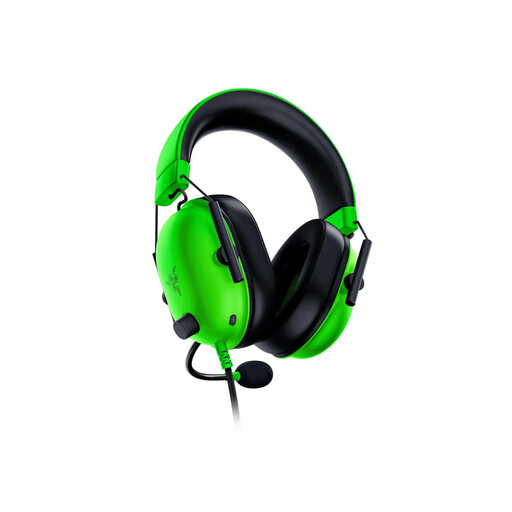
Razer BlackShark V2 X, Green
Consider this variant for a desk setup with a 3.5 mm connection. The Joybuy listing describes an approximate 240 g weight; check the fit and treat its passive isolation separately from active noise cancellation.
If surround processing matters to you, confirm its operating-system requirements for this exact variant before buying.
View on Joybuy
 No image available
Turtle Beach Stealth 500 Wireless Headset, Arctic Camo
Consider it if you review footage on a supported PlayStation or PC and want to avoid a desk cable. Its product title lists Bluetooth and up to 40 hours of battery life; that figure is a rating, not a guaranteed runtime.
Check how your chosen device connects and allow for charging between sessions.
View on Joybuy
 No image available
ASUS ROG Pelta Wireless Headset, Black
A wireless option to consider when a cable would hinder your review setup. Check the connection required by each playback device and plan for charging.
If room-noise isolation is a priority, assess the earcup fit rather than assuming it from the wireless design.
View on Joybuy
 No image available
Edifier G2II USB Wired Headset, Black
Consider this USB-wired model for a compatible fixed review station. The product title specifies 50 mm drivers and names PC, PS4 and Mac compatibility; confirm support for your exact device before relying on those connections.
Its advertised 7.1 mode is an optional feature to check with your playback setup, not a substitute for judging familiar clips yourself.
View on Joybuy
Common questions
Should I choose a wired or wireless headset for reviewing tournament footage?
Choose wired if you work at a fixed station and want to avoid charging; consider wireless if freedom to move or switching between supported devices matters more. Check the connector or receiver against your playback devices. HP lists wired connection options for the HyperX Cloud III, while SteelSeries documents 2.4 GHz and Bluetooth switching for the Arctis Nova 5.
Does reviewing footage in a dark room require a special headset?
No particular audio specification follows from the darkness itself. If fans or household sounds distract you, closed earcups may provide useful passive isolation, but they do not replace a comfortable fit or sensible volume control.
Will virtual surround sound make game cues easier to review?
Treat virtual surround as an optional mode to compare with stereo using the same clip, not as an automatic improvement. Check device and software requirements first: Razer states that BlackShark V2 X 7.1 surround sound is available only on Windows 11.
How loud should I play clips during repeated reviews?
Use the lowest volume at which you can comfortably follow the recording, and take breaks during repeated listening. Hinckley & Bosworth Borough Council notes that there is no single volume setting appropriate for every listener, so avoid treating a particular number on a volume control as a universal target.
What should I do with an unwanted electronic headset?
Use an appropriate electrical-waste collection or retailer take-back route rather than assuming it belongs in ordinary household waste. GOV.UK guidance explains that waste electrical and electronic equipment rules support recovery, reuse and recycling; check the available local route for a headset with a battery.


