Commentary-first live streamers
If viewers need to follow you over gameplay, prioritise a boom microphone, an unmistakable mute control and a way to check voice levels and background noise in your stream mix.


Choose a headset around your streaming setup and microphone controls, not driver size alone. A wired connection suits a fixed desk where charging would be an inconvenience; 2.4GHz wireless suits cable-free movement, but requires checks on the transmitter and exact platform variant. Whichever you choose, make a short OBS recording to check how your voice and game audio sound together.
If viewers need to follow you over gameplay, prioritise a boom microphone, an unmistakable mute control and a way to check voice levels and background noise in your stream mix.
If your setup spans a PC, console or capture card, check the exact headset variant, connector or transmitter, and the path taken by game sound, chat and microphone audio.
If you move away from the desk or switch to another device during a session, weigh cable-free use and charging against the connection modes you actually need.
Start with the connection that fits your streaming hardware, then check microphone control and the practical demands of a full session. A compatible headset still needs its voice and game levels set for viewers.
| Concern | What to check | Who this matters to |
|---|---|---|
| Voice clarity and noise control | Check the boom mic, mute control and microphone path into your streaming software. Test speech with your usual room noise. | If viewers struggle to follow my commentary, microphone placement and a dependable mute matter more to me than extra game-audio settings. Around 36% of consumers put clear commentary first. |
| Platform and audio routing | Confirm the exact PC or console variant, supplied connection hardware and where game, chat and microphone audio reach the stream. | When I switch between a console and PC, I need both my game sound and voice to take the intended route. For around 29% of consumers, workable platform routing is the primary concern. |
| Long-session comfort | Consider ear-pad and headband fit, including pressure around glasses; check the retailer’s applicable return terms before testing the fit. | For a long commentary session, I need a fit that does not distract me or press uncomfortably on my glasses. Comfort comes first for around 21% of consumers. |
| Wireless flexibility | Check the gaming connection, charging arrangements and whether Bluetooth switches sources or can play alongside game audio. | If I move around the desk or use another device between games, I want that freedom without losing the connection I use for play. Around 14% of consumers prioritise wireless flexibility. |
Wireless compatibility can differ between Xbox, PlayStation and PC versions of the same headset family. A platform name on a product range is not enough to establish how your stream audio will be routed.
Before checkout, match the precise variant and transmitter or connector to your console, PC, capture card and chat setup.
A microphone’s noise-reduction claim does not establish how your voice will sound on stream. The OBS Project says its Noise Suppression filter can help with mild noise such as a PC fan, but is generally ineffective against large amounts of background noise; stronger settings can distort speech.
Reduce noise at its source, position the microphone and make a private recording in your usual room before going live.
Claimed runtimes relate to particular models and use conditions. Your intended gaming connection and platform variant matter as well as the published battery figure.
Check which connection mode the runtime describes, charge before a long stream and confirm whether the headset can be used while charging.
Charging takes time, and a depleted battery can interrupt a session.
A comfortable level in your headphones does not establish that viewers can hear speech over gameplay. The OBS Project’s mixer and monitoring controls let you inspect the sources that make up the stream.
Record a short passage with normal and louder commentary, then listen to the resulting voice-to-game balance before adjusting processing.
The wired Cloud III is a reference point for a fixed desk setup needing several connection options.
The Stealth 600 Gen 3 and Stealth 700 Gen 3 illustrate different wireless device-switching arrangements.
Arctis Nova 5 is relevant if you want to adjust game-audio settings and switch between gaming and Bluetooth connections.
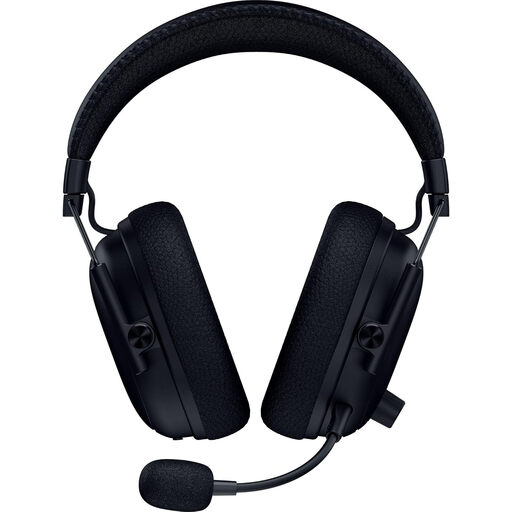
BlackShark V2 Pro is a brand reference for streamers considering a wireless headset with a boom microphone.
These wireless headset choices are relevant if you want a microphone for game commentary. Check each headset’s connection with your streaming hardware and test the voice-to-game mix before relying on it for a live session.
 No image available
Consider this wireless model if cable-free movement matters during commentary. Confirm the connection hardware and audio routing for your PC, console and capture setup, then test microphone levels in a recording.
 No image available
This wireless model is relevant to a commentary setup where microphone muting and game-audio routing need attention. Check the connection options for this exact version, including whether a wired option applies, and record an OBS test of your voice against gameplay.
Wired suits a fixed streaming desk if you would rather avoid charging; 2.4GHz wireless suits cable-free movement if its transmitter works with your platform. Check the exact headset variant and do not assume Bluetooth is its primary gaming connection.
Record yourself speaking at both normal and excited commentary levels while gameplay is audible. Use the OBS mixer and your configured monitoring device to check the resulting balance, then adjust levels or compression if loud speech clips.
Not reliably if the room is loud. The OBS Project says its Noise Suppression filter can reduce mild background noise such as a PC fan, but large amounts of noise are harder to address and stronger suppression can distort speech. Reduce the noise and position the microphone before adjusting the filter.
For a qualifying distance purchase, GOV.UK says customers generally have 14 days after receiving an item to tell the seller they want to cancel. Check how the retailer handles returns of a tried-on headset before opening or extensively using it; change-of-mind cancellation and remedies for faulty goods are separate questions.
No: marking does not establish microphone quality, comfort or compatibility with your streaming setup. GOV.UK states that Great Britain continues to recognise CE marking alongside or in place of UKCA marking where applicable; check connection and audio-routing requirements separately.