Players who put long-session comfort first
If you play for several hours, headband pressure, ear-cup depth and heat may matter more to you than competitive-game features. RTINGS identifies comfort as a key consideration for long gaming sessions.


For a long narrative-puzzle session, choose a headset that fits comfortably and connects to your actual gaming device before weighing up sound presets or driver size. A compatible wired model avoids charging; a 2.4 GHz dongle model offers cable-free game audio, while Bluetooth is worth considering if you also switch to a phone. Check the exact model and platform before relying on any audio feature.
If you play for several hours, headband pressure, ear-cup depth and heat may matter more to you than competitive-game features. RTINGS identifies comfort as a key consideration for long gaming sessions.
You want to follow spoken clues and quieter environmental details, and may want to adjust the sound. Check whether the exact headset offers EQ or presets on your platform: SteelSeries and Logitech G describe features with model- and software-specific conditions.
If you move between a game on a PC or console and audio on your phone, a headset with both a gaming connection and Bluetooth may suit you. SteelSeries, HyperX and Turtle Beach describe switching options on particular models; compatibility still depends on the variant and device.
Start with sustained fit and a connection that works with your gaming device. Then decide whether sound adjustment or fewer charging interruptions would make the greater difference to your sessions.
| Concern | What to check | Who this matters to |
|---|---|---|
| Comfort over several hours | Check headband adjustment, ear-cup fit and pad material; review the seller’s return terms before a sustained fit trial. | If pressure builds or the ear cups become too warm, I may cut a puzzle session short regardless of the audio features. Around 36% of consumers put sustained comfort first. |
| Platform and connection | Match the exact model variant and its wired connector or wireless dongle to your PC, console or other gaming device. | I need the headset to connect to the device I actually play on, not merely to another version of the same console family. For around 29% of consumers, a dependable connection is the primary concern. |
| Dialogue and sound adjustment | Check whether EQ, presets or spatial processing work through your intended connection and platform. | When dialogue and subtle effects carry clues, I want the option to adjust their balance without assuming a preset will improve every game. Around 21% of consumers prioritise this flexibility. |
| Charging interruptions | Compare the maker’s rated runtime for the wireless mode you will use and check the charging method. | I would rather not stop mid-session to charge another device, although I still want the freedom of wireless play. Keeping charging interruptions down comes first for around 14% of consumers. |
Wireless dongles and console support can differ within a product family. RTINGS identifies separate SteelSeries Nova 7, 7P and 7X variants, so a familiar family name does not establish support for your device.
Compare the exact variant on the seller’s page with the manufacturer’s compatibility list, particularly when choosing between PlayStation and Xbox models.
Manufacturer ratings can differ by wireless mode and operating conditions. HyperX, for example, gives separate 2.4 GHz and Bluetooth ratings for the Cloud III S Wireless.
Compare the rating for the mode you intend to use, and check how the headset charges rather than relying on one headline figure.
Virtual surround and EQ may require particular software or a particular connection. Logitech G says the G432’s DTS Headphone:X 2.0 and EQ presets require Windows and G HUB.
Confirm the feature and operating system for the exact model before making it a reason to choose that headset.
A driver measurement cannot establish how clearly dialogue will sound to you, and padding construction cannot guarantee comfort for your head shape. RTINGS treats long-session comfort as a core headset-selection factor.
Use specifications to narrow your choices, then check fit where a trial is permitted and read the seller’s return terms.
Its Arctis Nova models are relevant if you want dongle-based game audio and a way to switch to Bluetooth.
The Cloud III line gives you a wired option alongside the Cloud III S Wireless if you are weighing simpler setup against cable-free play.
The Stealth 600 Gen 3 line is relevant if you want 2.4 GHz gaming audio, Bluetooth and adjustable sound.
Its wired G432 is worth examining if you use Windows and want software-based sound controls.
These choices include wireless headsets for cable-free sessions and wired headsets for players who would rather avoid charging. Check each model’s connection, platform fit and wearing comfort against your own setup.
 No image available
Consider this wireless model if you want to move between gaming and mobile audio during a long session. Confirm its connection method and compatibility with your exact device, and assess the fit before relying on it for extended wear.
 No image available
Consider this variant for cable-free play on one of its named platforms, with Bluetooth switching if you also use a phone. Turtle Beach rates Stealth 600 Gen 3 for up to 80 hours and lists EQ through Swarm II; confirm the connection and assess fit for your sessions.
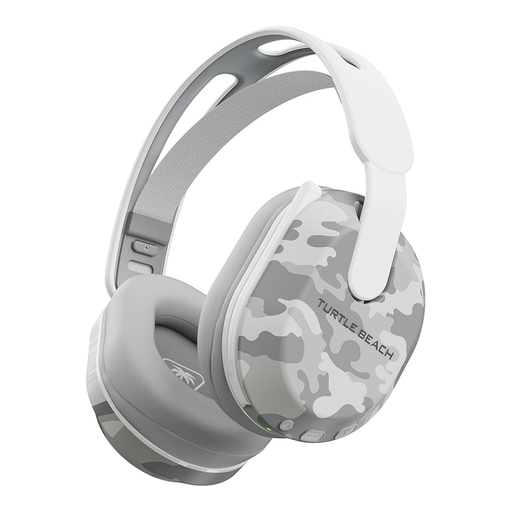 No image available
Consider this model if you want wireless gaming on one of its named platforms and Bluetooth for another device. Its title states up to 40 hours of battery life; treat that as a maximum rating, and check the connection and fit for your setup.
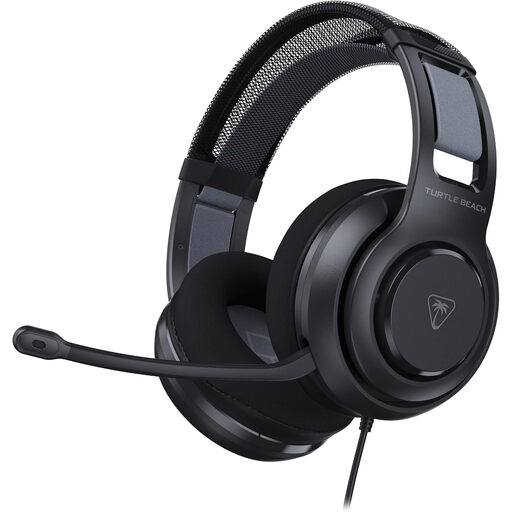 No image available
Consider this wired option if you would rather avoid charging, particularly if wearing glasses affects ear-cup comfort. Check that your device has a suitable connection and assess the fit; the cable remains part of your setup.
 No image available
Consider this wired headset if avoiding charging matters more to you than moving without a cable. Confirm that the connector, and any adapter your setup requires, will work with your gaming device; assess fit during a longer session where permitted.
Choose wired if you want to avoid charging and are comfortable using a cable; choose a compatible 2.4 GHz dongle model if cable-free gaming matters more. Bluetooth is most relevant if you also intend to use a phone or another device, but check the exact headset variant’s supported platforms.
No, virtual surround and game presets are optional sound controls, not requirements for following dialogue or clues. If you want them, verify where they work: Logitech G says the G432’s DTS Headphone:X 2.0 and EQ presets require Windows and G HUB.
Check headband pressure, ear-cup depth, pad warmth and fit with glasses during a sustained trial where the seller’s return terms permit one. Padding materials help you compare designs, but they cannot guarantee personal fit; RTINGS also identifies comfort as important for long gaming sessions.
Compare the stated runtime for the wireless mode you plan to use, then check the charging method and the model manual. An ‘up to’ figure is not a promise for every setting: HyperX gives separate 2.4 GHz and Bluetooth ratings for Cloud III S Wireless.