For multiplayer map practice at a desk, start with a headset that connects to your device and lets you hear game cues while making clear team call-outs; a wired model avoids charging, while 2.4 GHz wireless is worth considering if a cable gets in your way. In a shared student room, also weigh cushion fit and microphone controls, and check whether advertised audio processing works with your platform and game rather than assuming it will improve your play.
Who is this for?
Players learning map cues
If you are practising routes and listening for the direction of in-game sounds, check how the headset handles audio on your particular game and platform. SteelSeries and Logitech G describe spatial or surround features on specific models, but their availability can depend on software and connection.
Players sharing a room
Conversation and keyboard noise can compete with game audio and team chat. Cushion fit, a usable mute control and the microphone arrangement matter more here than a surround-sound label alone.
Desk-based players keeping setup simple
If you usually stay at your desk, a compatible wired connection removes the charging routine. Check the device's socket and any software requirements before choosing between a straightforward connection and additional features.
What matters when choosing?
Identify your gaming device and connection first, then decide whether hearing directional cues, communicating around room noise, staying comfortable or moving without a cable is your main priority.
| Concern | What to check | Who this matters to |
|---|
| Directional game cues |
Check whether spatial or surround processing works with your device, connection and game audio settings. Do not use driver diameter as proof of positional accuracy. |
When learning unfamiliar routes, I need to make sense of where game sounds come from without interrupting practice; around 36% of consumers put directional cues first. |
| Room noise and team chat |
Consider cushion fit, microphone placement and mute controls; check whether any microphone filtering requires PC software. |
If flatmates or a keyboard make call-outs difficult, I need to hear my team and be understood. Room noise and communication are the main concern for around 29% of consumers. |
| Comfort during repeated sessions |
Look at adjustment, ear-pad material and stated weight where available; assess fit and the retailer's return conditions. |
Repeated matches are harder to stick with if the ear pads or headband become uncomfortable; roughly 21% of consumers prioritise long-session fit. |
| Compatible, manageable setup |
Match the connector to your device and check whether an adapter is needed. For wireless use, consider charging alongside cable freedom. |
I want the headset to work with my current setup without an unwanted charging routine or extra connections; around 14% of consumers make setup simplicity their first priority. |
Buying pitfalls
-
Assuming surround sound works on every device
Audio processing can depend on a particular application. Logitech G says the advanced Blue VO!CE and DTS Headphone:X 2.0 features of its PRO X Wired headset work only on PC through G HUB.
Check each advertised feature against your exact gaming device and connection. If you switch devices, establish basic connection compatibility before relying on software features.
-
Choosing by driver diameter alone
A stated driver size describes a component; by itself, it does not establish how accurately you will locate cues in your game or how the headset will fit.
Use it alongside platform support, microphone controls, cushion design and your own fit requirements rather than treating the largest number as a verdict.
-
Turning up the volume to overcome room noise
A closer-fitting cushion may reduce distractions, but it is not a reason to keep increasing the listening level. The Royal Free London NHS Foundation Trust advises against listening above 60% of maximum volume.
Set a comfortable level, take listening breaks and consider fit and passive isolation when outside noise is distracting.
-
Putting an old headset in household rubbish
Headsets are electrical products, and wireless models may also contain a battery. GOV.UK advises taking electrical waste and batteries to an appropriate recycling collection point.
Use an appropriate local electrical-waste collection or retailer take-back route when replacing a headset.
Brands to consider
SteelSeries
The wired Arctis Nova range may interest PC players who want adjustable audio settings and a retractable microphone.
- SteelSeries lists spatial-audio controls and an equaliser for the Arctis Nova 3.
- Check which connection and software features work on your platform; the brand's positional-audio claims do not establish an advantage in every game.
Turtle Beach
The wired Recon 70 line offers a straightforward 3.5 mm route for devices with a compatible connection.
- Turtle Beach lists noise-isolating cushions and a flip-to-mute microphone for the Recon 70.
- Confirm your device has the required 3.5 mm connection; do not expect PC software features from the analogue connection alone.
HyperX
The wired Cloud III is worth considering when cushioning and a boom microphone are priorities for repeated sessions.
- HyperX describes memory-foam cushioning and a noise-cancelling microphone on the Cloud III.
- Confirm the connection and included accessories for the version you intend to buy; cushioning descriptions cannot establish individual fit.
Logitech G
The PRO X range includes wired and 2.4 GHz wireless options with different setup demands.
- Logitech G lists more than 20 hours of battery life for PRO X Wireless, a specification for that model rather than wireless headsets generally.
- The advanced Blue VO!CE and DTS Headphone:X 2.0 features of PRO X Wired work only on PC through G HUB; wireless use introduces charging.
Headsets for map practice on Joybuy
These wired and wireless gaming headsets cover desk-based and cable-free practice. Match the stated connection and platform to your setup before weighing audio labels, microphone features and fit.
 Image unavailable
ASUS ROG Pelta wireless gaming headset, black
Consider this wireless model if a cable gets in the way of practice in your room. Check its connection with your device and whether any virtual-surround controls work with your platform and game; assess the fit for longer sessions.
View on Joybuy
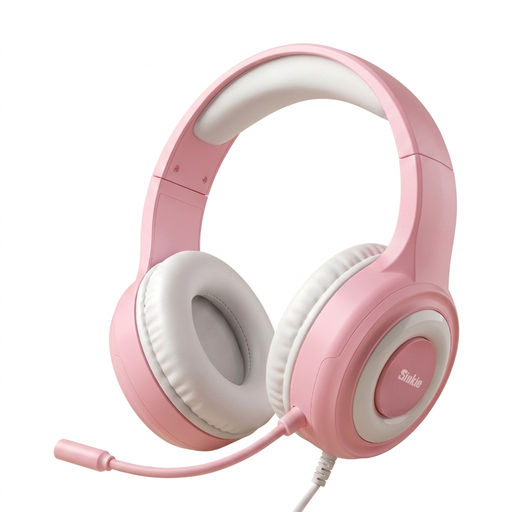 Image unavailable
Siukie CH25 wired headset, USB and 3.5 mm, blue LED
This wired option suits a desk setup if its connections match your device. Its title specifies a 50 mm driver and noise-cancelling microphone, but neither label establishes cue accuracy or call clarity; confirm the required audio and microphone connections before buying.
View on Joybuy
 Image unavailable
Turtle Beach Stealth 500 wireless headset for PC, PS5 and PS4, black
Consider it for cable-free practice on one of the platforms named in the title. Wireless use means planning for charging; check which audio settings work on your intended platform and game.
View on Joybuy
 Image unavailable
Turtle Beach Stealth 600 Gen3 wireless headset for PS5, PS4 and PC, black
This wireless option is relevant if you play on a platform named in the title and prefer to avoid a cable. Check device compatibility and any app-dependent settings, and assess cushion fit and room-noise isolation for your own space.
View on Joybuy
 Image unavailable
Logitech ASTRO A10 Gen 2 wired headset, white
Consider this wired model for desk-based sessions if its connection suits your gaming device. Check whether your setup needs an adapter or splitter, and do not assume that virtual-surround processing is included.
View on Joybuy
Common questions
Should I choose a wired or wireless headset for map practice?
Choose wired if you mainly play at a desk, have a compatible connection and would rather avoid charging. Consider a dedicated 2.4 GHz wireless model if cable-free movement matters more; check its supported platform and charging requirements, and do not assume Bluetooth mode behaves the same way as its dedicated gaming connection.
Will virtual surround sound make map cues easier to locate?
Not automatically: the feature's availability and usefulness depend on the headset, platform, software and game settings. For example, Logitech G says the advanced DTS Headphone:X 2.0 feature on PRO X Wired works only on PC through G HUB, so check the feature on the device you actually use.
How can I listen in a noisy room without turning the volume up too far?
Start with a comfortable cushion fit and a moderate listening level rather than raising the volume to mask room noise. The Royal Free London NHS Foundation Trust advises against listening above 60% of maximum volume; take breaks during longer sessions.
What should I do with an old headset?
Take an old headset to an appropriate electrical-waste collection or retailer take-back route rather than putting it in household rubbish. GOV.UK advises taking electrical products and batteries to a suitable recycling collection point.


