For commentary at a fixed desk, a wired headset avoids charging; choose a 2.4 GHz wireless connection if freedom to move matters more. Treat Bluetooth as a potential second-device connection, and check microphone routing, fit and any software features against the device and commentary app you will use.
Who needs which setup?
Commentators focused on voice pickup
If you speak over game audio for extended periods, look for a boom microphone you can position consistently. Noise-reduction features may be worth considering when keyboard, fan or room noise is present, but assess the result in your room and commentary app rather than relying on a manufacturer claim alone.
Commentators at a fixed desk
If you use one computer and want to avoid pairing and charging, a wired connection may simplify the setup. Confirm that both the microphone and any software-dependent controls work with your intended device.
Commentators monitoring two devices
If you follow the match on a PC or console while keeping phone audio available, consider a headset that supports simultaneous dongle and Bluetooth audio. Check how its microphone is routed before depending on it for commentary.
What matters when choosing?
Choose the connection for your main match device before comparing microphone features or fit. A second audio connection is useful only if it works with the way you monitor and speak during a match.
Wired headset
Choose it when: You commentate at one desk and prefer not to manage a headset battery.
Allow for: A cable that may limit movement, plus platform-specific software features.
2.4 GHz wireless headset
Choose it when: You want to move around the room while keeping a dedicated connection to the match device.
Allow for: Charging and a compatible port for the wireless dongle.
2.4 GHz plus Bluetooth
Choose it when: You need match audio and a separate mobile source at the same time. SteelSeries describes simultaneous dongle and Bluetooth audio for its Arctis Nova 7 Wireless Gen 2.
Allow for: Microphone and playback routing that may differ between devices and apps.
| Concern |
Buying checks |
Who this matters to |
| Voice clarity |
Check whether you can position the boom near your mouth and whether voice processing requires compatible software. |
When keyboard or fan noise competes with my speech, I need the commentary app to pick up my voice clearly. Around 50% of consumers put voice clarity and noise control first. |
| Match-audio connection |
Confirm the connection and microphone input on your match device, including the required dongle or free port. |
If I cannot reliably hear the match while speaking, the connection becomes my main concern. Around 30% of consumers prioritise stable monitoring and device compatibility. |
| Long-session fit |
Compare stated weight and pad materials, and consider how charging fits into an extended session. |
For a full match and the discussion afterwards, I need a fit I can keep wearing without losing the freedom to move that matters to me. Around 20% of consumers place comfort and mobility first. |
Buying pitfalls
-
Assuming compatibility covers every feature
Game audio may work even when microphone controls or software features do not work on your device. Razer, for example, limits the stated 7.1 feature of the BlackShark V2 X USB to Windows 10 64-bit.
Check the exact variant, connection, operating system and microphone input in your commentary app before buying.
-
Relying on Bluetooth for the main match connection
Bluetooth may suit a separate phone source, but it should not be assumed to behave like a dedicated gaming dongle. SCAN's UK headset guidance favours 2.4 GHz dongle connections for PC gaming.
Choose a confirmed wired or dedicated 2.4 GHz route for the main device if that connection is important to your workflow.
-
Expecting microphone claims to guarantee your voice quality
Noise reduction and voice filters cannot by themselves establish how commentary will sound alongside your keyboard, fans and room noise.
Position the boom consistently, reduce avoidable room noise and try the microphone in the app you intend to use.
-
Choosing on features without considering fit
Published weight and pad materials help narrow a shortlist, but they cannot establish whether the headset will remain comfortable through a match and post-match discussion.
Assess the fit over a realistic session where possible, check the seller's applicable return terms, and plan charging before a match if you choose wireless.
Relevant brands to consider
Razer
Razer offers distinct routes within its BlackShark line: the V2 HyperSpeed for wireless use and the V2 X USB for a wired desk setup.
- Razer lists a bendable microphone and 2.4 GHz, Bluetooth and USB connection options for the BlackShark V2 HyperSpeed.
- Its microphone descriptions are manufacturer claims; the BlackShark V2 X USB's stated 7.1 feature is limited to Windows 10 64-bit.
SteelSeries
The Arctis Nova 7 Wireless Gen 2 is relevant when commentary requires match audio alongside a separate phone source.
- SteelSeries states that the headset plays dongle-based game audio and Bluetooth mobile audio simultaneously.
- Confirm the required port and how the microphone works with your platform and commentary app.
Logitech G
The PRO X Wireless is a reference point for PC commentators interested in software voice controls.
- Logitech G describes noise-reduction, compression and de-essing settings through BLUE VO!CE in G HUB, and lists leatherette and velour ear pads.
- Those voice controls depend on G HUB; do not assume they are available on another device or in every app.
Joybuy headsets for this setup
These headsets cover wired desk use and wireless alternatives for home-studio match commentary. Choose by the connection your device accepts, then confirm microphone operation in your commentary app.
 No image available
Logitech ASTRO A10 Gen 2 Wired Headset, White
Consider this wired model for commentary at a fixed desk. Confirm that its microphone connection works with your device and commentary app.
View on Joybuy
 No image available
Edifier G2II USB Wired Gaming Headset, Black
A USB wired option for a fixed desk, with PC, PS4 and Mac named in its product title. Check microphone support and whether the listed 7.1 feature works on your intended platform before relying on either for commentary.
View on Joybuy
 No image available
ASUS ROG Pelta Wireless Gaming Headset, Black
Consider this wireless model if moving away from the desk matters. Confirm the connection supplied for your device and test how the microphone is selected in your commentary app.
View on Joybuy
 No image available
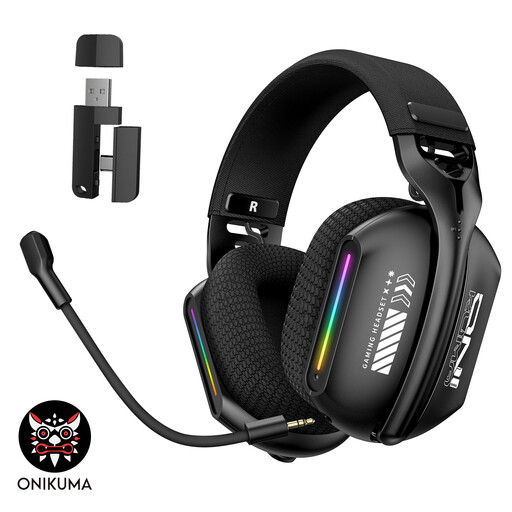
ONIKUMA GT808 Triple-Mode Wireless Headset
This model is relevant if you are choosing between connection modes for a PC or laptop setup. Check which mode carries the microphone to your commentary app, and whether charging fits the length of your sessions.
View on Joybuy
 No image available
Turtle Beach Stealth 500 Wireless Headset for PC, PS5 and PS4, Black
A wireless option whose title names PC, PS5 and PS4. Check fit for a full commentary session and confirm that the microphone and any app controls work with your chosen device and software.
View on Joybuy
Common questions
Should I choose a wired or wireless headset for desk commentary?
Choose wired if you stay at one desk and want to avoid charging; consider 2.4 GHz wireless if movement and less cable clutter matter more. Check the required port and microphone compatibility either way.
Will a USB headset work with every commentary setup?
No: microphone input and additional features can depend on the device and operating system. Razer states that the BlackShark V2 X USB's 7.1 feature requires Windows 10 64-bit, so check your exact headset variant, platform and commentary app separately.
Can I hear the match and my phone at the same time?
You can if the headset supports simultaneous audio from both devices. SteelSeries states that the Arctis Nova 7 Wireless Gen 2 mixes game audio through its USB-C dongle with Bluetooth mobile audio; confirm how your chosen headset routes its microphone to the commentary app.


