For a home-studio multiplayer lobby, start with a microphone you can mute quickly and a connection confirmed for your exact PC, console or controller. A wired headset avoids charging at a fixed desk; choose a compatible 2.4 GHz receiver for wireless game audio, or add Bluetooth if switching to a phone matters enough to justify checking how the two modes work.
Who is this for?
Players who rely on lobby chat
If teammates need to hear you clearly and you need to stop transmitting promptly, examine the boom microphone and mute control on the exact model. A stated noise-reduction feature is not, by itself, a measure of how you will sound to others.
Players choosing between a cable and a receiver
At a fixed desk, a wired headset avoids a charging routine, provided its connection fits your device. If freedom to move matters more, check the wireless receiver, available USB port and charging needs before choosing a 2.4 GHz model.
Players who also use a phone
If you move between a PC or console lobby and a phone, check which devices support the headset’s 2.4 GHz and Bluetooth modes. SteelSeries and Razer describe these connection options for particular models, but switching behaviour depends on the headset you choose.
What matters when choosing?
Decide which device must run the lobby first, then weigh microphone control, connection type and long-session fit. For the needs below, each consumer is counted under the one concern that would most influence their choice.
| Concern |
What to check |
Who this matters to |
| Lobby voice and muting |
Check the boom microphone and how to mute it directly; confirm whether mute status is visible if you need that cue. |
When I coordinate a lobby, I need teammates to hear me and I want to stop transmitting without searching through settings. Around 29% of consumers put voice control first. |
| Platform and connection fit |
Match the exact device and its ports to the supplied cable or receiver; check which features work in your intended mode. |
If I move between gaming devices, a headset is useful only when it connects as intended to the ones I own. Around 29% of consumers make compatibility their primary concern. |
| Long-session comfort |
Consider stated weight and pad materials, then check the seller’s return terms in case the fit does not suit you. |
During a long lobby session, I would notice pressure or heat more than an extra audio setting. For around 24% of consumers, fit comes first. |
| Wireless convenience |
Check the gaming connection, whether Bluetooth switches or plays alongside it, and battery claims for the mode you will use. |
I want to move around my desk or switch to my phone, but I need a charging routine that fits my sessions. Wireless convenience is the main concern for around 18% of consumers. |
Mistakes to avoid
-
Assuming “multi-platform” means every feature works everywhere
Connections and features vary by model and device. Corsair specifies that Dolby Atmos on the HS80 RGB Wireless is for PC, although it also lists PlayStation receiver compatibility.
Check your exact headset variant, the supplied cable or receiver, and any software or spatial-audio feature separately against your device.
-
Treating Bluetooth and gaming wireless as interchangeable
RTINGS describes a wireless dongle as a way to keep game audio in sync. Bluetooth may serve a different purpose, such as connecting a second device.
If game-audio timing matters, check for a compatible 2.4 GHz receiver. Add Bluetooth when you have a use for its phone or device-switching mode.
-
Reading an “up to” battery figure as session length
Manufacturer battery claims can change with connection mode. HyperX quotes up to 120 hours on 2.4 GHz and up to 200 hours on Bluetooth for the Cloud III S Wireless; neither figure promises your actual runtime.
Compare claims in the mode you intend to use and plan when you will charge. If you would rather avoid that routine, consider a wired headset.
Charging may interrupt a session if the headset cannot be used in the way you need while its battery runs low.
-
Putting an old headset in household rubbish
GOV.UK advises that electrical waste and batteries should be recycled rather than put in household rubbish.
Use an appropriate electrical-waste collection route and follow local guidance for any removable battery.
Brands to consider for these headset features
SteelSeries
The Arctis Nova 5 is relevant if you want to switch between a 2.4 GHz gaming connection and Bluetooth.
- SteelSeries describes switching between the two modes with a button on the Nova 5.
- Check the selected platform version and whether its switching behaviour fits your devices; do not assume another Nova model works the same way.
Logitech G
The PRO X 2 offers a choice of connection methods for players comparing wireless and wired use.
- Logitech G lists LIGHTSPEED wireless, Bluetooth and 3.5 mm connections for the PRO X 2.
- Check which connection and software features work on your platform rather than applying one PRO model’s specifications to another.
HyperX
The Cloud III range gives desk-based players a choice between a wired model and the Cloud III S Wireless.
- HyperX lists 3.5 mm, USB-C and USB-A connection options for the wired Cloud III, and 2.4 GHz and Bluetooth modes for the Cloud III S Wireless.
- The Cloud III S Wireless battery figures are manufacturer maximums that differ by mode; confirm the connection options of the exact model you select.
Razer
The Barracuda X is relevant when a gaming connection and a Bluetooth device both feature in your setup.
- Razer describes the Barracuda X as able to connect to a 2.4 GHz device and a Bluetooth device at once.
- Confirm how audio and microphone use behave with your chosen devices; the Barracuda X description does not define every Razer headset.
Corsair
The HS80 RGB Wireless is worth examining if you use a PC or a compatible PlayStation setup and want to compare wireless features.
- Corsair lists PlayStation receiver compatibility for the HS80 RGB Wireless.
- Corsair limits its stated Dolby Atmos feature to PC; check the receiver and other features for your exact platform.
Joybuy headset choices
These headsets offer wired or wireless choices for a fixed gaming desk. Match each model’s connection and microphone controls to your own lobby device before deciding; the list does not establish which fit will feel comfortable to you.
 No image available
ASUS ROG Pelta Wireless Gaming Headset – Black
Consider this wireless model if you want to move around a home-studio desk while staying in a lobby. Confirm the connection, receiver and microphone controls for your exact device before buying.
View on Joybuy
 No image available
LOGITECH ASTRO A10 Gen 2 Wired Headset – White
Wired use suits a fixed desk if you would rather avoid charging a headset. Check how this model connects to your PC or controller and how you will mute the microphone during chat.
View on Joybuy
 No image available
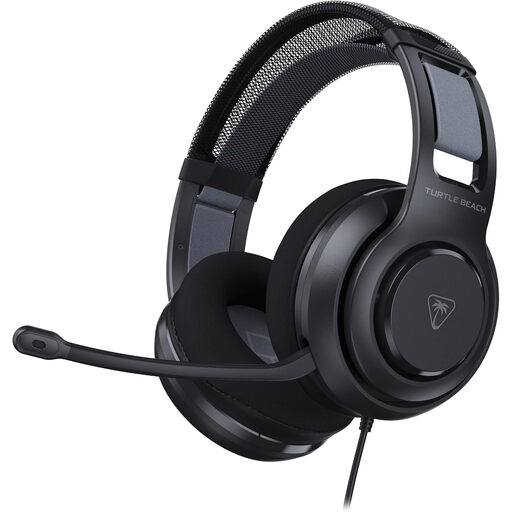
Turtle Beach Atlas 200 Gaming Headset – Black
This is another wired option for a desk-based lobby. If you wear glasses for long sessions, consider how its cushions fit you, and confirm the connection to your gaming device.
View on Joybuy
 No image available
Turtle Beach Stealth 500 Wireless Headset for PC, PS5 and PS4 – Black
Consider this wireless model if you want fewer cables at your desk or need to move between gaming and phone use. Check the receiver and switching behaviour for your setup, and allow for charging.
View on Joybuy
 No image available
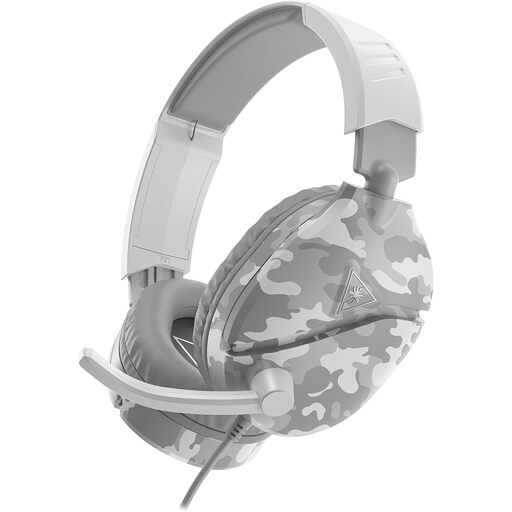
Turtle Beach Recon 70 Wired Headset for PS5, PS4 and Xbox Series X/S and Xbox One – Camo White
This wired model may suit a fixed console position where charging is inconvenient. Confirm that your exact controller or device accepts its connection and check how microphone muting works.
View on Joybuy
Common questions
Is Bluetooth alone enough for a multiplayer lobby?
Do not assume Bluetooth will suit timing-sensitive game audio. RTINGS notes that wireless gaming headsets commonly use a dongle to keep audio in sync; check whether the headset includes a compatible gaming receiver and how its Bluetooth and microphone modes behave.
How do I check whether a headset will work with my setup?
Identify your exact PC, console, controller or phone, then match its ports to the headset’s supplied cable or receiver and stated compatibility. Check individual features too: Corsair limits Dolby Atmos on the HS80 RGB Wireless to PC despite listing PlayStation receiver compatibility.
What if an online headset is unsuitable or faulty?
For UK online orders, GOV.UK describes a limited period in which customers can cancel an order; check the applicable timing and return steps before you rely on a change-of-mind return. A faulty or misdescribed headset raises a separate question about remedies, rather than simply whether the retailer accepts voluntary returns.
How should I dispose of an old gaming headset?
Use an appropriate electrical-waste recycling route instead of putting the headset in household rubbish, as GOV.UK advises for electrical products. Follow local battery guidance if the headset has a removable battery.


