Choose the connection to your recording device before comparing microphone features: a headset needs to deliver your voice to the app you will use, not just support game chat. A wired model avoids charging at a fixed desk, while wireless models offer more freedom but call for checks on battery life and microphone behaviour in the chosen wireless mode.
Who needs which setup?
PC podcasters who want voice controls
If you record on a PC and want to adjust your microphone sound, check that the exact headset supports those controls through your connection and recording software. Logitech G, for example, specifies PC software requirements for advanced features on its wired PRO X.
Creators recording at a fixed desk
A wired connection avoids charging before an episode. Check the recording computer’s ports and the headset’s connector: HyperX specifies USB-C, USB-A and 3.5 mm routes for Cloud III, while Razer offers a USB connection on BlackShark V2 X USB.
Players using more than one device
If you alternate between gaming hardware and another device, check how the microphone works in each mode before relying on wireless switching. SteelSeries specifies 2.4 GHz and Bluetooth switching for Arctis Nova 5; its stated battery life still needs to fit your session plan.
What matters when choosing?
Start with the device and app that will capture the podcast, then choose the microphone controls and wired or wireless arrangement that suit your sessions.
| Concern |
What to check |
Who this matters to |
| Voice capture and control |
Check microphone positioning and mute controls, plus whether any voice-processing settings work on your recording PC. |
I want my speech to remain intelligible alongside game audio and to adjust it when needed; around 33% of consumers put voice capture and control first. |
| Recording-device compatibility |
Confirm the device’s port and microphone-input support through the intended USB, 3.5 mm or wireless connection. |
If I switch between gaming devices, I need the headset microphone to reach the device recording the episode; around 27% of consumers make connection compatibility their primary concern. |
| Long-session wireless use |
Consider fit, the stated battery limit and whether the required microphone mode works with your device. |
For longer play-and-record sessions, I want freedom from a cable without an interruption halfway through; around 20% of consumers prioritise wireless continuity and comfort. |
| Simple wired use |
Check the headset jack or USB connection, microphone mute control and whether an adapter is needed. |
If I record only occasionally, I would rather use a straightforward connection than configure wireless or PC voice software; around 20% of consumers put simple wired use first. |
Mistakes to avoid
-
Assuming PC voice controls work on every device
Logitech G specifies that advanced Blue VO!CE functions on its wired PRO X require a PC and G HUB. Console or mobile compatibility does not establish access to the same controls.
Identify the device that will record the podcast, then check the exact headset model’s connection and software requirements.
-
Taking microphone descriptions as a recording result
Terms such as noise-cancelling describe a headset feature, not how your voice will sound beside your keyboard, fans or co-hosts in your room.
Record a short clip in your intended setup and listen for speech clarity, background sound and changes when you move the microphone.
-
Choosing wireless without checking the recording mode
A stated battery maximum does not guarantee a particular episode length, and a headset’s dongle and Bluetooth modes may handle microphone input differently.
Check the microphone path for the mode you intend to use and plan charging before a long session.
-
Turning up monitoring to overcome room noise
The World Health Organization advises that hearing risk rises with both sound level and listening duration.
Keep monitoring at a comfortable level and reduce surrounding noise where possible rather than continually increasing headset volume.
Brands to consider for this setup
Logitech G
Relevant if you record on a PC and want to compare wired and wireless headsets with microphone settings.
- Logitech G specifies Blue VO!CE settings for PRO X3 LIGHTSPEED and its wired PRO X.
- Advanced Blue VO!CE features on the documented wired PRO X require PC use through G HUB; do not assume the same controls work on console or mobile.
SteelSeries
Relevant when switching between game audio and another Bluetooth-connected device matters to your recording routine.
- SteelSeries specifies a USB-C dongle and 2.4 GHz/Bluetooth switching for Arctis Nova 5.
- Its stated battery figure is a maximum; confirm microphone input on the device and wireless mode you will record with.
Razer
Offers distinct wireless and wired USB headset routes to compare against your recording-device connection.
- Razer specifies a Super Wideband microphone for BlackShark V2 Pro and USB sound processing for BlackShark V2 X USB.
- Those descriptions do not establish voice quality in your room. Razer specifies Windows 10 64-bit for the USB model’s 7.1 feature.
HyperX
Relevant if a wired headset with several connection options would suit a desk or multi-device setup.
- HyperX specifies USB-C, USB-A and 3.5 mm connections, a 10 mm microphone and a mic-mute indicator for Cloud III.
- Confirm that the recording device accepts microphone input through the particular connection you intend to use.
Turtle Beach
Relevant if a basic wired game-chat headset is sufficient for occasional podcast recording.
- Turtle Beach specifies a removable microphone, 3.5 mm connection and in-line controls for Recon 50.
- Check the device’s headset jack and whether it needs an adapter or controller for microphone input.
Gaming headsets on Joybuy
These wired and wireless gaming headsets offer different starting points for a podcast setup. Choose by the connection to your recording device, then check microphone input in the app and mode you plan to use.
 No image available
Turtle Beach Stealth 600 Gen3 Wireless Headset, Black
A wireless option to consider if you game on PS5, PS4 or PC while planning a separate voice-recording path.
Check microphone input in your recording app and chosen wireless mode before relying on it for an episode.
View on Joybuy
 No image available
ASUS ROG Pelta Wireless Gaming Headset, Black
Consider this wireless model if you want to compare connection choices for a gaming and recording setup.
Check microphone input in the intended recording app for the connection you will use. The stated battery figure applies to 2.4 GHz mode with RGB off, not every recording setup.
View on Joybuy
 No image available
Edifier G2II Wired USB Gaming Headset, Black
A wired USB option for a fixed recording desk if its microphone works with your chosen app.
The product name lists PC, PS4 and Mac compatibility, a noise-cancelling microphone, 50 mm drivers and 7.1 surround sound. The listing says it is not for Xbox.
View on Joybuy
 No image available
Turtle Beach Stealth 500 Wireless Gaming Headset, Black
This wireless model is labelled for PC, PS5 and PS4; choose the device that will record your podcast before settling on a connection.
Confirm microphone input in your recording app and wireless mode. Its stated battery maximum is not a guaranteed recording runtime.
View on Joybuy
 No image available
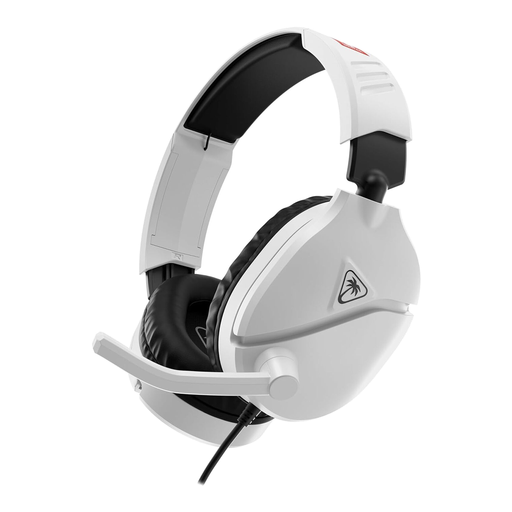
Turtle Beach Recon 70N Nintendo Licensed Gaming Headset, White
A wired option if you want to use a Nintendo Switch for gaming and can connect its microphone to your recording device.
Check the intended device’s 3.5 mm headset connection and microphone-input behaviour; compatibility with other devices depends on the model.
View on Joybuy
Questions about recording
Should I use USB, 3.5 mm or wireless for a gaming podcast?
Use a connection that carries the headset microphone to the device recording your podcast. HyperX specifies USB-C, USB-A and 3.5 mm options for Cloud III, while Razer says BlackShark V2 X USB uses its own sound processing. Check microphone input through the exact connection and app you intend to use.
Will a noise-cancelling headset microphone remove room noise?
Do not count on a microphone description to remove every sound in your room. HyperX and Razer describe noise-reduction features on particular models, but a test clip with your usual keyboard, fans and speaking distance is more useful for judging your recording setup.
What should I do with an old gaming headset in the UK?
Check the electrical-equipment recycling options available locally rather than putting a headset straight into general waste. GOV.UK explains that UK waste electrical and electronic equipment rules aim to reduce the amount incinerated or sent to landfill.
How can I monitor long sessions without turning the sound up too far?
Keep headset monitoring at a comfortable level and take breaks during extended sessions. The World Health Organization advises that hearing risk increases as sound gets louder and exposure lasts longer; reducing surrounding noise can help you avoid repeatedly raising the volume.


