What should you check before buying?
Decide which device will capture the podcast and how you will hear your own voice, then check microphone placement and long-session fit; consider cable freedom only alongside its charging requirements.
| Concern |
What to check |
Who this matters to |
| Voice capture in the room |
Check boom-microphone positioning and make a short recording with your usual keyboard, game audio and speaking level. Treat noise-reduction features as model-specific claims, not a substitute for listening to the result. |
If keyboard sounds or nearby activity could enter my podcast, I want to hear what my microphone actually captures before recording an episode. Around 36% of consumers put voice capture first. |
| Connections and monitoring |
Match the headset connector to the recording device and any headphone output used for monitoring. Confirm microphone support on the exact device, not just game-audio playback. |
When I move between a controller and a recording setup, I need both voice input and monitoring to work on the connections I use. For around 29% of consumers, that compatibility is the primary concern. |
| Comfort and playback isolation |
Assess ear-pad fit and stated weight for longer sessions. Check whether closed-back earcups meet your listening needs without mistaking them for microphone noise removal. |
I may spend longer wearing the headset than the finished episode lasts, so pressure and distracting room sound matter while I play and edit. Comfort and playback isolation come first for around 21% of consumers. |
| Cable freedom and charging |
Check which wireless mode the recording device accepts and plan when to charge. If considering a wired fallback, confirm that the model and device support the intended wired functions. |
A cable gets in my way at the desk, and I am willing to manage charging to avoid it. Around 14% of consumers make that convenience their primary concern. |
Joybuy headset options
These models cover wired 3.5 mm, wired USB and wireless headset choices for the student-room recording decision. Choose by the connector your devices accept and the fit you need, then listen to a test recording rather than treating listed microphone features as a result you will necessarily hear.
 No image available
Logitech ASTRO A10 Gen 2 wired headset, white
Consider this wired model if a straightforward headset connection suits your recording device. Confirm that the device accepts its 3.5 mm connection for microphone input as well as listening, and test the recorded voice in your room.
View on Joybuy
 No image available
Edifier G2II USB wired gaming headset, black
Consider this USB option for a recording setup that accepts a USB headset. The product name lists PC, Mac and PS4 use, 50 mm drivers and 7.1 surround sound; check microphone operation with your recording software. The listing rules out Xbox use, and its stated features do not establish podcast-recording quality.
View on Joybuy
 No image available
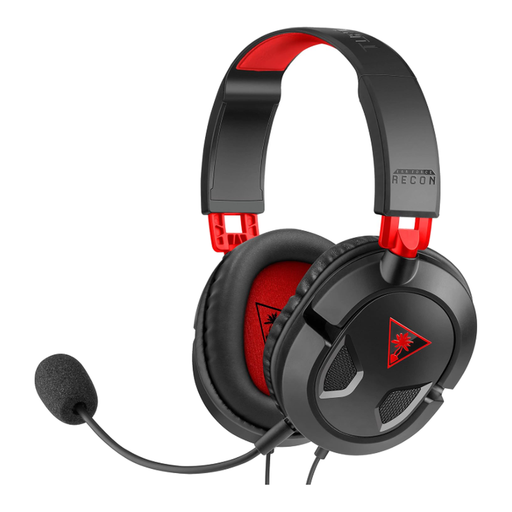
Turtle Beach Recon 50 wired headset
Consider this model if a wired gaming headset needs to move between a PC and the consoles named in its product listing: Xbox Series X or S, Xbox One, PS5 and PS4. Check the microphone connection on your recording device and assess fit for the length of your sessions; the listed device range does not establish recorded voice quality.
View on Joybuy
 No image available
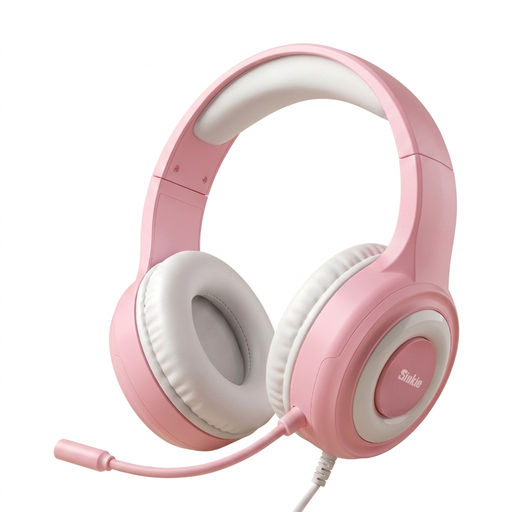
Siukie CH25 wired over-ear headset
Consider this model only after checking how its connections fit your gaming and recording devices. Its product name lists 3.5 mm and USB connections and 50 mm drivers; confirm the separate audio and microphone plug requirements and do not assume that USB carries the recording audio. Check support for your exact device and make a voice test.
View on Joybuy
 No image available
ASUS ROG Pelta wireless gaming headset, black
Consider this wireless model if fewer desk cables matter enough to make charging part of your recording routine. Confirm which connection mode carries the microphone on your intended device, whether a wired fallback meets your needs, and how a test recording sounds before relying on it for an episode.
View on Joybuy
Frequently asked questions
Should I choose USB or 3.5 mm for a gaming podcast?
Choose by the connection your recording and monitoring setup actually uses: USB is worth considering for documented PC processing, while 3.5 mm or a multi-connector headset can suit a controller or analogue headphone output. Logitech G limits advanced PRO X Wired Blue VO!CE features to PC use through G HUB; HyperX lists 3.5 mm alongside USB options for Cloud III. Confirm microphone and monitoring functions on the connection you intend to use.
Can I monitor an external USB microphone through a gaming headset?
Yes, if the headset has a connection compatible with the monitoring output you plan to use. For Elgato Wave:3’s documented real-time-monitoring setup, Elgato requires 3.5 mm analogue headphones connected to the microphone’s headphone output; a USB-only headset does not fit that particular path. Check the output on any other microphone or interface separately.
Will closed-back earcups remove noise from my podcast recording?
No: closed-back construction concerns sound reaching your ears, not a guaranteed reduction in sound captured by the microphone. Razer describes passive earcup isolation separately from its microphone pickup claims. Record a clip with your usual keyboard, fan and speaking level to assess the microphone track.
Is a wireless headset practical for recording?
It can be, provided the headset is charged and its intended connection mode supports microphone input on your recording device. HyperX lists 2.4 GHz and Bluetooth modes for Cloud III S Wireless, but those options do not establish support on every device or remove the need to check charge before a session.
How should I dispose of an old headset?
Check your local electrical-waste collection instructions or an appropriate retailer take-back route. Durham County Council lists headphones among small electrical items accepted under its local arrangements; your own area’s accepted items and collection points may differ.


