Players keeping cables out of the mouse area
If a headset lead would cross your aiming space, a 2.4 GHz wireless connection and a receiver that fits your setup matter more than having every possible connection mode.


Choose a wired USB or 3.5 mm headset if you can keep its cable clear of your mouse and want to avoid charging. A 2.4 GHz wireless model removes that cable from the desk but needs a compatible receiver port and charging; extra connection modes are worth considering when you will use them with other devices. Audio presets may help you distinguish cues supplied by a game, but they will not improve mechanical aim on their own.
If a headset lead would cross your aiming space, a 2.4 GHz wireless connection and a receiver that fits your setup matter more than having every possible connection mode.
If you practise recognising footsteps and other sounds supplied by your shooter, compare its own audio settings with any headset presets. Neither spatial audio nor an EQ setting replaces aim practice.
If you mainly play at one desk, a compatible USB or 3.5 mm headset avoids charging. You will still need a cable route that stays clear of the mouse and chair.
At a small desk, decide where a cable or wireless receiver will sit before weighing audio settings against the simplicity of a wired connection.
| Concern | What to check | Who this matters to |
|---|---|---|
| Cable-free mouse space | For 2.4 GHz wireless, check the exact variant, receiver connector, available USB port and charging arrangement. | If a lead would cross my mouse area, I want it off the desk without finding that the receiver will not fit my device; roughly 44% of consumers would put cable-free space first. |
| Distinguishable game cues | Try the shooter's own stereo or positional-audio settings; check game, software and operating-system support for headset presets. | When practising a shooter, I want to hear the cues the game provides without assuming a surround label will improve my aim; around 33% of consumers would prioritise audio tuning. |
| Simple setup and fit | Check the device's USB or 3.5 mm connection, cable path, headset fit and any software-dependent features. | At a fixed desk, I would rather manage one cable than charge a headset, provided it fits and stays clear of play; approximately 23% of consumers would make straightforward wired use their priority. |
Presets and surround processing change how available game sounds are presented. Their usefulness depends on the game, settings and listener; they do not improve mouse or controller control.
Compare stereo, the game's positional-audio option and any headset preset in the shooter you practise.
Wireless support can differ between variants and platforms, while a receiver occupies a USB port.
Match the exact model, receiver connector and intended device before buying, and check whether an adapter is included if you need one.
Manufacturer battery figures are stated maximums, not a promise for every set of settings. Wireless use also needs a charging routine.
Check the charging connector and the conditions attached to the stated runtime, then choose a charging position that works on your desk.
Comfort depends on the wearer, and audio features may be operating-system specific. Razer lists the BlackShark V2 X USB's 7.1 surround feature for Windows 10 64-bit only.
Check software support for the feature you intend to use, and review the seller's return terms before trying the headset for fit and microphone operation.
Its Arctis range includes wired and wireless choices; the exact Nova variant matters when choosing a platform and receiver.
The PRO X 2 is relevant when one headset needs to move between gaming and other compatible devices.
The BlackShark models provide examples of both wireless and wired connection choices for shooter play.
These choices include wireless headsets for keeping a cable out of the mouse area and a wired USB option for a fixed desk. Check each model's connections against the device you use for shooter practice.
 No image available
Consider this wireless model if a headset lead would cross your mouse area. Check whether its specified USB-C dongle fits your device or needs a compatible adapter, and allow for charging.
 No image available
For a PS5, PS4 or PC desk where you want the headset cable out of the way, this is a wireless option. Leave a USB port for its transmitter and plan to charge it; stated battery runtime should not be treated as a guarantee for every setup.
 No image available
This wireless model suits a PC or PlayStation setup where a headset cable would get in the way. It needs charging and a USB port for its receiver. Before judging comfort, check the listed weight of approximately 1 lb (454 g) against the lightweight description.
 No image available
For a fixed desk where you can route a cable away from the mouse, this USB headset avoids a charging routine. Its title lists a 50 mm driver, RGB lighting, a microphone and 7.1 surround sound; check operating-system support for the audio software before relying on that feature.
 No image available
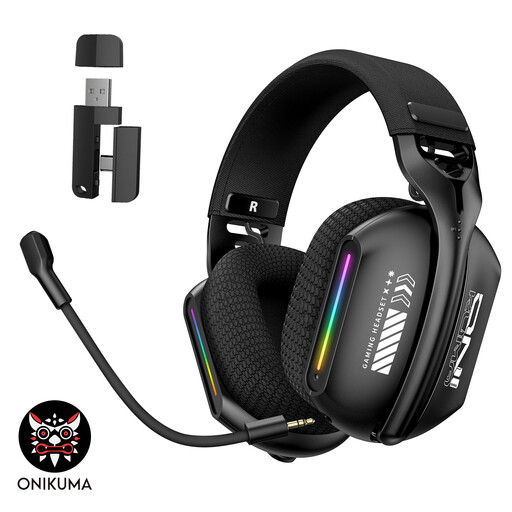
Consider its listed 2.4 GHz wireless mode if you want the headset cable away from your PC or laptop mouse area. Check the receiver connector, adapter inclusion and device compatibility before buying; wireless use also requires charging.
A headset will not improve mechanical aim by itself. It may help you distinguish sounds provided by the game, so compare its settings with the shooter's own audio options rather than treating an FPS preset as a training result.
Wireless is worth considering when a headset cable would cross your mouse area. A 2.4 GHz model still needs a compatible receiver port and charging; a wired headset remains straightforward if you can route its lead clear of play.
Match the exact headset variant and connection method to your device, not just the product family name. Check the receiver or plug, available ports and any operating-system conditions for the audio features you intend to use.
Keep volume at the lowest practical level, take breaks and use available volume controls or exposure warnings. The World Health Organization's safe-listening standard for video gameplay discusses controls, warnings and headphone safety modes; the features available to you depend on your equipment.
For most UK online orders, GOV.UK says customers can cancel within 14 days of receiving the item, subject to applicable exceptions. Check the seller's return instructions if fit is uncertain; if a headset is faulty, ask the seller about applicable remedies rather than relying only on a manufacturer warranty.