Choose the headset around how you will connect and record your voice, rather than its surround-sound features alone. PC software controls may suit a narrator willing to configure them; a compatible wired 3.5 mm headset keeps the connection simple, while wireless switching is useful if moving between devices matters enough to justify a dongle and charging.
Who each setup suits
PC walkthrough narrators
If you record on a PC and want to adjust your microphone sound, a headset with compatible voice software is worth considering. Logitech G lists noise reduction, compression and de-essing among its BLUE VO!CE controls, but its advanced features require G HUB on PC.
Small-desk minimalists
If you prefer a wired connection without charging or a wireless receiver, check whether your recording device accepts the headset’s connector. Joybuy lists the BlackShark V2 X Green with a 3.5 mm analogue connection.
Multi-device creators
If you regularly switch between compatible gaming devices and a phone, wireless switching may be useful. SteelSeries specifies 2.4 GHz and Bluetooth 5.3 Quick-Switch connectivity for the Arctis Nova 5; confirm the dongle fits the device you will record on.
What to check before buying
For a small-desk walkthrough, settle the recording connection first, then check the microphone controls and whether the headset will be comfortable for the length of your takes.
Wired headset with PC voice software
Choose it when: You record on a PC and want to configure microphone processing.
Trade-off: The controls may depend on software and platform; Logitech G says advanced BLUE VO!CE functions require G HUB on PC.
Wired 3.5 mm headset
Choose it when: A straightforward wired connection matters most and your device has a suitable headset input.
Trade-off: Check the device’s input arrangement rather than assuming one 3.5 mm connection fits every computer or controller.
2.4 GHz wireless headset
Choose it when: Removing the headset cable or switching to phone audio is a genuine priority.
Trade-off: A dongle needs a compatible port, and the headset needs charging; confirm which connection carries the audio you intend to record.
| Concern |
What to check |
Who this matters to |
| Narration control |
Check boom-mic positioning and whether any voice controls work with your recording device and software. |
If my voice needs to remain intelligible over gameplay, I want a microphone path I can position and adjust. Around 42% of consumers put narration control first. |
| Connection simplicity |
Match the exact headset connector or dongle to an available port; account for charging if choosing wireless. |
At a small desk, I would rather settle the connection quickly than manage extra devices. Connection simplicity comes first for around 33% of consumers. |
| Comfort and monitoring |
Consider fit for your session length, then check recorded voice and game levels with a short playback test. |
For a long take, I need a headset I can wear comfortably and a recording I can judge accurately. Around 25% of consumers prioritise comfort and monitoring. |
Mistakes to avoid
-
Assuming voice software works on every device
A microphone-control feature advertised for PC may not be available when you record on a console or phone. Logitech G specifies that advanced BLUE VO!CE and DTS Headphone:X 2.0 functions require G HUB on PC.
Check the exact headset model, recording device and software requirements before choosing it for those controls.
-
Choosing a headset before checking its connection
A 3.5 mm plug, USB connection and wireless dongle place different demands on your recording device and desk setup.
Identify your available ports and headset-jack arrangement, then check the connector for the particular model and variant.
-
Judging recording level by headphone loudness
Comfortable playback volume does not tell you whether the captured microphone signal is clipping.
Make a short spoken recording with representative game audio. Check the OBS Studio meters and listen back before recording the full walkthrough.
-
Using surround sound as a shortcut for microphone quality
A surround feature affects playback or monitoring; it does not establish how clear the recorded narration will be. Platform conditions can also limit its availability.
Check microphone placement and the recording input separately, and treat surround support as a distinct playback consideration.
Relevant brands to consider
Logitech G
Relevant to PC narrators considering a wired headset with software-based microphone controls, including the PRO X range.
- Logitech G lists BLUE VO!CE controls for noise reduction, compression and de-essing.
- Advanced BLUE VO!CE and DTS Headphone:X 2.0 functions require G HUB on PC.
Razer
Relevant when comparing wired BlackShark connections and boom-microphone positioning.
- Razer specifies a bendable cardioid microphone and 240 g weight for the BlackShark V2 X.
- Razer states that this model’s virtual 7.1 feature is limited to Windows 11; it does not establish recorded voice quality.
SteelSeries
Relevant when a wireless connection and switching between compatible devices matter more than keeping one headset connected to the desk.
- SteelSeries specifies a USB-C dongle and 2.4 GHz/Bluetooth Quick-Switch for the Arctis Nova 5.
- Check dongle compatibility and allow for charging before choosing it for a fixed recording setup.
ASUS ROG
Relevant to buyers considering a wired boom-mic headset without making PC voice software part of the setup.
- ASUS specifies a 3.5 mm connection, detachable unidirectional boom microphone and two ear-cushion options for the ROG Delta S Core.
- Compare the stated cushion options for fit; this model is not the software-control route described for compatible PC headsets.
Joybuy headset choices
These headsets offer wired choices for a small-desk recording setup alongside a wireless option for consumers who want connection flexibility. Check each model’s microphone connection with the device that will capture your walkthrough.
 No image available
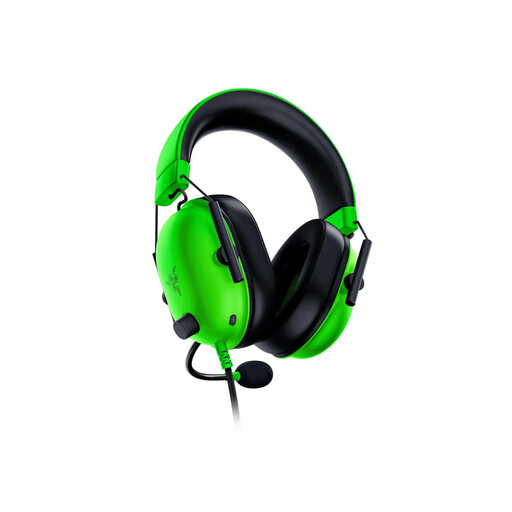
Razer BlackShark V2 X Green
Consider this wired model if your recording device accepts a 3.5 mm analogue headset connection. Joybuy lists the Green variant at approximately 240 g; check the fit for your session and test the recorded microphone level before a full take.
View on Joybuy
 No image available
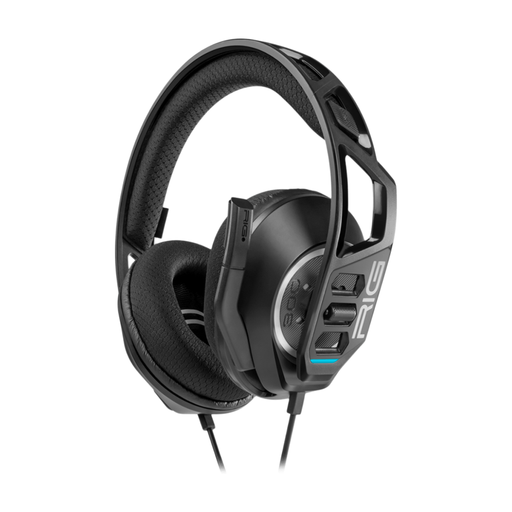
Nacon RIG 300 PRO HN Wired Headset, Black
A wired option for recording at a desk. Confirm that your device accepts this variant’s headset connection, and make a short narration test to assess the captured microphone sound.
View on Joybuy
 No image available
ONIKUMA K8 Wired Gaming Headset with Flexible Mic
The flexible microphone is relevant if you want to adjust its position while narrating. Check how its audio and microphone connections fit your recording device; its RGB lighting is separate from the question of recorded voice quality.
View on Joybuy
 No image available
Edifier G2II USB Wired Gaming Headset, Black
Consider the USB route if it suits your recording computer’s available ports. The product name specifies a 50 mm driver and names PC, PS4 and Mac compatibility; check any microphone software controls on the device you plan to use, then test the recording.
View on Joybuy
 No image available
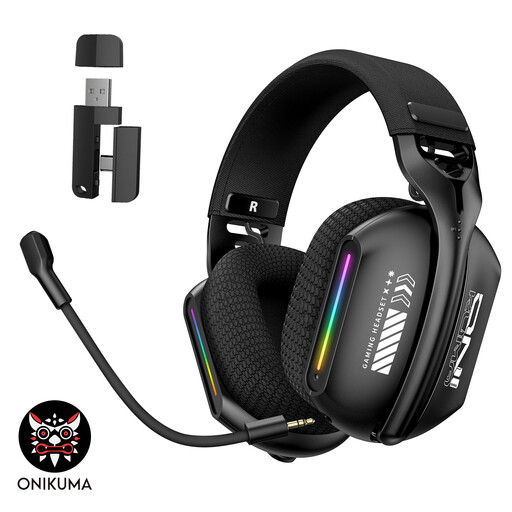
ONIKUMA GT808 Triple-Mode Wireless Headset
A connection-flexible choice if you do not want to commit to a permanently wired desk setup. The product name identifies a 2.4 GHz wireless mode; confirm the connector or dongle for the mode you will record with, and plan for charging and a test recording.
View on Joybuy
Frequently asked questions
How should I set voice and game levels before recording?
Make a short test recording and inspect the OBS Studio mixer, then listen back. OBS Studio advises keeping speech near the lower end of the red meter range and gameplay lower; adjust the inputs if the recording clips or the voice is hard to follow.
Will surround sound make my recorded narration clearer?
No: surround playback is separate from the microphone signal captured for narration. Check boom-mic placement, input level and a test recording instead; Razer states that the BlackShark V2 X virtual 7.1 feature is limited to Windows 11.
Will microphone filters work when I switch devices?
Only if the specific filter supports the new device and its required software. For example, Logitech G says advanced BLUE VO!CE and DTS Headphone:X 2.0 functions require G HUB on PC.
What should I do with an old headset in the UK?
Use an appropriate electrical-equipment collection or recycling route rather than general waste. GOV.UK’s WEEE guidance covers electrical and electronic equipment; check your local council’s arrangements for the headset you are disposing of.


