Choose a headset with a boom microphone you can control easily, then check whether its connection and audio settings work on the device you use for team chat. A wired model avoids charging at a fixed desk; if you want to move without a cable, a compatible 2.4 GHz USB-transmitter model is the more relevant PC-gaming route, while Bluetooth can provide a separate connection for a phone.
Who needs which features?
Squad players in a noisy home office
If keyboard sounds or nearby conversation compete with your voice, look for a boom microphone, accessible mute control and noise-handling settings that work on your chat platform. Microphone features described by Turtle Beach and SteelSeries may depend on the headset and its software.
PC players listening for directional cues
Check how a headset handles footsteps and other cues in the games you play. Spatial-audio settings and adjustable EQ need compatible software and game audio; a surround-sound label alone cannot tell you how clearly you will locate a sound.
Long-session, multi-device gamers
If gaming, phone audio and work calls share your desk, check how the headset switches sources, how it charges and whether its fit remains comfortable. Connection options described by SteelSeries, Turtle Beach and Logitech G differ by model and variant.
What should you check?
Start with the microphone and the device used for voice chat, then check how you will hear game cues. Choose a connection method before comparing comfort and charging routines.
| Concern | What to check | Who this matters to |
|---|
| Clear team callouts |
Check the boom microphone and mute control, plus whether any noise-processing or mic-EQ setting works on your chat platform. |
If keyboard or household noise gets into team chat, I need teammates to understand a short callout without asking me to repeat it. Roughly 36% of consumers would make microphone clarity their primary concern. |
| Directional game audio |
Check spatial-audio compatibility with your game and platform, and whether EQ settings require an app. |
When a sound comes from outside my view, I want to locate it before telling the team where to look. Around 29% of consumers would put directional cues first. |
| Connection and latency |
Check the exact PC or console variant and transmitter; find out whether Bluetooth switches sources or can play alongside game audio. |
If I game at my desk but also use a phone, I need a suitable game connection without making the second device awkward to use. About 21% of consumers would prioritise connection flexibility and latency. |
| Long-session use |
Compare fit and stated weight; for wireless models, check charging needs and the conditions behind battery claims. |
When a session runs long, I need the headset to stay comfortable and its charging routine to fit around play. Roughly 14% of consumers would put long-session use first. |
Buying pitfalls
-
Assuming every wireless mode works alike
Bluetooth and a dedicated 2.4 GHz USB transmitter serve different purposes. SCAN UK recommends 2.4 GHz for PC gaming where connection latency matters; Bluetooth support does not establish that a headset will work the same way on your console.
Check the exact variant, supplied transmitter and available ports before ordering.
-
Choosing surround-sound features but overlooking the microphone
Hearing a cue is only half the task if teammates cannot understand the resulting callout over background noise. Advertised microphone processing can depend on software and platform support.
Check the boom mic and mute controls, then try a short recording or voice-chat test on the platform you use.
-
Treating battery and noise-control claims as fixed results
Stated battery duration and noise-control features describe particular products and conditions, not every volume level or connection mode.
If either feature will decide your purchase, check the model's operating conditions and independent tests relevant to your use.
-
Turning up the volume to compensate for room noise
A louder headset does not resolve an unclear game mix or improve the microphone signal your team receives.
Use a comfortable listening level, take breaks and address room noise or fit where you can.
Brands to consider
SteelSeries
The Arctis Nova range includes a fixed-desk wired option and wireless models with more connection choices.
- SteelSeries lists a 3.5 mm connection and 253 g weight for Arctis Nova 1, while Arctis Nova 5 adds a USB-C wireless transmitter and Bluetooth switching.
- Nova 1 microphone processing uses Sonar software, so check its availability on your platform. Confirm the exact platform variant when considering a wireless Nova model.
Turtle Beach
The Stealth lines are relevant if you want wireless gaming alongside microphone and app controls.
- Turtle Beach lists 2.4 GHz wireless, Bluetooth 5.2, a flip-to-mute microphone and 10-band EQ for Stealth 600 Gen 3.
- Xbox and PlayStation variants can differ. Stealth Pro adds adjustable active noise cancellation and a removable boom mic, but those features should not stand in for checking fit and voice-chat behaviour.
Logitech G
PRO X 2 LIGHTSPEED is a model to compare if you want several ways to connect one headset.
- Logitech G lists LIGHTSPEED wireless, Bluetooth and 3.5 mm wired connections, alongside a cardioid microphone.
- Check software support, console compatibility and fit for the devices and sessions you have in mind; the brand's audio descriptions do not establish how well you will locate cues in your games.
Joybuy headset choices
These wired and wireless headsets offer different starting points for a home-office gaming desk. Match the listed platform variant to your devices, and assess microphone clarity and directional audio in the games and chat software you use.
 No image available
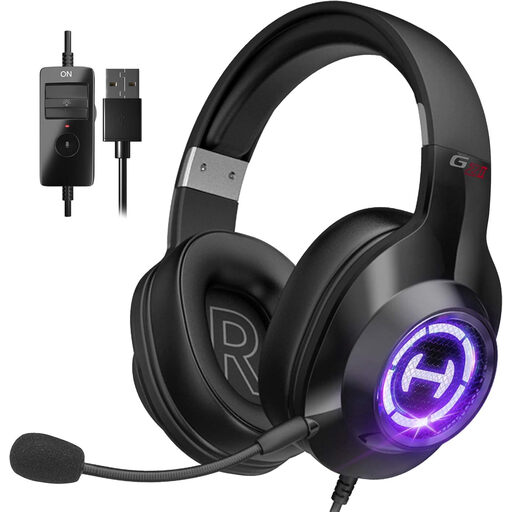
Edifier G2II USB Gaming Headset, Black
Consider this wired option for a fixed PC or PS4 desk where avoiding charging matters. Its title specifies USB, a microphone, 50 mm drivers and virtual 7.1 audio; check whether the audio and microphone software features work on your operating system. The listed variant is not for Xbox.
View on Joybuy
 No image available
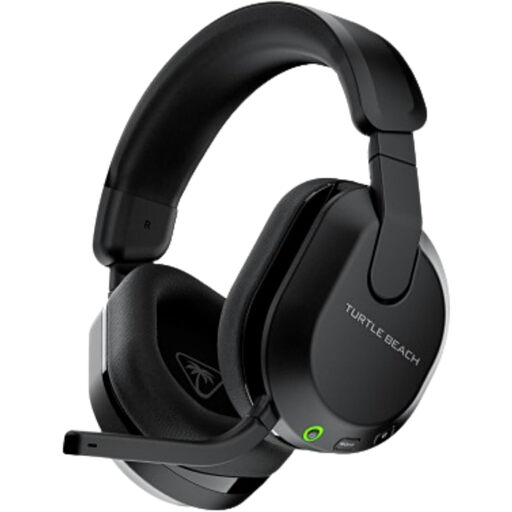
Turtle Beach Stealth 600 Gen 3 Wireless, PS5/PS4/PC, Black
Consider this variant if you game on a listed PlayStation or PC and also want a connection route for another device. Turtle Beach lists 2.4 GHz wireless, Bluetooth 5.2 and a flip-to-mute microphone for the Stealth 600 Gen 3 line; the Joybuy product description also describes microphone EQ through Swarm II. Check that this variant's transmitter and app controls suit your devices.
View on Joybuy
 No image available
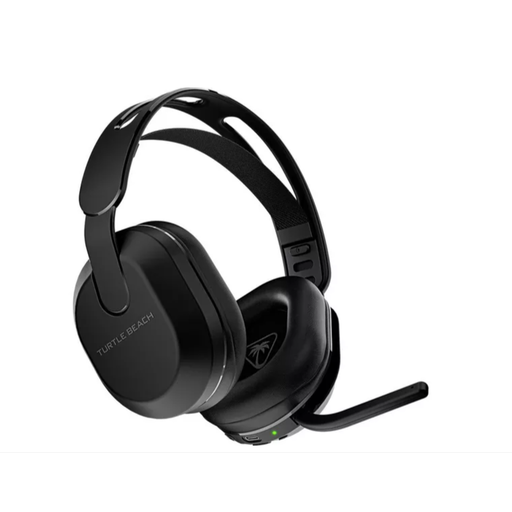
Turtle Beach Stealth 500 Wireless, PS5/PS4/PC, Black
This listed PlayStation and PC wireless variant is worth considering if you want to avoid a desk cable. Check its connection options and microphone controls against the devices you use, and assess fit before relying on it for long sessions.
View on Joybuy
 No image available
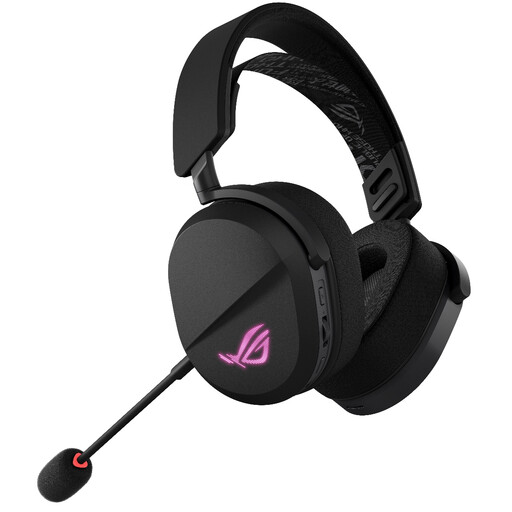
ASUS ROG Pelta Wireless Gaming Headset, Black
Consider this wireless model if you need a headset for a multi-device desk. Check the exact device and dongle compatibility, along with where its microphone and audio controls are available, before choosing it for team callouts.
View on Joybuy
 No image available
LOGITECH ASTRO A10 Gen 2 Wired Headset, White
This wired model suits a fixed desk if you would rather avoid charging. Check the connection your device requires, including whether your PC needs separate microphone and headphone connectors, and try the mic and game audio on your platform.
View on Joybuy
Common questions
Should I use Bluetooth or a USB transmitter for competitive PC gaming?
Use a compatible headset's dedicated 2.4 GHz USB-transmitter mode when low latency is a priority for PC gaming. SCAN UK favours that connection over Bluetooth for this purpose; check the exact headset variant and keep Bluetooth in mind for a phone or other secondary device.
How can I make team callouts clearer after setting up a headset?
Position the boom microphone consistently and test a short recording or voice chat on the platform you actually use. Try the headset's mute, mic-level or noise-processing controls where supported, since software features may differ between connection modes.
What matters during long gaming sessions at a home-office desk?
Check fit, listening level and, for wireless headsets, whether charging fits your routine. Take breaks rather than turning up the volume to compete with room noise; comfort and battery duration can vary with how you use the headset.
How should I dispose of an old gaming headset in the UK?
Check your local electrical-equipment collection or retailer take-back arrangements rather than assuming a headset belongs in general waste. GOV.UK describes the UK's waste electrical and electronic equipment framework as supporting recovery, reuse and recycling; the available collection route depends on your area and the item.


