
24/7 Customer Support

Free returns

Same-day & Next-day Delivery

Quality Guaranteed

Unlock Your Welcome Offers: FREE Delivery | Up to 80% OFF | Free 30-day JoyPlus trial
Download the APP
Navigating the world of gaming headsets can feel like a mission in itself. With endless specifications, flashy designs and bold marketing claims, it is easy to end up with a product that looks the part but fails to deliver when it matters most. As the Joybuy Product Recommendation Officer, my role is to help you sidestep the common purchasing traps and focus on the features that genuinely improve your gaming experience.
Before you add anything to your basket, let’s look at the three most common pitfalls that UK gamers encounter and how to avoid them.
Many headsets claim to be compatible with every platform, from a PS5 headset to an Xbox gaming headset and PC. While a standard 3.5mm jack will transmit audio on most devices, it does not guarantee full functionality. You might find the microphone does not work on your Nintendo Switch or the volume controls are unresponsive on your Xbox controller. True compatibility means all features work as intended on your primary platform.
A headset with vibrant RGB lighting can look impressive, but this aesthetic flair often comes at a cost, especially in the budget gaming headset category. Manufacturers may allocate budget to eye-catching designs while using lower-quality audio drivers or cheaper materials for the headband and earcups. A comfortable fit and clear audio should always take priority over cosmetic features.
In any multiplayer game, clear communication is key. Yet, the microphone is frequently the most neglected component of a gaming headset with mic. Many products focus on delivering immersive sound to your ears but fail to capture your voice with clarity, leaving your teammates struggling to understand you. A headset with a poor-quality microphone can hinder teamwork and cause unnecessary frustration.
To make an informed choice, focus on these three non-negotiable parameters.
Your first decision is how you want to connect to your device. Each method has distinct advantages.
The speakers inside the earcups are called drivers. While many brands highlight driver size (e.g., 40mm or 50mm), the audio tuning is far more important. Well-tuned drivers produce a balanced sound profile with clear highs for hearing footsteps, detailed mids for dialogue and impactful bass for explosions. This is crucial for spatial audio technologies like Sony’s Tempest 3D AudioTech on the PS5 or Windows Sonic on Xbox and PC, which help you pinpoint the direction of in-game sounds.
For multiplayer gaming, a clear microphone is essential. Look for a unidirectional (or cardioid) microphone, as it is designed to pick up your voice while minimising background noise. An omnidirectional mic, by contrast, captures sound from all directions, which can include keyboard clicks and other ambient sounds. Features like a flip-to-mute function offer great convenience, and some microphones also include noise cancelling technology to further isolate your voice.
Instead of a generic list, here are recommendations matched to specific types of gamers.
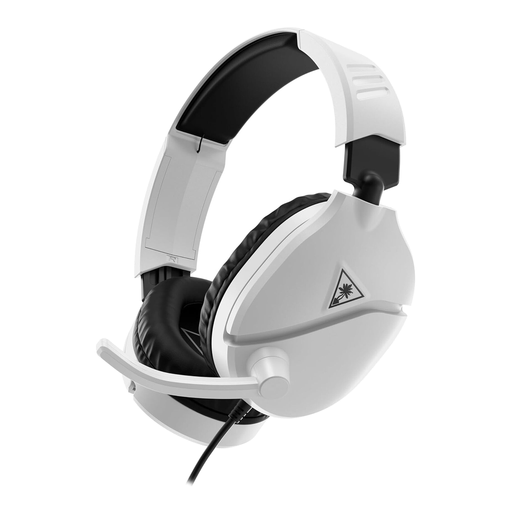
Why This Fits Their Persona: Ideal for gamers on a budget who play across multiple platforms. It provides the essential features for a great gaming experience—clear sound and a reliable mic—without the high cost of premium models. It is a straightforward, plug-and-play solution.
This headset avoids the trap of overpaying for aesthetics. Its design is functional and focuses the cost on what matters: 40mm audio drivers and a high-sensitivity flip-to-mute microphone.
Its primary advantage is its wide, reliable compatibility via the 3.5mm jack, working well with Xbox, PlayStation, Switch and PC. The lightweight design ensures comfort during long sessions.

Why This Fits Their Persona: For the gamer who wants to cut the cord without compromising on performance. This headset is perfect for moving between a PC and PlayStation, offering both low-latency gaming and Bluetooth for music or calls from a mobile.
It sidesteps the "universal compatibility" myth by offering two distinct wireless modes. The 2.4GHz connection provides a low-latency link for serious gaming on PC and PlayStation, while Bluetooth 5.2 handles other devices.
The dual-connectivity with a QuickSwitch button is a major plus. It also boasts a 40-hour battery life and a lightweight floating headband design for excellent long-session comfort.
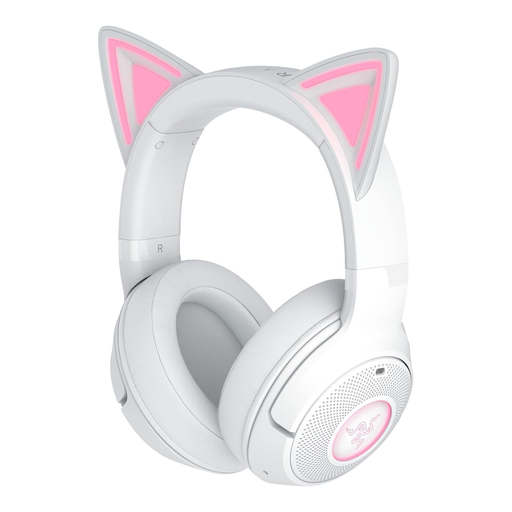
Why This Fits Their Persona: For the gamer or streamer who wants their personality to shine through their setup. This headset combines a unique, customisable aesthetic with the audio performance expected from a brand like Razer, making it perfect for being on camera.
While it leads with a strong aesthetic, it avoids being "style over substance." It features Razer's TriForce 40mm drivers for balanced audio and a beamforming microphone that minimises background noise for clear chat.
The standout feature is the customisable Chroma RGB kitty ears. It also offers a very long battery life of up to 60 hours (with lighting off) and a stable, low-latency Bluetooth 5.2 connection.
We have compiled a complete, real-time list of products that fully satisfy these strict selection criteria and UK safety regulations.
A well-made gaming headset should last between 2 to 5 years, depending on usage and build quality. Models with a durable headband (often reinforced with metal) and replaceable parts like ear cushions and cables tend to have a longer lifespan. How you store and handle the headset also plays a significant role in its longevity.
It depends on your environment. Most over-ear gaming headsets provide good passive noise isolation just by covering your ears, which is enough to block out most household distractions. Active Noise Cancellation (ANC) is a more advanced feature that uses microphones to cancel out ambient sound. It is effective against consistent, low-frequency noises like fans or air conditioning but is often a premium feature that may not be necessary for everyone.
For most headsets, especially wired ones, you do not. They are typically plug-and-play. However, many brands like Razer and Turtle Beach offer optional software for their more advanced models. This software allows you to customise equaliser (EQ) settings, adjust microphone monitoring levels, configure virtual surround sound and control RGB lighting, giving you more control over your audio experience.