For ranked strategy matches on a large screen, choose wired if you want a direct connection without charging, or 2.4 GHz wireless if keeping a cable off your desk matters more. Consider dual wireless when you also need phone audio during play, but check how the headset handles microphone use across the two sources. In every case, the headset must work with the PC, console or controller supplying the audio—not simply with the screen.
Who is this for?
Team-call strategists
If your matches involve frequent plans and call-outs, start with microphone controls and compatibility with your voice-chat device. A large driver specification tells you little about how conveniently you can mute or speak to teammates.
Cable-free desk setup players
If you want fewer cables around a large-screen PC or console setup, check the headset’s gaming wireless connection and the port needed for its receiver. Bluetooth can be useful for another device, but it does not by itself establish how game audio will connect.
Long-session comfort prioritists
If ranked sessions run for hours, consider ear-pad material, headband adjustment and published weight alongside connection choice. Fit is personal; a cushioning description cannot tell you how a headset will feel throughout your own session.
What matters when choosing?
Identify the device supplying game audio first, then decide whether a cable, a dedicated wireless receiver or a second Bluetooth audio source serves your routine. Check voice-chat controls and long-session use before treating extra connection options as an advantage.
| Concern |
What to check |
Who this matters to |
| Team communication |
Check the microphone and mute controls on the exact variant, including whether voice chat works through your intended connection. |
If I make frequent call-outs, I need teammates to hear me and a way to mute quickly. Around 42% of consumers put team communication first. |
| Connection and setup |
Match the cable connector or wireless receiver to the PC, console or controller supplying audio; check platform support for that connection mode. |
I want the headset to connect cleanly to the device behind my large-screen setup, without assuming the display provides audio. Connection is the first concern for around 33% of consumers. |
| Long sessions |
Assess fit and cushioning for yourself; for wireless models, check the stated runtime conditions and charging connection. |
When matches run long, I want a wearable fit and, if I choose wireless, a manageable charging routine. Around 25% of consumers prioritise those long-session needs. |
Buying pitfalls
-
Assuming the screen determines compatibility
The headset connects to the audio source. A suitable screen size does not mean that a headset’s cable, receiver or microphone mode will work with the connected PC, console or controller.
Note the source device and its available connections, then check support for the exact headset variant before ordering.
-
Buying dual wireless without needing two audio sources
SteelSeries says the Arctis Nova 7 can play 2.4 GHz game audio alongside Bluetooth audio, but its microphone cannot transmit to both sources at once.
Choose simultaneous audio for a real phone-and-game use case, and check which device gets the microphone during calls.
-
Treating advertised battery life as your runtime
Wireless runtime figures are manufacturer specifications with model-specific conditions. They are useful for planning, not a promise of how long your own settings and usage will last.
Compare the stated conditions and charging connector as well as the headline figure.
Charging takes time, and a depleted headset may interrupt cable-free use.
-
Assuming competitive branding settles the choice
Razer’s latency and microphone claims for the BlackShark V3 Pro concern that model; they do not establish an advantage for every player or strategy game.
Decide whether its connection, microphone arrangement and fit address the limits of your own setup before giving those claims priority.
Brands to consider
These examples show connection choices within particular product lines, not a judgement about every headset from each brand.
SteelSeries
The Arctis Nova 7 Gen 2 is relevant if you want 2.4 GHz game audio and Bluetooth phone audio together.
- SteelSeries specifies mixed audio from a USB-C dongle and a Bluetooth device, plus a stated 50-hour battery life.
- SteelSeries Support says its microphone cannot send voice to both sources at once.
HyperX
The Cloud III line offers a choice between a wired connection and a wireless model.
- HyperX lists 3.5 mm, USB-C and USB-A connectivity for the wired Cloud III; the Cloud III S Wireless lists 2.4 GHz and Bluetooth.
- HyperX rates the wireless model for up to 120 hours on 2.4 GHz or up to 200 hours on Bluetooth. These are separate stated maximums, not guaranteed runtimes.
Logitech G
The PRO X 2 LIGHTSPEED is a model to examine if you want several connection options in one headset.
- Logitech G lists LIGHTSPEED wireless, Bluetooth and 3.5 mm wired connections, along with leatherette or velour memory-foam ear pads.
- Check the exact package and intended platform before relying on a particular connection or software feature. Its stated battery life is up to 50 hours.
Razer
The BlackShark V3 Pro is positioned around competition-oriented wireless and microphone features.
- Razer specifies a detachable 12 mm microphone and claims wireless audio latency as fast as 10 ms for this model.
- That claimed figure does not establish the latency or communication experience of another headset, connection or gaming setup.
Joybuy headset choices
These headsets offer wired and wireless options for a large-screen gaming setup. Choose by the audio source and connection you intend to use; a wireless product title alone does not establish simultaneous game-and-phone audio.
 No image available
ASUS ROG Pelta Wireless Gaming Headset, Black
Consider this for a cable-free gaming setup if its connection works with the device supplying your audio. Check receiver compatibility and the runtime conditions before relying on it for extended sessions.
View on Joybuy
 No image available
Logitech ASTRO A10 Gen 2 Wired Gaming Headset, White
A wired choice if you would rather avoid charging during matches. Check that the connection suits your audio source and that the cable can reach comfortably from where you play.
View on Joybuy
 No image available
Edifier G2II USB Wired Gaming Headset, Black
Consider this for a USB-connected PC, PS4 or Mac setup, as named in the product title. It lists 50 mm drivers, a noise-cancelling microphone and 7.1 surround sound; do not treat the surround label as a guarantee of an advantage in your game. Check compatibility with your exact audio source, particularly if you use an Xbox.
View on Joybuy
 No image available
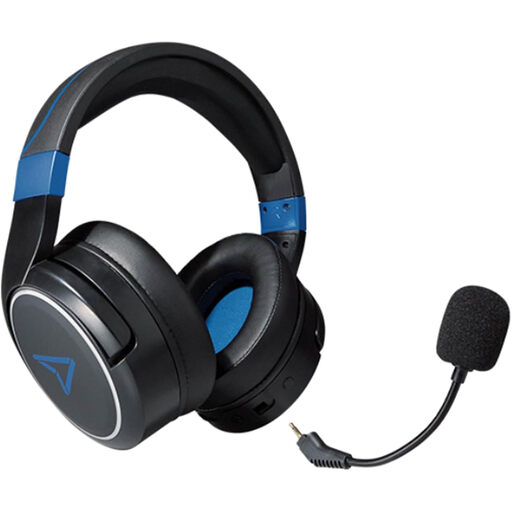
LEXIP Metaltech Wireless Headset, Cobalt Blue
A wireless option to assess if you want more freedom from the audio source during play. Before choosing it, confirm the connection available for your device and the battery runtime you need for your sessions.
View on Joybuy
 No image available
Turtle Beach Stealth 600 Gen3 Wireless Gaming Headset, Black
Consider this for a wireless PS5, PS4 or PC setup, the platforms named in the product title. If you rely on team call-outs or phone audio during play, check its microphone controls and whether the connection modes can play audio simultaneously rather than assuming source switching means mixing.
View on Joybuy
Frequently asked questions
Does a large screen need a particular gaming headset?
No—the relevant connection is usually on the PC, console or controller supplying game audio. Identify that device and check its available ports or supported wireless receiver before choosing a headset.
Can I hear game and phone audio at the same time?
Yes, if the exact headset supports simultaneous connections. SteelSeries says the Arctis Nova 7 can mix 2.4 GHz game audio with Bluetooth audio, but its microphone cannot send voice to both sources at once; a Bluetooth call uses the microphone for that call.
Should I choose wired or wireless for ranked strategy matches?
Choose wired if the cable reaches your audio source and you want to avoid charging. Choose a compatible 2.4 GHz wireless model if cable-free positioning matters more and you can accommodate a receiver and charging routine; neither connection makes every player’s voice-chat setup automatically suitable.
What should I check when buying a wireless headset for Great Britain?
Check the product and seller information for the exact wireless model as well as its compatibility with your equipment. The Office for Product Safety & Standards’ Great Britain guidance describes the Radio Equipment Regulations 2017 as addressing radio-equipment safety, electromagnetic compatibility and spectrum protection; Northern Ireland has separate guidance.


