Choose a wired headset if you want to avoid charging and have a compatible connection, but plan where its cable will run across your small desk. Choose a headset with a dedicated 2.4 GHz dongle if removing that cable matters more and you can spare a compatible port and charge the headset. For either route, check microphone placement and the software features available on your actual gaming platform.
Who these headsets suit
Players making frequent team callouts
If you regularly give short, time-sensitive directions, look for a microphone you can position consistently near your mouth. At a crowded desk, consider where its cable or wireless receiver will sit alongside your controls.
Players switching between devices
If you move between PC, console, handheld and mobile play, check the exact headset variant, connection and software support for each device. Basic audio compatibility does not necessarily include every chat or sound-setting feature.
Players who prefer not to charge a headset
A compatible wired headset avoids a charging routine. You still need a suitable port and a cable route that stays clear of your mouse, keyboard or controller.
What matters when choosing
Decide whether a headset cable or a wireless receiver fits your desk and gaming device, then check the microphone and any platform-specific features you intend to use.
Wired headset
Choose when: You have a compatible 3.5 mm or USB connection and would rather not charge a headset.
Allow for: A lead that needs routing away from your controls.
2.4 GHz dongle headset
Choose when: Removing the headset lead from your desk is worth using a compatible receiver port.
Allow for: Receiver placement and regular charging; Bluetooth support alone does not establish the gaming connection you need.
| Concern |
What to check |
Who this matters to |
| Voice-callout clarity |
Check whether the boom can be positioned near your mouth and whether microphone processing needs particular software. |
When I give quick directions to teammates, I need to place the microphone consistently so they can follow the callout. Around 40% of consumers put that voice-communication need first. |
| Cables and charging |
Check the cable route for a wired model, or the receiver port and charging requirements for a wireless one. |
If a headset lead crosses my mouse or controller space, keeping that area clear takes priority over extra settings. Roughly 30% of consumers put desk-cable management first. |
| Platform and software |
Match the exact headset variant and connection to your device; check operating-system and app requirements for advertised features. |
I switch devices or rely on particular chat controls, so I need to know which functions work on each platform. About 30% of consumers make compatibility their primary concern. |
Buying pitfalls
-
Assuming software features work on every device
Logitech G says the advanced Blue VO!CE and DTS Headphone:X 2.0 functions of its wired PRO X headset require a PC and G HUB. A controller connection or console purchase should not be judged by those PC functions alone.
Check the exact variant, connection, operating system and required app for each feature you intend to use.
-
Treating Bluetooth as the gaming connection
SteelSeries describes the Arctis Nova 5 Wireless as switching between 2.4 GHz and Bluetooth. The presence of Bluetooth does not establish how a particular headset handles game audio and team chat on your device.
Confirm which connection mode your gaming platform uses for both audio and voice chat.
-
Assuming wireless takes up no desk space
A wireless headset removes its lead from your controls, but its receiver still needs a compatible port and a place to sit.
Check port access and your charging routine before choosing wireless; for wired models, plan a cable route clear of mouse movement.
-
Putting an old headset in household rubbish
UK government guidance says electrical products marked with the crossed-out wheelie-bin symbol should not go into household rubbish.
Use an appropriate electrical-waste collection point or check whether a retailer offers a take-back route.
Brands to consider for these headset routes
SteelSeries
The Arctis Nova 5 Wireless represents a multi-device wireless route with a USB-C dongle and switching between 2.4 GHz and Bluetooth.
- SteelSeries states up to 60 hours of battery life and lists a retractable ClearCast 2.X microphone.
- SteelSeries limits PC ChatMix through Sonar to Windows 10 or later and says ChatMix is not supported on Mac or PlayStation. Check the functions available on your platform.
Logitech G
The PRO X range includes a PC-oriented route for buyers who want to adjust voice processing and audio settings.
- Logitech G documents a 48 kHz/16-bit microphone, 10-band EQ and up to 70 hours of stated battery life for the wireless PRO X3 LIGHTSPEED.
- Logitech G says advanced Blue VO!CE and DTS Headphone:X 2.0 functions on the wired PRO X require a PC running G HUB; do not assume those functions carry over to console use.
Razer
The BlackShark V2 X represents a wired 3.5 mm route with a bendable cardioid microphone.
- Razer states a 240 g weight for the BlackShark V2 X. Its wired connection avoids charging, provided your device has a compatible headset port.
- Razer’s UK page and a Joybuy listing for a specific variant give different Windows requirements for the 7.1 feature. Check the exact model number and applicable software conditions before relying on it.
Joybuy headset choices
These models cover wired headsets for avoiding charging and wireless headsets for keeping a lead off a small desk. Match the connection and microphone controls to the device you use for team chat.
 No image available
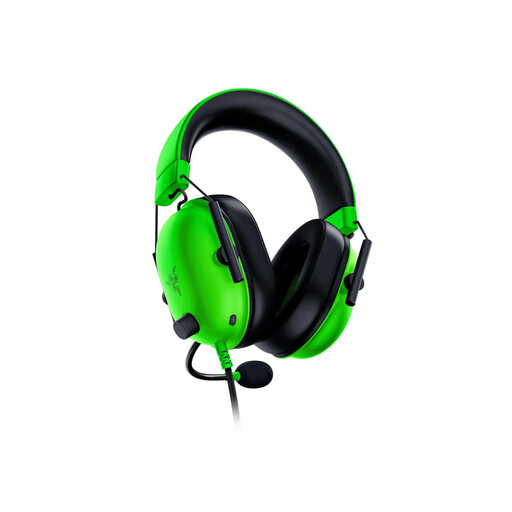
Razer BlackShark V2 X – Green
Consider this wired model if you have a compatible 3.5 mm headset port and want a bendable microphone for team callouts.
The Joybuy listing describes a cardioid microphone and a 1.3 m cable. Route the lead clear of your controls, and check the exact variant’s Windows requirements if you want its advertised 7.1 feature.
View on Joybuy
 No image available
Logitech ASTRO A10 Gen 2 Wired – White
This wired headset suits a battery-free setup when your gaming device has the connection it needs.
Check the port or adapter arrangement for your device, and leave room to route its cable away from your controls.
View on Joybuy
 No image available
ASUS ROG Pelta Wireless – Black
Consider this wireless headset if moving a headset lead off your small desk is your priority.
Check which connection mode supports game audio and chat on your device, where its receiver will fit and how you will charge the headset.
View on Joybuy
 No image available
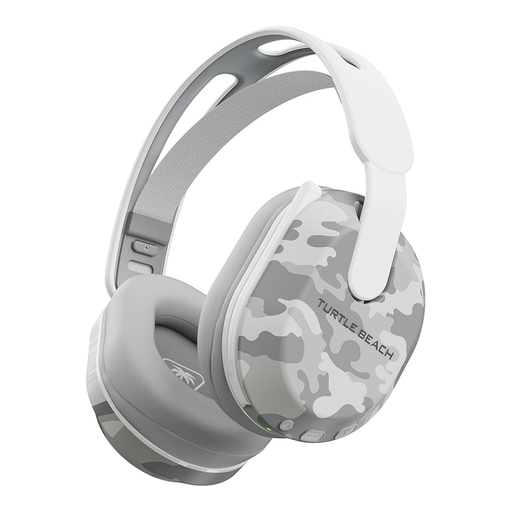
Turtle Beach Stealth 500 Wireless – Arctic Camo
This wireless model is an option if you want the headset lead away from your controls and play on a compatible device.
Its title names Bluetooth, PS5, PS4 and PC and states up to 40 hours of battery life. Confirm the connection used for game chat and allow for charging and receiver placement.
View on Joybuy
 No image available
Edifier G2II USB Wired – Black
Consider this wired USB headset for a PC or PS4 setup when you can route its cable comfortably.
The listing explicitly excludes Xbox. Check the software requirements on your intended device before relying on its advertised audio or microphone settings.
View on Joybuy
Common questions
Should I choose wired or wireless for team callouts at a small desk?
Choose wired if you have a compatible connection and want to avoid charging; choose a headset with a dedicated wireless gaming connection if clearing the cable from your desk matters more. For wireless play, confirm that its receiver and voice-chat connection work with your gaming device.
Will a 7.1 surround label help me locate opponents?
The label alone cannot establish how well you will locate in-game sounds or whether the feature works on your device. Razer’s UK BlackShark V2 X page specifies Windows 11 for its stated 7.1 feature, while a Joybuy listing for a particular variant gives a different Windows requirement; check the exact model number and activation conditions before relying on it.
What should I do with an old gaming headset in the UK?
Take an electrical headset marked with the crossed-out wheelie-bin symbol to an appropriate electrical-waste collection route rather than putting it in household rubbish, as UK government guidance advises. Check local collection options or an applicable retailer take-back service.


