Choose a wired headset if a compatible controller or device connection and no charging routine matter more than moving freely. Choose wireless if you want to play without a cable and the headset’s specified connection supports both game audio and chat on your device; Bluetooth alone does not establish console-chat compatibility. In a busy home, check the microphone and mute controls, then test the input in the game or chat service you use.
Who needs to check what?
The right connection depends on where you play and how your friends’ voice chat reaches the headset.
Multiplayer players in shared homes
If household activity can reach your microphone, look for accessible mute controls and check how the mic behaves in your actual chat service. Discord offers optional noise suppression for some background sounds, but its settings cannot replace choosing the correct microphone input.
Console players using voice chat
Check the connection supported by your particular console and headset. Xbox Support describes compatible headsets connected through a controller’s 3.5 mm jack; PlayStation Support describes a USB adapter for the PULSE Elite on PS5. Nintendo’s microphone guidance also depends on the console and connection used.
Players moving between gaming and mobile devices
A headset may offer more than one connection mode, but its controls and chat features need not work identically in each. Xbox Support, for example, says the Xbox Wireless Headset’s audio-balance dial is not supported over Bluetooth. Check each device and mode you plan to use.
What matters when choosing?
Start with the device and chat connection. Then decide whether a cable or a charging routine is easier to live with, and how much attention your room and microphone setup need.
| Priority |
What to check |
Your needs |
| Device and chat compatibility |
Match the exact headset version and connector, adapter or wireless mode to your device. Confirm that the same route carries microphone input as well as game audio in your game or chat service. |
I need friends to hear me on the console, PC or mobile device I actually use—not just to hear the game myself. |
| Wired or wireless play |
For wired use, check the headset socket and mic connection. For wireless use, check the supported receiver or console radio, charging requirements and any mode-specific controls. Xbox Support documents features that differ between its wireless headset’s connection modes. |
A cable is fine if it avoids charging during my sessions. If I move around a desk or sofa, I would rather check a compatible wireless route. |
| Microphone in a shared room |
Check the mic’s position, mute control and selected chat input. A directional design or app-based suppression is worth assessing in your own setup; Discord describes its Krisp option as filtering selected non-voice sounds. |
People nearby may be talking or moving around while I play, so I want to control when my microphone transmits. |
| Wireless setup |
Check which supplied adapter or wireless mode works on each platform, and the maker’s battery-life conditions. Keep the adapter-placement guidance for your headset in mind if the connection becomes unreliable. |
I want cable-free sessions without discovering that the headset needs charging or a different connection mode halfway through my plans. |
| Fit and room awareness |
Consider headband adjustment, cushion material and whether the earcups are open or closed. Turtle Beach describes its Atlas Air as open-back; that design is a different choice from seeking separation from household sound. |
For longer sessions, I care about how the headset sits on my head. I also need to decide whether hearing the room is helpful or distracting. |
Common buying mistakes
-
Assuming “wireless” means it will work on your console
Bluetooth, a USB adapter and a console-specific wireless connection are different paths. Xbox Support documents mode-dependent features, while PlayStation Support specifies a PlayStation Link USB adapter for the PULSE Elite on PS5.
Match the exact headset version and its required connection to your device, then check game audio and microphone chat separately.
-
Relying on a product-family compatibility claim
Connections vary between models and editions. Logitech G describes the Astro A50 X as connecting Xbox, PS5 and PC/Mac through its particular multi-system setup; that description does not establish the connections of another headset in the family.
Read the supported-device list and connection instructions for the exact model and edition you intend to order.
-
Expecting noise suppression to fix every chat problem
Processing cannot correct a microphone that the device or chat service has not selected. Nintendo Support instructs Switch 2 GameChat users with a connected headset to check the audio input setting; Discord describes noise suppression as a separate chat feature.
Set up and position the mic, test the selected input with friends, and then try supported noise-suppression controls if background sound remains a problem.
Brand and model references
These examples illustrate different connection and room-use choices; check the specifications of the individual model rather than applying a feature to an entire brand.
Razer
Razer describes both 2.4 GHz and Bluetooth modes for the Barracuda X Chroma, a combination to examine if gaming and phone use share one headset.
- Razer specifies a detachable cardioid microphone for the Barracuda X line.
- Confirm the exact Barracuda variant, its supported platforms and microphone behaviour in each connection mode.
Logitech G Astro
Logitech G describes the Astro A50 X as a multi-system headset that connects Xbox, PS5 and PC/Mac through its PLAYSYNC setup.
- Its documented switching arrangement is relevant if those are the systems you regularly use.
- Check the required connections and setup before choosing it for a simpler, single-device arrangement.
Turtle Beach
Turtle Beach describes the Atlas Air as an open-back wireless headset designed for PC gaming, with listed PlayStation and Bluetooth-equipped mobile compatibility.
- Open-back construction is worth considering if you prefer to remain aware of sounds in the room.
- If household sound is distracting, assess whether an open-back design fits your room before choosing it.
SteelSeries
In its March 2026 wireless-headset roundup, PCMag UK selected the Arctis Nova Pro Wireless as its overall category pick, citing active noise cancellation, a flexible transmitter and swappable batteries.
- Those named features make this model relevant to checking room distractions and charging arrangements.
- PCMag UK’s assessment concerns the Arctis Nova Pro Wireless, not every SteelSeries headset or every platform version.
Gaming headsets on Joybuy
These options cover a wired headset and several wireless models for online play. Compare each one against your device’s connection and the microphone path used by your game or chat service.
 No image available
ASUS ROG Pelta Wireless Gaming Headset, Black
Consider this wireless option if you want to play without a cable. Before choosing it for a shared-home chat setup, confirm the connection, microphone input and supported functions on each device you intend to use.
View on Joybuy
 No image available
Logitech Astro A10 Gen 2 Wired Headset, White
A wired route suits a setup where staying connected by cable is more convenient than charging a headset. Check that your controller or device accepts this headset’s connection and microphone for the chat service you use.
View on Joybuy
 No image available
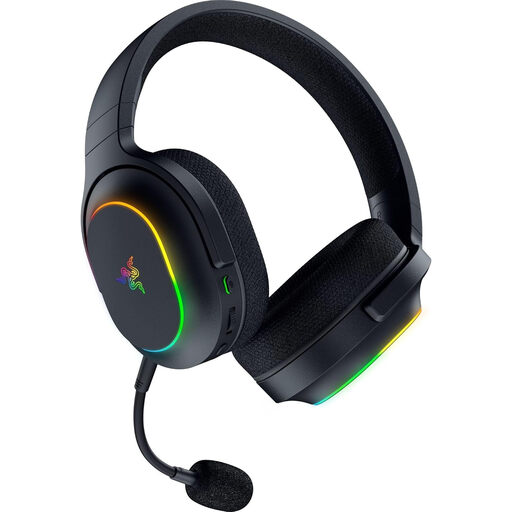
Razer Barracuda X Chroma Wireless Headset, Black
Its listed 2.4 GHz and Bluetooth 5.2 modes make the connection choice important: check which mode carries game audio and microphone chat on each intended device. The product title also specifies 6-zone RGB and a 70-hour battery claim; check the maker’s conditions for that figure. Do not choose it if your setup requires an Xbox wireless connection or a 3.5 mm headset jack.
View on Joybuy
 No image available
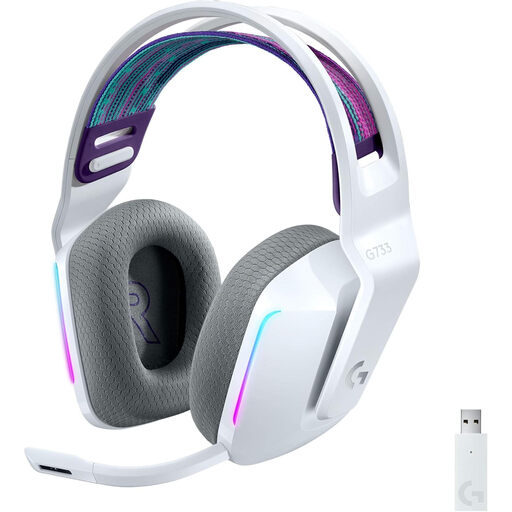
Logitech G G733 LIGHTSPEED Wireless Headset, White
If this wireless model fits your gaming setup, check the receiver connection and microphone-chat support for the exact device and game. For Nintendo Switch use in particular, confirm the intended docked setup and chat path before ordering.
View on Joybuy
 No image available
Turtle Beach Stealth 500 Wireless Headset for PC, PS5 and PS4, Black
The title lists PC, PS5 and PS4, making it an option to check for wireless play on those devices. Confirm the required connection and whether your game or chat app accepts its microphone input; do not assume the listed platforms establish support for a different console.
View on Joybuy
Questions about gaming-headset compatibility
Will any Bluetooth gaming headset connect to an Xbox console?
No. Xbox Support says Xbox One consoles do not have Bluetooth functionality for headset connection. Check a headset’s documented Xbox connection instead, such as a compatible controller connection or Xbox wireless support; do not assume its Bluetooth mode carries console chat.
What should I check for a headset used with PS5 and PC?
Check the exact model’s supported connection on both devices and whether microphone chat works in each mode. PlayStation Support specifies the included PlayStation Link USB adapter for connecting its PULSE Elite headset to PS5 and to PC or Mac; another headset may use a different arrangement.
Will a headset microphone automatically work in Nintendo online chat?
Not necessarily. Nintendo Support describes voice chat through the Nintendo Switch Online app for many Switch games, while its Switch 2 GameChat guidance directs users to check the connected microphone and selected input. Confirm the game’s chat method and your console generation before choosing a headset.
Can chat-app noise suppression take the place of microphone setup?
No. Discord describes Krisp as an optional way to filter selected background sounds, but your device and chat service still need the correct microphone input. Position the mic and test your voice in the service you use before adjusting its noise-suppression setting.


